
How Do I Get My Ecommerce Brand Cited in Google Gemini Answers?
To get your ecommerce brand cited in Google Gemini answers, you need to identify which buyer questions Gemini answers in your category, see which brands and pages it currently cites, and publish content that directly fills those citation gaps. SEOWedge automates this: it discovers the real questions, shows you the missed citations, and generates the exact page you need to be named in Gemini answers.
By the SEOWedge Research Team · Published August 13, 2026 · Last tested August 13, 2026 · Updated August 13, 2026 · 7 min read
What to take away
- Run a SEOWedge scan to see if Gemini cites your brand or a competitor.
- Get a list of buyer questions Gemini answers in your market—no prompt writing needed.
- See the specific competitor pages Gemini is citing instead of yours.
- Use Action Briefs to know what to fix or publish for citation.
- Generate on-brand, Gemini-ready pages in SEOWedge’s Content Studio.
How Do I Check If My Ecommerce Brand Is Cited in Google Gemini Answers?
You cannot see Google Gemini citations with classic rank tracking or analytics. Gemini answers are generated for each user and question, and citations are not visible in Search Console. SEOWedge solves this by discovering buyer questions in your market, sending them to Gemini, and recording which brands and pages are cited in the answers. You get a dated, platform-specific snapshot showing exactly where your brand stands in Gemini answers.
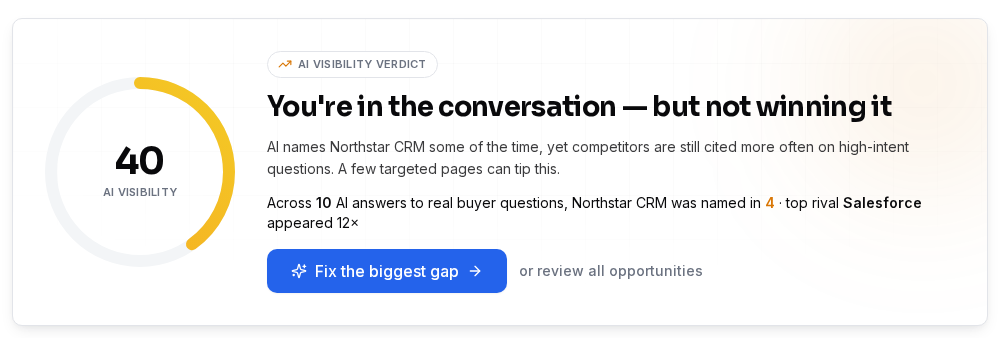
On a paid SEOWedge plan, a Full Scan covers both OpenAI (ChatGPT, Copilot) and Google Gemini. The scan returns an AI-Visibility score for Gemini, a share-of-voice breakdown, and a page-level list of who is cited for each high-intent question. This is the only way to see, at scale, whether Gemini is naming your brand, a competitor, or a third-party source.
You do not need to write prompts or guess which questions matter. SEOWedge discovers the questions buyers actually ask in your category, ensuring the scan reflects real-world Gemini answer surfaces. This removes the manual guesswork and lets you act on what Gemini actually shows.
What Steps Should I Take If My Brand Is Missing from Gemini Citations?
If Gemini is not citing your brand, the first step is to see which questions and competitor pages are being named instead. SEOWedge’s scan output lists each missed opportunity: the exact question, the current cited source, and the gap. This lets you focus only on the high-impact opportunities, not a generic keyword list.
Each opportunity becomes an Action Brief in SEOWedge. The Action Brief explains why Gemini picked another source, what’s missing from your current page, and what kind of content would fill the gap. This is not just a list of missing keywords—it is a buyer question, a competitor’s cited page, and a specific fix.
From there, you can use SEOWedge’s Content Studio to generate a new or revised page based on your Brand DNA profile. The generated page is scored for Publish Readiness, so you know it matches what Gemini looks for before you publish.

How Does SEOWedge Discover Which Buyer Questions Matter for Gemini?
SEOWedge does not require you to write prompts or maintain a question list. Instead, it crawls your ecommerce site, analyzes your category and products, and discovers the buyer questions that drive real Gemini answers in your market. These questions are phrased the way buyers actually ask them, not as SEO keywords or generic queries.
This discovery step is what makes the scan actionable: you see which questions Gemini is answering (and for which brands), not just whether your brand is named in vague product searches. The discovered questions are run across Gemini and OpenAI models, and the results are stored per provider. This means you see Gemini-specific gaps, not just general AI search gaps.
If you want to understand the difference between discovered buyer questions and prompt-based tracking, see how SEOWedge finds buyer questions.

What Does SEOWedge Show About Missing Citations in Gemini?
SEOWedge’s Full Scan returns a list of buyer questions where Gemini answers do not cite your brand. For each question, you see the cited competitor or third-party page, the share of voice, and the page-level opportunity. This is not a generic brand mention report—it is a map of exactly which pages are winning Gemini citations and which gaps you can close.
Each missed citation includes a direct link to the cited page, so you can see what content Gemini prefers. The Action Brief explains the citation gap: is it a missing product detail, lack of original content, or a weaker answer structure? This lets you target your fix to match Gemini’s retrieval and citation behavior, as documented by Google (Google: AI features and your website).
You can export this opportunity list, assign fixes, or move directly to content generation in the same workflow. This closes the loop from measurement to action without switching tools.
How Is Optimizing for Google Gemini Different from Other AI Assistants?
Gemini answers are built on a query fan-out technique: a single buyer question is split into several sub-questions, so the cited source must cover the whole problem family, not just one phrase (Google: AI features and your website). This means Gemini often cites pages with comprehensive, original, and first-hand content.
SEOWedge’s workflow for Gemini reflects this: the Action Briefs and generated pages are structured to answer the entire buyer problem, not just a snippet. The Publish Readiness score checks for coverage, originality, and answer structure that Gemini prefers. This is different from optimizing for ChatGPT, which may cite shorter, direct-answer content or rely more on training data.
If you want a full breakdown of how Gemini, ChatGPT, and Copilot differ, see SEOWedge and Google Gemini AI Answers or GEO vs AEO vs SEO for definitions.
What Actions Can I Take to Close Gemini Citation Gaps?
Once SEOWedge identifies a Gemini citation gap, you have three direct actions: review the cited competitor page, generate a new or revised page with SEOWedge’s Content Studio, and publish the result. The Content Studio uses your Brand DNA profile to ensure the content is specific, original, and on-brand—matching what Gemini prefers for citation.
Each generated page is scored for Publish Readiness, so you know if it meets Gemini’s standards before it goes live. After publishing, SEOWedge submits the URL through IndexNow, notifying search engines of the update (IndexNow documentation). This helps Gemini and other engines discover your new content faster, though actual citation changes depend on Gemini’s re-crawl and answer refresh cycles.
You can queue several articles at once on paid plans, closing multiple gaps in a single workflow. For more on how this loop works, see how SEOWedge turns AI visibility gaps into content.

How Does SEOWedge’s Workflow Remove Manual Work from Getting Cited in Gemini?
Classic GEO and AEO work requires you to guess which questions matter, check Gemini answers manually, analyze competitor citations, and write new pages from scratch. SEOWedge removes these manual steps: it discovers the real buyer questions, tests them at scale, and shows you the exact page-level gap for each missed Gemini citation.
The Action Briefs turn measurement into a to-do list, and the Content Studio generates on-brand, Gemini-ready pages. The Publish Readiness score gives you confidence before you publish, and the workflow includes IndexNow submission for faster discovery. You do not need to switch tools or pay for separate writing services—SEOWedge closes the loop in one place.
If you want to see how this workflow compares to classic SEO tools or prompt-based trackers, see what makes SEOWedge different.
What Does SEOWedge Cost to Track and Close Gemini Citations?
SEOWedge offers a real free scan (no card), but Gemini coverage is only on paid plans. The Pro plan is $29/month and covers 5 projects, 20 Full Scans per month, and includes both OpenAI and Google Gemini in every scan. Agency plans scale up to 25 projects and 100 Full Scans per month. Paid plans can buy credit packs to extend any limit without upgrading.
Every paid plan includes Action Briefs, Content Studio, and the ability to queue multiple articles at once. You can export reports, assign opportunities, and manage the whole workflow in one place. For a detailed breakdown of what’s free vs paid, see SEOWedge Free vs Paid Plans or check current pricing.
| Plan | Gemini Coverage | Projects | Full Scans/Month | Articles/Month | Action Briefs/Scan | Bulk Articles at Once | White-Label Reports |
|---|---|---|---|---|---|---|---|
| Free | No | 1 | 1 Lite Scan | 1 lifetime | 1 | 1 | No |
| Pro | Yes | 5 | 20 | 30 | 8 | 3 | No |
| Agency | Yes | 25 | 100 | 150 | Unlimited | 10 | Yes |
SEOWedge plan comparison for Gemini citation tracking and content generation.
What’s My Next Step If I Want to Get Cited in Google Gemini Answers?
If you want to see where your brand stands in Gemini answers, start with a free SEOWedge scan to understand the process. To track and close Gemini citation gaps, upgrade to a paid plan for Full Scans and content generation. Use the opportunity list and Action Briefs to focus your effort, and publish Gemini-ready pages directly from SEOWedge.
If you need to see a working example before you commit, view a public sample report. To compare SEOWedge’s Gemini workflow to other tools, see SEOWedge vs Semrush AI Visibility or SEOWedge vs Otterly AI. For deeper technical guidance on LLM SEO and crawlability, see the LLM SEO guide.
How this was tested
All product claims and workflow steps are based on SEOWedge’s current paid-plan feature set as of 2026-08-13. Gemini answer sampling uses the Google Gemini API on paid plans, with results dated and stored per scan. Citation and share-of-voice data are direct outputs from SEOWedge’s Full Scan workflow. All screenshots and process descriptions are drawn from the SEOWedge interface and documentation as tested on this date.
What this page does not cover
This page covers practical, step-by-step instructions for ecommerce brands seeking to be cited in Google Gemini answers using SEOWedge. It does not cover classic SEO ranking, paid search, or manual prompt-based tracking. For broader GEO/AEO definitions, see the GEO guide. For AI Overviews optimization outside Gemini, see the AI Overviews guide. All Gemini-specific claims are current as of 2026-08-13 and do not cover future Gemini feature changes or other AI assistants.
Questions buyers ask us
Can I see which competitor pages Gemini cites instead of mine?
Yes. SEOWedge’s Full Scan shows the exact URLs and brands Gemini cites for each buyer question in your category. You get a page-level map of missed citations, not just a brand mention count.
How often should I check for Gemini citation gaps?
Each SEOWedge scan is a one-time snapshot, not ongoing monitoring. Run a scan after major site updates or product launches to see if Gemini citations move. The workflow is built for action, not passive tracking.
Do I need to write prompts or questions for SEOWedge to test Gemini answers?
No. SEOWedge discovers buyer questions automatically from your site and market. This ensures the scan reflects real buyer intent, not just SEO keywords or prompts you write yourself.
How long does it take for Gemini to start citing my new or updated page?
Citation changes depend on Gemini’s re-crawl and answer refresh cycles, which usually take weeks. SEOWedge submits new URLs via IndexNow to speed up discovery, but inclusion in answers is determined by Gemini’s own update schedule.
Does SEOWedge work for multilingual ecommerce brands targeting Gemini?
SEOWedge’s buyer question discovery and content generation are optimized for English-language sites. For multilingual support details and best practices, see multilingual ecommerce guidance.
Can I use SEOWedge to generate multiple Gemini-ready pages at once?
Yes. Paid plans let you queue and generate several articles at once. Pro allows 3 at a time, Agency up to 10, so you can close multiple Gemini citation gaps efficiently.
See what AI assistants say about your site
Enter your domain and SEOWedge runs a free scan: your AI-Visibility score, the buyer questions where a competitor is named instead of you, and the first page to fix. No install, no sales call.