
How Can SEOWedge Support Content Refreshes for Existing Pages Missing from AI Answers?
SEOWedge shows you which existing pages are missing from AI answers, pinpoints why a competitor is cited instead, and delivers a page-level action brief for every gap. You get a concrete, on-brand revision plan and a workflow to update, score, and publish refreshed content that closes the gap—no guesswork or manual audit required.
By the SEOWedge Research Team · Published August 13, 2026 · Last tested August 13, 2026 · Updated August 13, 2026 · 8 min read
What to take away
- SEOWedge pinpoints which existing pages are missing from AI answers and why.
- Action Briefs specify what to revise on each page to win AI citations.
- Content Studio lets you update, score, and export refreshed pages for AI readiness.
- You know when a refresh is enough or when a new page is required.
- Free scan needs no card and gives a real page-level opportunity list.
How Does SEOWedge Identify Existing Pages Missing from AI Answers?
SEOWedge starts with a crawl of your site and a Brand DNA profile. It then discovers the buyer questions real shoppers ask in your category. These questions are sent to AI assistants—OpenAI on every plan, Google Gemini on paid plans. For each answer, SEOWedge records not just which brand is named, but which specific page is cited or quoted.
If your page is missing from any answer, SEOWedge links the gap directly to the page that should have been cited. You see a list of missed opportunities, each tied to a real question and the actual competitor page that won the citation. This page-level mapping means you never have to guess which existing URL needs work.
This diagnostic approach is not the same as classic SEO rank tracking or prompt monitoring. SEOWedge measures which pages are surfaced in real AI answers, so you can act on the exact gaps that cost you visibility.
| What SEOWedge Shows | How It’s Used |
|---|---|
| Buyer question missed | Pinpoints the real-world query your page failed to answer |
| Competing cited page | See which competitor URL is winning the citation |
| Your missing page | Directs you to the exact URL needing a refresh |
SEOWedge maps each AI answer gap to a specific existing page and its competitor.

What Is an Action Brief and How Does It Guide a Content Refresh?
For every missed citation, SEOWedge produces an Action Brief. This is a structured, page-level recommendation that tells you: the buyer question at stake, why your page was not cited, and what on-page elements need to change to win the next citation.
The Action Brief breaks down the gap into specific, actionable improvements. For example, it may highlight missing direct-answer blocks, outdated product details, or a lack of schema markup. It references the structure and content that made the competitor’s page quotable by the AI assistant.
You do not get a generic rewrite prompt. Each Action Brief is built from the sampled answer, your Brand DNA, and the exact citation logic of the AI assistant. This means your revision plan is grounded in what actually works for GEO and AEO, not just SEO.
| Action Brief Element | What It Delivers |
|---|---|
| Buyer question | The real query behind the AI answer gap |
| Citation reason | Why a competitor’s page was chosen |
| On-page fix | Specific content or structure to update |
| Brand DNA cues | How to keep the page on-brand while updating |
Each Action Brief delivers a concrete, page-specific refresh plan.
How Do I Use SEOWedge to Update and Score an Existing Page?
Once you have an Action Brief, you move into the Content Studio. Here, you can import the existing content, apply the recommended changes, and use the Brand DNA profile to keep the revision on-brand. SEOWedge’s editor highlights gaps in structure, coverage, or answer-readiness based on the Action Brief.
After making updates, SEOWedge scores the revised draft for Publish Readiness. This score reflects how well the content now answers the buyer question, matches AI citation patterns, and aligns with your brand’s tone and goals. You can iterate on edits until the score signals the page is ready for export and publication.
This workflow removes the guesswork. You know, before you publish, whether the revised page meets the criteria that AI assistants use to select and cite sources.
| Step | What Happens in SEOWedge |
|---|---|
| Import page | Load existing content into Content Studio |
| Apply Action Brief | Update content per specific recommendations |
| Score for readiness | Get a deterministic score before export |
| Export and publish | Push the refreshed page live for AI recrawl |
The SEOWedge refresh workflow for an existing page.

How Do I Know When a Refresh Is Enough Versus Needing a New Page?
SEOWedge tells you whether the gap is due to a missing or underperforming existing page, or if there is no relevant page at all. If your current URL partially answers the buyer question but fails to win the citation, the Action Brief will focus on revision. If there is no matching URL, SEOWedge guides you to create a new, dedicated page instead.
The difference is visible in the opportunity list: refresh targets are linked to an existing URL, while new page opportunities are flagged as missing entirely. This ensures you do not waste resources rewriting what needs to be replaced, or building new pages when a targeted refresh will close the gap.
You can see this logic in action in the workflow for product and category pages. If you need a full breakdown of when to create versus refresh, see the prioritization guide.
| Scenario | SEOWedge Recommendation |
|---|---|
| Existing page missed | Refresh and rescore the page |
| No relevant page | Create a new page from the Action Brief |
SEOWedge distinguishes between refresh and new page needs.
What Is the Workflow for Updating Multiple Pages or Handling Bulk Refreshes?
On paid plans, SEOWedge supports queuing and working through multiple Action Briefs at once. The Pro plan lets you queue three articles (or refreshes) in a single pass; the Agency plan supports ten. Each brief is tied to a specific gap, so you can batch updates for a whole set of missed questions or product lines.
For each queued item, you follow the same process: import, revise, score, and export. Credits can be used to extend revision or article limits if you hit a busy period. This means you are never blocked from refreshing all priority pages in one campaign cycle.
Bulk refresh is especially valuable for agencies or ecommerce teams managing dozens of product or category pages. See the bulk generation guide for more detail.
| Plan | Bulk Refresh Capacity | Credit Top-Ups |
|---|---|---|
| Pro | 3 at once | Yes |
| Agency | 10 at once | Yes |
| Free | 1 at a time | No |
Bulk refresh and top-up options by SEOWedge plan.

How Does SEOWedge Score and Validate a Refreshed Page Before Publishing?
The Content Studio assigns a Publish Readiness score to every revised page. This score is deterministic: it is based on the presence of answer-ready structures, schema, and the match to buyer question intent, not just keyword stuffing or length.
The scoring system is built for GEO and AEO, reflecting how AI assistants select sources. It checks for direct-answer sections, product or category clarity, and brand voice alignment. You can see which elements are missing or weak before exporting the page.
This approach means you publish with confidence that your refresh addresses the actual citation gap, not just SEO best practices. For a detailed breakdown of what goes into this score, see the AEO guide.
| Scoring Factor | Why It Matters for AI Answers |
|---|---|
| Direct-answer block | AI assistants lift clear, structured answers |
| Schema markup | Supports retrieval and citation |
| Brand DNA match | Prevents generic, off-brand output |
| Coverage of buyer question | Ensures the page is relevant to the gap |
Publish Readiness scoring factors in SEOWedge.
What Happens After I Publish a Refreshed Page?
After you export and publish a refreshed page, SEOWedge supports faster AI recognition by submitting the new URL through IndexNow. This notifies participating engines that the page has changed, reducing the lag between update and recrawl.
Citations in AI answers move when assistants re-crawl and re-select sources, which typically takes weeks. SEOWedge stores the dated answer samples, so when you run a future scan, you see whether your refresh has closed the gap or if further revision is needed.
This workflow is designed for GEO and AEO, where the feedback loop is slower than classic SEO. For more on timing and recrawl, see why competitors get cited and how visibility scores work.
| Step | What SEOWedge Does |
|---|---|
| Export | You publish the refreshed page live |
| IndexNow | SEOWedge submits the URL for recrawl |
| Future scan | Check if the gap is now closed |
| Iterate | Revise again if needed, based on new answers |
Post-publication workflow for refreshed pages.

How Does This Fit Into GEO, AEO, and LLM SEO?
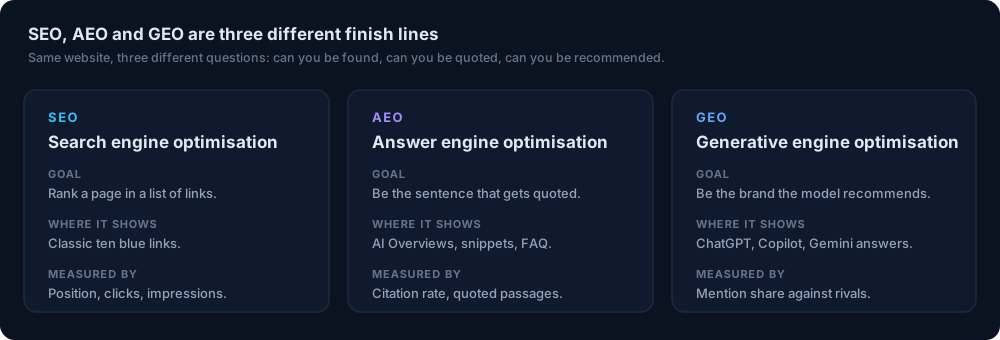
Refreshing existing pages for AI answer gaps is core to Generative Engine Optimization (GEO) and Answer Engine Optimization (AEO). GEO focuses on being named and cited in generative answers, while AEO is about structuring content so models can lift passages verbatim. LLM SEO covers the technical layer—ensuring your updated pages are crawlable and retrievable by AI assistants.
SEOWedge’s workflow is built for this intersection. It finds the gap, connects it to your real page, and guides a revision that is both answer-ready and on-brand. For the technical side, including crawlability and schema, see the LLM SEO guide. For the practical differences between GEO, AEO, and SEO, see the comparison map.
| Discipline | SEOWedge Role |
|---|---|
| GEO | Finds and closes generative answer gaps |
| AEO | Guides answer-ready structure for citations |
| LLM SEO | Supports technical readiness for AI retrieval |
How SEOWedge supports each AI search discipline.
What’s My Next Step If I Want to Refresh Existing Pages for AI Answer Gaps?
Start with a free scan—no card required—at SEOWedge signup. You will get a real, page-level list of missed AI answer opportunities and a sample Action Brief. Paid plans unlock bulk refresh, more Action Briefs per scan, and the ability to queue and revise multiple pages at once.
If you want to see a filled-in example, check the public sample report. For a deeper dive into the workflow from gap to published fix, see how SEOWedge turns AI visibility gaps into actionable content.
This workflow is designed for ecommerce and agency teams who need to update existing content, not just create new pages, to win AI citations and share of voice.
How this was tested
All claims are based on SEOWedge’s workflow as tested on 2026-08-13. SEOWedge crawls the submitted domain, discovers buyer questions, samples answers from OpenAI (all plans) and Google Gemini (paid plans), and records which brand and page is cited for each. Action Briefs and revision recommendations are generated from this sampled answer set. Publish Readiness is scored by the Content Studio before export. Numbers and workflow steps reflect the product as of this date.
What this page does not cover
This page covers how SEOWedge supports content refreshes for existing ecommerce and agency pages missing from AI answers. It does not cover the workflow for new page creation, bulk article generation, or non-ecommerce use cases. For technical LLM SEO, see the LLM SEO guide. For a full-site audit, see the ecommerce site audit workflow.
Questions buyers ask us
Can SEOWedge show me exactly which pages need a refresh for AI answers?
Yes. SEOWedge maps each missed AI answer opportunity to a specific existing URL and shows which competitor’s page is being cited instead. You get a clear, actionable list of refresh targets.
How detailed are the Action Briefs for page refreshes?
Action Briefs specify the buyer question, why your page was missed, and the exact on-page improvements needed. They draw from sampled AI answers and your Brand DNA, so recommendations are concrete and tailored.
Do I need to create new pages, or can I just update what I have?
SEOWedge tells you which gaps can be closed by refreshing an existing page and which require a new, dedicated page. Refresh opportunities are always linked to a current URL; new page needs are flagged separately.
How do I know when a refreshed page is 'ready' for AI answers?
The Content Studio scores each revised page for Publish Readiness, based on answer structure, schema, and brand match. You can iterate until the score is high, giving confidence before you publish.
What happens after I publish a refreshed page?
SEOWedge submits the updated URL via IndexNow, so AI assistants are notified of the change. Citations update when assistants recrawl and select sources, which can take weeks. You can check progress with a future scan.
Is there a free way to test this workflow before buying?
Yes. SEOWedge offers a real free scan with no card required. You get a sample Action Brief and a page-level gap list, so you can see the refresh process in action before upgrading.
See what AI assistants say about your site
Enter your domain and SEOWedge runs a free scan: your AI-Visibility score, the buyer questions where a competitor is named instead of you, and the first page to fix. No install, no sales call.