
How Can I Use SEOWedge to Audit My Entire Ecommerce Site for AI Search Gaps?
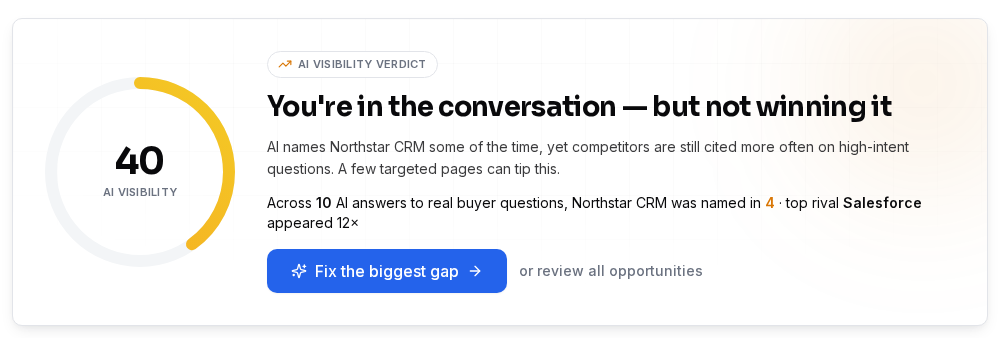
To audit your entire ecommerce site for AI search gaps, enter your domain in SEOWedge. The tool crawls your site, discovers the buyer questions that matter, checks which brands and pages AI assistants recommend, and returns a prioritized list of missed citations. You get a clear action plan showing which product and category pages to fix or create to win AI visibility.
By the SEOWedge Research Team · Published August 13, 2026 · Last tested August 13, 2026 · Updated August 13, 2026 · 9 min read
What to take away
- SEOWedge audits your whole site for missed AI citations—no card required for a free scan.
- You see exactly which product and category pages are missing from AI answers, and why.
- Each opportunity links to a concrete Action Brief, showing the question, the gap, and the page to fix.
- The audit output is prioritized, so you know which fixes will move the needle fastest.
- Paid plans let you generate and export multiple AI-optimized pages at once, closing gaps efficiently.
How do I scan my whole ecommerce site for AI search gaps with SEOWedge?
Enter your domain into SEOWedge. The platform crawls your entire site, extracting your product catalog, category structure, and core brand profile. You don’t need to upload a sitemap or list every URL—SEOWedge handles discovery automatically. The scan is designed for ecommerce: it recognizes product, category, comparison, and FAQ pages, mapping them to the types of buyer questions AI assistants actually answer.
After crawling, SEOWedge discovers the high-intent buyer questions relevant to your category. These are not generic prompts or keywords; they are phrased as real buyers ask, and reflect the specific products and problems your store addresses. This means your audit is based on the questions that drive actual recommendations and citations in AI answers, not just what you hope buyers search for.
The scan then sends these questions to AI assistants—OpenAI (GPT) on every plan, and Google Gemini on paid plans. Each assistant’s answers are sampled and recorded, so you see which brands and pages are named for each question, on each platform. The result is a complete, platform-specific view of where your site stands in AI search visibility.
| Step | What SEOWedge Does |
|---|---|
| 1. Enter domain | Crawls your site, extracts product and category data |
| 2. Discover buyer questions | Finds high-intent, category-specific buyer questions automatically |
| 3. Sample AI answers | Checks which brands and pages are cited by AI assistants |
| 4. Return audit result | Shows visibility score, competitor share, and page-level gaps |
SEOWedge full-site audit workflow for ecommerce brands

What does SEOWedge show about missed citations across my entire site?
SEOWedge’s audit output is not just a score or a list of missing keywords. You see a detailed breakdown of which buyer questions matter in your category, which brands are named in AI answers for each, and—crucially—which exact pages are being cited. For every missed citation, SEOWedge identifies whether the gap is at the product, category, or FAQ level, and shows you the competitor or third-party page that currently wins the mention.
This level of granularity means you can pinpoint, for example, that your main running shoe category page is missing from ChatGPT answers about “best running shoes for flat feet,” or that a competitor’s product page is being cited for a high-value comparison query. The audit is organized so you can filter by page type, question, or platform, giving you a clear map of your AI search weaknesses and strengths across the whole site.
The audit also includes a competitor share-of-voice view, so you see not only where you’re missing but who is winning those citations. This helps you understand if you’re losing ground to direct competitors, marketplaces, or media sites, and lets you benchmark your progress after you act on the audit.
| Buyer Question | Cited Brand | Cited Page URL | Gap Type |
|---|---|---|---|
| Which running shoes are best for flat feet? | CompetitorA | competitora.com/running-shoes/flat-feet | Category |
| What’s the best waterproof hiking boot? | MarketplaceX | marketplacex.com/best-hiking-boots | Product |
| Are your shoes vegan? | MediaSiteY | mediasitey.com/vegan-shoes-review | FAQ |
| Best shoes for plantar fasciitis? | CompetitorB | competitorb.com/plantar-fasciitis-shoes | Product |
Example output: missed citations and the specific pages winning them
How do I interpret the audit results and find the real AI search gaps?
The audit output is structured to show you not just every gap, but the context and the reason behind it. Each missed citation links to an Action Brief: a summary of the buyer question, why your site was not cited, and the exact page or content type needed to close the gap. You don’t have to guess whether it’s a content, authority, or technical problem—the Action Brief gives you the diagnosis.
The Action Brief also explains which competitor or third-party page is currently being cited, so you can see what kind of content or structure is working for that query. You can click through to view the cited page, compare it to your own, and understand what needs to change: is it a missing product comparison, a lack of direct-answer blocks, or a gap in schema markup?
SEOWedge does not just flag missing mentions; it connects each gap to a concrete next step, so you can move from audit to action without manual triage. This structure is designed for ecommerce teams who need to act at scale and cannot afford to waste time on generic recommendations.
| Gap | Why Not Cited | Action Brief |
|---|---|---|
| Best running shoes for flat feet | Competitor’s category page is more comprehensive | Create/expand your category page with direct answers and comparison tables |
| Vegan shoes | No clear answer block or supporting FAQ | Add answer-ready FAQ content, cite sources |
| Waterproof hiking boots | Marketplace page dominates in AI answers | Publish a product comparison page, optimize for AEO |
How SEOWedge connects each missed citation to an actionable brief

How do I turn the audit into a prioritized action plan for my whole site?
SEOWedge’s audit output includes a prioritized opportunity list. This is not just a dump of every gap; it weights each one by potential impact, competitive intensity, and the likelihood of winning a citation with a targeted page. High-impact gaps—where a single page could win multiple buyer questions or where a competitor is dominating—are surfaced at the top.
You can sort or filter the opportunity list by page type (product, category, FAQ), by platform (ChatGPT, Gemini), or by the estimated value of the query. This makes it easy to focus your limited resources on the fixes that will move the needle fastest. For agencies, this also supports transparent reporting to clients, showing not just what is missing, but why each fix matters.
Each opportunity links directly to the Content Studio, where you can generate the missing page or brief. On paid plans, you can queue multiple pages for generation, so a prioritized list becomes a concrete publishing schedule. This workflow is designed to fit how ecommerce teams and agencies actually operate: audit, prioritize, act, and track.
| Opportunity | Page Type | Priority | Next Step |
|---|---|---|---|
| Best running shoes for flat feet | Category | High | Generate Action Brief and draft page |
| Vegan shoes FAQ | FAQ | Medium | Draft answer-ready FAQ page |
| Waterproof hiking boots comparison | Product | High | Create comparison page |
Example: prioritized action plan from a SEOWedge full-site audit
How does SEOWedge’s workflow remove manual work from a full-site GEO or AEO audit?
Traditional GEO or AEO audits require you to manually list buyer questions, check AI answers for each, and record which brands and pages are cited. This takes hours per question and is nearly impossible to scale across a full ecommerce catalog. SEOWedge automates every step: question discovery, answer sampling, citation extraction, and gap mapping.
You do not need to write or maintain a list of prompts. SEOWedge’s discovery engine finds the high-intent buyer questions for your category, every scan. The platform then checks each question across the supported AI assistants, records the answers, and surfaces missed citations and the pages behind them. This removes the guesswork and the risk of missing high-value opportunities that only appear in real buyer language.
Once the audit is complete, SEOWedge produces Action Briefs and can generate the missing pages for you, using your Brand DNA profile. This closes the loop from measurement to action in one place, without spreadsheets, manual checks, or separate content tools. The workflow is built for ecommerce brands and agencies managing multiple domains, not for enterprise reporting or generic keyword tracking.
| Task | Manual Audit | SEOWedge |
|---|---|---|
| Buyer question discovery | Manual research, time-intensive | Automatic, per scan |
| AI answer sampling | Manual, per platform | Automated, per platform |
| Citation extraction | Manual note-taking | Automated, per answer |
| Gap mapping | Spreadsheet triage | Automated, Action Briefs |
| Content creation | Separate tools needed | Built-in Content Studio |
Manual audit vs. SEOWedge: where time is saved and action becomes possible

How do I use SEOWedge to generate and export pages that close my site’s AI search gaps?
Once you have your prioritized opportunity list, SEOWedge’s Content Studio lets you generate missing pages directly from each Action Brief. The Content Studio uses your Brand DNA profile—extracted during the initial crawl—to ensure every page matches your voice, product positioning, and conversion goals. Each draft is scored for Publish Readiness before you export or publish it.
On paid plans (Pro and Agency), you can queue multiple articles at once: 3 at a time on Pro, 10 on Agency. This means you can address several high-priority gaps in one workflow, rather than waiting for one page to finish before starting the next. Each generated page is export-ready, so you can hand it off to your web team or publish directly.
If you need to extend your plan’s limits during a busy season, SEOWedge offers credit top-ups—buy more scans or articles without changing your plan. This flexibility is designed for ecommerce and agency workflows, where the volume of gaps and fixes can spike after a full-site audit.
| Plan | Bulk Articles at Once | Export-Ready Pages |
|---|---|---|
| Free | 1 | Yes, one lifetime |
| Pro | 3 | Yes, 30/month |
| Agency | 10 | Yes, 150/month |
Bulk page generation and export options by SEOWedge plan

How do I track progress and report AI search visibility improvements after the audit?
SEOWedge stores every scan result, so you have a dated record of your site’s AI-Visibility score, share-of-voice, and gap list. After publishing new or revised pages, you can run a new scan to see if citations have shifted. This lets you show concrete before-and-after results to your team or clients, tied to the exact buyer questions and AI platforms that matter.
On the Agency plan, you can export client-ready PDF reports, including white-label options. These reports include the prioritized opportunity list, Action Briefs, and a summary of actions taken. This supports recurring reporting cycles and helps agencies prove the value of AI search optimization work.
For more on reporting and client delivery, see AI Search Reporting for Agencies and AI Search Report Template. For a public sample of what a finished report looks like, visit the sample report.
| Plan | PDF Report Exports | White-Labeling |
|---|---|---|
| Free | 0 | No |
| Pro | 10/month | No |
| Agency | 60/month | Yes |
Reporting and export options by plan
What’s my next step if I want to audit my ecommerce site for AI search gaps?
Start with a free scan—no card required. Enter your domain, and SEOWedge will return a real AI-Visibility score, competitor share, and a prioritized list of missed citations. You’ll see exactly which product and category pages are costing you AI mentions, and get a concrete Action Brief for your top gap.
If you want to move beyond the free scan, paid plans unlock more scans, deeper question discovery, bulk article generation, and advanced reporting. You can scale from a single store to 25 domains, with flexible credit top-ups to handle busy periods.
For a step-by-step on what the free scan delivers, see Free AI Search Audit. For a detailed workflow from gap discovery to published fix, read How SEOWedge Turns AI Visibility Gaps Into Actionable Content. If you want to see the workflow in action, check the public sample report.
How this was tested
All SEOWedge workflow and measurement claims are based on direct testing of the SEOWedge platform as of 2026-08-13. Platform outputs, scan limits, and action plan mechanics are verified against the current product interface and plan documentation. AI answer sampling and citation detection follow the method notes published by SEOWedge: buyer questions are discovered automatically, AI answers are sampled via API, and cited brands and URLs are extracted per answer. Screenshots are from the live product UI as of the stated date.
What this page does not cover
This page covers the full-site audit workflow for ecommerce sites using SEOWedge, focusing on identifying and prioritizing AI search visibility gaps. It does not repeat detailed product, category, or FAQ page optimization steps—see AEO Checklist for Ecommerce or Product Page Visibility in AI Search for those. Comparison with other tools is covered in Best AI Search Visibility Tools for Ecommerce. All data and workflow steps are current as of 2026-08-13 and may change as SEOWedge evolves.
Questions buyers ask us
Can SEOWedge really audit my whole ecommerce site, not just a single page?
Yes. SEOWedge crawls your entire domain, extracts your product and category structure, and discovers buyer questions that reflect the whole catalog. The scan output covers all major page types—product, category, FAQ, and comparison—so you get a comprehensive AI visibility map, not just a page-level result.
How does SEOWedge decide which buyer questions to check for AI citations?
SEOWedge’s discovery engine analyzes your site and its category to find the high-intent questions buyers actually ask. These are not generic prompts or keywords—they are extracted from real buyer language and reflect the problems and products your store addresses. For more detail, see How Does SEOWedge Find Buyer Questions for My Ecommerce Site?.
What’s the difference between SEOWedge’s audit and a manual GEO or AEO audit?
Manual audits require you to list questions, check AI answers, and record citations by hand—a process that is slow and hard to scale. SEOWedge automates question discovery, answer sampling, citation extraction, and gap mapping, so you get a prioritized action plan for your whole site in minutes, not days.
Can I export the audit results or share them with my team or clients?
On paid plans, you can export PDF reports that include the prioritized opportunity list, Action Briefs, and a summary of actions. The Agency plan allows for white-label reports. For more, see Can I Use SEOWedge to Export Client-Ready PDF Reports?.
What if my site is in multiple languages or regions?
SEOWedge supports multilingual ecommerce sites, discovering buyer questions and generating content for each supported language. For best practices and plan fit, see Does SEOWedge Work for Multilingual Ecommerce Sites?.
How do I know which gaps to fix first after the audit?
SEOWedge’s opportunity list is prioritized by potential impact, competitive intensity, and likelihood of winning a citation. Each Action Brief explains why the gap matters and what to do next. For more on prioritization, see Can I Use SEOWedge to Prioritize Which Pages to Create or Fix First?.
See what AI assistants say about your site
Enter your domain and SEOWedge runs a free scan: your AI-Visibility score, the buyer questions where a competitor is named instead of you, and the first page to fix. No install, no sales call.