
How to Use SEOWedge to Improve Product Page Visibility in AI Search
SEOWedge finds which of your product pages are missing from AI answers by scanning your site, discovering real buyer questions, and testing those questions across major AI assistants. It shows which competitor pages are being cited instead, then produces a step-by-step Action Brief and can write the exact page you need to win that recommendation—all matched to your brand voice.
By the SEOWedge Research Team · Published August 12, 2026 · Last tested August 12, 2026 · Updated August 12, 2026 · 9 min read
What to take away
- SEOWedge discovers high-intent buyer questions for your products automatically—no prompt writing required.
- It tests those questions against OpenAI (on all plans) and Google Gemini (on paid plans) to see which product pages are missing from AI answers.
- You receive Action Briefs naming the competitor page that wins the citation and what to fix or create.
- The Content Studio writes new or revised product pages using your Brand DNA, scored for publish readiness.
- A real free scan is available with no card required—see your gaps and one fix instantly.
How does SEOWedge discover which product pages are missing from AI answers?
SEOWedge starts by crawling your ecommerce site and extracting a Brand DNA profile. This includes your product categories, main conversion goal, and the language your brand uses. It then discovers the high-intent questions buyers actually ask in your category—these are not generic prompts or keywords but questions that drive purchase decisions.
Each discovered question is tested against major AI assistants: OpenAI on all plans, and Google Gemini on paid plans. SEOWedge records which brands and product pages are named or cited in the answers. If your product is not named, it identifies the exact competitor page that is winning the citation. This is not a guess: every answer is date-stamped and stored, so you see real, sampled results.
This workflow means you do not have to write or maintain your own list of prompts. The questions are discovered automatically from your site and your market. SEOWedge's approach ensures the gaps it finds are the real reasons your products are missing from AI recommendations, not hypothetical SEO gaps.
For a deeper explanation of how SEOWedge finds buyer questions, see How Does SEOWedge Find Buyer Questions for My Ecommerce Site?.
| Step | What SEOWedge Does |
|---|---|
| 1. Crawl site | Extract Brand DNA and product structure |
| 2. Discover buyer questions | Find 5-25 high-intent questions per scan |
| 3. Test questions in AI assistants | Check OpenAI (all plans), Google Gemini (paid) |
| 4. Record citations | Store which brands and pages are named |
| 5. Identify missing pages | Name the competitor page behind each gap |
SEOWedge's discovery and measurement workflow

What actions can I take using SEOWedge to improve product page visibility?
Once SEOWedge identifies which product pages are missing from AI answers, it turns each gap into an Action Brief. Each Action Brief shows the buyer question, why your page was not cited, and exactly which competitor page is currently winning the recommendation. You get a prioritized list of opportunities, not just a score or a chart.
For each Action Brief, you can choose to fix an existing product page or create a new one. SEOWedge links the gap directly to the page or content type that needs to be published. This removes the guesswork from deciding what to do next—every opportunity is actionable and mapped to a concrete next step.
On paid plans, you can queue several Action Briefs at once and move through your opportunity list in bulk. This is especially useful for ecommerce teams or agencies managing multiple products or clients. The workflow is built to go from measurement to action without switching tools or exporting lists.
If you want to see what a finished opportunity list looks like, view the public sample report.
| Plan | Action Briefs per Scan | Bulk Actions |
|---|---|---|
| Free | 1 | No |
| Pro | 8 | Up to 3 articles at once |
| Agency | Unlimited | Up to 10 articles at once |
Action Briefs and bulk workflow by plan

Does SEOWedge show me the exact changes or new pages I need to create?
Yes. Each Action Brief names the question that cost you a citation, the competitor page that was cited, and the type of content (product page, comparison, guide) needed to win that recommendation. The Brief explains what is missing or weak in your current page, so you know whether to revise or start new.
The Action Brief does not just point to a gap; it tells you what the AI assistant saw, what it chose, and why. This is possible because SEOWedge stores the sampled answers and matches them to real URLs. You see the mechanism: the model's answer, the citation, and the competitive source.
This approach is different from classic SEO tools, which typically show keyword gaps or ranking drops but do not name the exact page or competitor behind the missed recommendation. SEOWedge's workflow is designed for GEO (generative engine optimization) and AEO (answer engine optimization), where the job is to become the cited source in AI answers.
For a breakdown of how SEOWedge turns AI visibility gaps into actionable content, see this detailed workflow guide.
| Action Brief Field | What You See |
|---|---|
| Buyer Question | The high-intent question missing your product |
| Competitor Page | URL currently cited by AI assistants |
| Gap Reason | Why your page is not being cited |
| Recommended Action | Revise existing or create new page |
What an Action Brief contains
Can SEOWedge write product page content that matches my brand and what AI assistants look for?
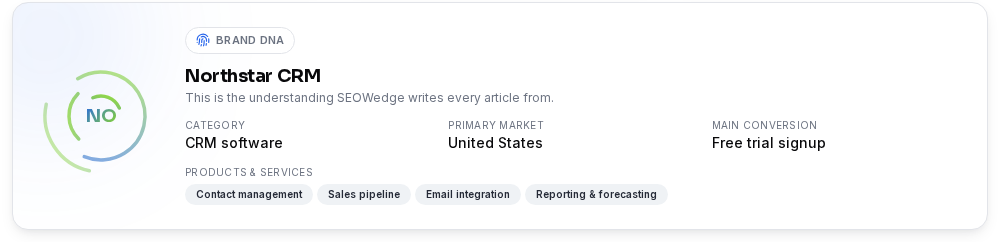
SEOWedge's Content Studio writes new product pages or rewrites existing ones using your Brand DNA profile. This profile is built automatically from your site crawl: it captures your category, product types, tone, and conversion goals. The generated content is not generic—it is tailored to your brand's language and market position.
Each draft receives a Publish Readiness score, which measures how well the page answers the buyer question, matches your brand, and fits the structure AI assistants prefer for citation. You can edit the draft, request up to 150 revisions per month on Pro, and export when ready.
This workflow means you do not have to brief a copywriter or use a separate AI tool. SEOWedge produces content that is both on-brand and optimized for GEO and AEO. The Brand DNA approach ensures consistency across all pages, even when generating content in bulk.
For more on how SEOWedge writes in your brand voice and scores content for AI readiness, see Can SEOWedge Write Pages That Match My Brand Voice?.
| Step | What SEOWedge Does |
|---|---|
| Extract Brand DNA | Crawl site for tone, category, product details |
| Draft Content | Write new or revised product page |
| Score for Readiness | Check for direct answers, structure, and brand match |
| Edit and Export | Revise up to plan limit, then export for publishing |
Brand DNA-driven content workflow
How does SEOWedge's workflow fit into GEO, AEO, and LLM SEO for product pages?
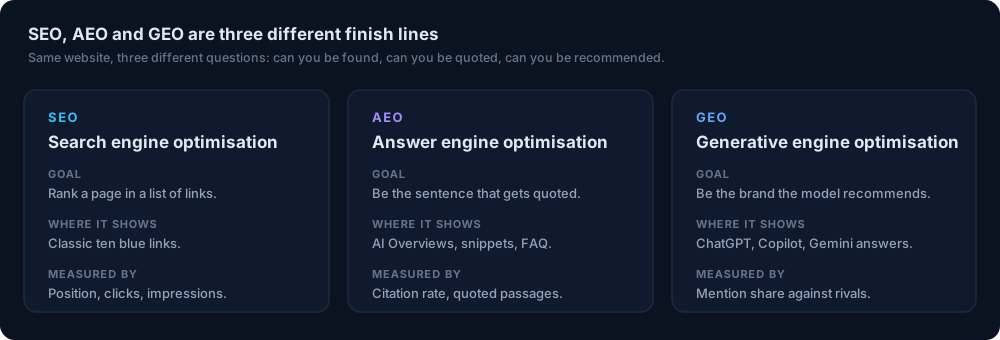
SEOWedge is built for generative engine optimization (GEO) and answer engine optimization (AEO). GEO focuses on being named and cited in AI-generated answers, while AEO is about structuring pages so models can lift passages verbatim. LLM SEO covers technical access for AI crawlers and retrieval systems.
SEOWedge's workflow covers the discovery of buyer questions (GEO), the creation of answer-ready content (AEO), and the technical checks needed for AI assistants to access your product pages (LLM SEO). The scan and content loop are shaped for ecommerce: you get the exact questions, see which pages block citations, and publish new content that is both on-brand and AI-ready.
For technical implementation details—like ensuring AI crawlers can reach your product pages—see the LLM SEO technical guide. For page-level structure and schema, see the AEO checklist for ecommerce.
SEOWedge removes the manual work from GEO and AEO by discovering questions, measuring real answers, and producing on-brand, answer-ready content in one loop.
| Discipline | What SEOWedge Delivers |
|---|---|
| GEO | Buyer questions, competitor citations, gap list |
| AEO | Answer-ready page drafts, schema guidance |
| LLM SEO | Technical checks (see LLM SEO guide) |
GEO, AEO and LLM SEO in the SEOWedge workflow
What do I get for free, and when should I upgrade?
The SEOWedge Free plan gives you a real scan with no card required. You get one Lite Scan, which discovers 5 buyer questions, tests them against OpenAI (GPT), and returns one Action Brief and a free article draft. This is enough to see your AI-Visibility score, competitor share of voice, and a concrete next step for one product or gap.
If you need to cover more products, run multiple scans, test against Google Gemini, or generate more Action Briefs and articles, the Pro and Agency plans unlock higher limits and bulk actions. Paid plans start at $29/month, the lowest entry point in this category, and allow credit top-ups if you hit a limit during a busy month.
The free scan is designed to give you a useful result instantly, not a teaser or locked dashboard. You can see your first gap and draft a page before deciding to upgrade. For a full breakdown of what is included free and paid, see the pricing page or run a free AI search audit now.
| Plan | Buyer Questions per Scan | Action Briefs per Scan | Articles per Month | Providers |
|---|---|---|---|---|
| Free | 5 | 1 | 1 (lifetime) | OpenAI (GPT) |
| Pro | 12 | 8 | 30 | OpenAI (GPT) + Google Gemini |
| Agency | 25 | Unlimited | 150 | OpenAI (GPT) + Google Gemini |
Free vs. paid plan limits
What happens after I publish a new or revised product page?
Once you export and publish the new or revised product page, SEOWedge submits the URL through IndexNow so participating engines are notified of the update. This speeds up recrawling, which is required before AI assistants can see and cite the new content. (IndexNow documentation: IndexNow.org.)
Citations in AI answers move only after assistants re-crawl and choose a new source, which typically takes weeks. SEOWedge is built for this reality: every answer is date-stamped and stored, so you can see if citations move after publishing. The Publish Readiness score helps ensure your page meets the structure and detail AI models look for, increasing the chance of being cited when the next crawl occurs.
You do not need to repeat the scan immediately after publishing. The workflow is designed for batch action: fix the gaps, publish, and then check back after a few weeks to see if AI answers have updated. This fits the real-world pace of GEO and AEO, where changes are measured by new citations, not by daily rank shifts.
For a step-by-step on what to do after publishing, see How to Get My Brand Cited in AI Answers.
| Step | What Happens |
|---|---|
| Export & Publish | Page goes live on your site |
| Submit via IndexNow | Engines notified of new/updated URL |
| Wait for Recrawl | AI assistants re-crawl and update answers |
| Check Citations | See if your page is now cited in answers |
After publishing: the citation update loop

What is the next step if I want to improve my product page visibility in AI search?
Start with a free scan on SEOWedge—no card required. You will see your AI-Visibility score, a list of buyer questions, one Action Brief, and a ready-to-edit article draft for a real product gap. This gives you a concrete next step and lets you test the workflow with your own site.
If you need to cover more products, run bulk actions, or test across multiple AI assistants, review the plan options on the pricing page. For ecommerce teams or agencies, the Pro and Agency plans unlock higher limits and bulk content generation.
If you want to see how SEOWedge fits into your existing GEO, AEO or LLM SEO process, explore the resources hub for practical guides and checklists. The workflow is designed to remove manual work and make AI search visibility actionable for real ecommerce brands.
Your next step: run the free scan, review your first Action Brief, and decide if bulk fixes or broader coverage are right for your brand or clients.
How this was tested
All workflow and product claims on this page are based on SEOWedge's documented process as of 2026-08-12. Discovery of buyer questions, gap identification, Action Briefs, and content generation are described exactly as implemented in SEOWedge. Numbers for questions discovered, Action Briefs, and articles per plan are current as of this date. AI assistant coverage (OpenAI and Google Gemini) and the Brand DNA content process are taken from SEOWedge's live product and documentation. All AI answer sampling is performed per the method notes: each scan records dated, platform-specific answers to discovered questions, not simulated or hypothetical data.
What this page does not cover
This page covers how SEOWedge helps ecommerce owners and marketers improve product page visibility in AI search by showing missing citations and producing on-brand content. It does not cover technical LLM SEO implementation (see the LLM SEO guide), general AEO page structure (see the AEO checklist), or Google AI Overviews specifics (see the Google AI Overviews guide). All workflow steps and numbers refer to SEOWedge as of 2026-08-12; external changes to AI platforms or crawling requirements may affect future results.
Questions buyers ask us
Do I need to write my own prompts or questions for SEOWedge to track?
No. SEOWedge automatically discovers high-intent buyer questions from your site and market. You do not have to write or maintain any prompts. This is different from tools that require you to supply a list of tracked prompts and pay per prompt.
Will SEOWedge show me which competitor page is being cited instead of mine?
Yes. Each Action Brief names the exact competitor page or URL that is currently being cited by AI assistants for each buyer question. You see the mechanism behind the missed citation, not just a generic gap or keyword.
Can SEOWedge write product page content that matches my brand voice?
Yes. SEOWedge builds a Brand DNA profile from your site and uses it to generate new or revised product pages that match your tone, language, and conversion goals. Each draft is scored for Publish Readiness and can be revised before exporting.
How long does it take for AI assistants to update and start citing my new page?
AI assistants update their citations after recrawling your site, which typically takes weeks, not days. SEOWedge submits your published page via IndexNow to speed up discovery, but the timing depends on when each assistant re-crawls and updates its knowledge.
What do I get for free before I pay for a plan?
The Free plan gives you one Lite Scan with 5 discovered buyer questions, 1 Action Brief, and one article draft—no card required. This is enough to see your AI visibility gaps and test the workflow before deciding if you need more coverage or bulk actions.
How does SEOWedge compare to traditional SEO tools for product pages?
Traditional SEO tools focus on keyword rankings and traffic, while SEOWedge measures and acts on AI assistant citations and recommendations. It shows which product pages are missing from AI answers and produces the content needed to win those citations. For a full comparison, see What Makes SEOWedge Different from Traditional SEO Tools for Ecommerce.
See what AI assistants say about your site
Enter your domain and SEOWedge runs a free scan: your AI-Visibility score, the buyer questions where a competitor is named instead of you, and the first page to fix. No install, no sales call.