
AI Search Report Template for Clients: Structure, Caveats, and Credibility
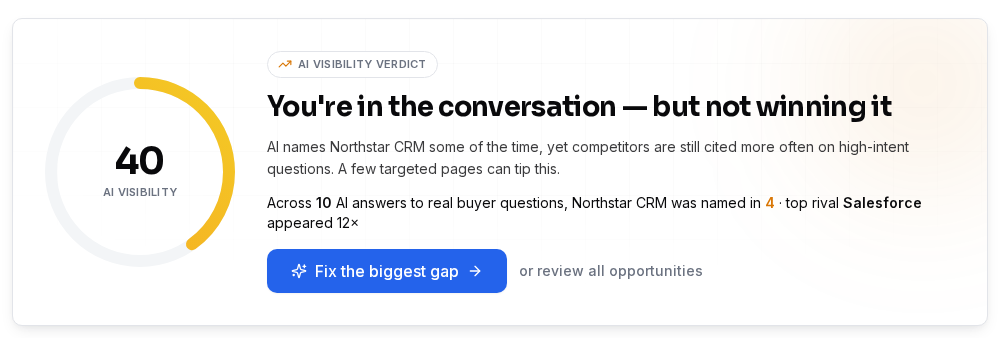
A client-facing AI search report must show which AI assistants name your brand, where you’re missing, and what to do next—while explaining that answers change over time. Use dated, reproducible samples and compare the same questions month to month. The client needs a clear verdict, a prioritized action list, and a way to see credible progress. You can get a filled-in example at SEOWedge’s public sample report.
By the SEOWedge Research Team · Published August 11, 2026 · Last tested August 12, 2026 · Updated August 12, 2026 · 7 min read
What to take away
- Start every AI search report with a dated visibility verdict and competitor share of voice.
- Always explain that AI answers are sampled and can vary by day—show the date and method.
- List the specific buyer questions tested, not just keywords or tracked prompts.
- Show before/after change using the same question set and method for each period.
- Use SEOWedge’s public sample for a real filled-in example and structure.
What Sections Belong in a Client-Facing AI Search Report?
Every AI search report should answer three questions for the client: Where do we stand in AI answers? What are the gaps? What do we do next? Structure the report around these outcomes, not just data points. The standard sections are:
1. Executive Summary: A one-paragraph verdict—are you named, cited, or missing in AI answers?
2. Visibility Score and Share of Voice: A dated, platform-specific score plus a table showing which brands are named most often.
3. Buyer Questions Tested: List the exact high-intent questions run through each AI assistant. This grounds the findings in real buyer language, not generic keywords.
4. Brand Citations by Platform: For each question, show which brands are named in OpenAI (GPT), Google Gemini, and other engines if relevant. Date every sample.
5. Page-Level Opportunities: Highlight the missing or underperforming pages responsible for the gap, mapped to specific questions.
6. Prioritized Action List: List the next steps—new pages, rewrites, or schema fixes—ranked by potential impact.
7. Method and Caveats: Explain how answers were sampled, why results can vary, and how change is measured over time.
A filled-in example with these sections is available at SEOWedge’s public sample report.
How Do I Phrase Findings When AI Answers Vary by Day?
AI answers are not static. The same question can yield different results on different days or even in different sessions. To keep your report credible, always:
- State the date and time each answer was sampled. Use phrasing like “As of 2026-08-12, ChatGPT named [Brand] for [Question], while Google Gemini named [Competitor].”
- Explain that results are based on a snapshot, not a fixed ranking. This is the only defensible way to show movement or progress.
- Avoid absolute language. Instead of “We are always cited,” say “In the sample taken on [date], our brand was named in 3 out of 5 tested questions.”
- If answers are inconsistent, document the range: “Across three samples, ChatGPT named [Brand] twice and [Competitor] once for [Question].”
SEOWedge’s method note: every scan records the sampled answer, the date, and the platform. This makes every finding reproducible and defensible in a client conversation.

What Does the Client Actually Need to Decide?
The client is not asking for a data dump—they need to know what to do next. The report must make it clear:
- Which gaps are costing them citations or recommendations in AI answers?
- Which competitor or page is being named instead, and why?
- What specific action will close each gap: a new page, a rewrite, or a technical fix?
- How will progress be measured next month?
For each opportunity, include a short action brief: “To win citation for [Question], create a comparison page covering [Topic], as [Competitor] currently owns this answer in Google Gemini.”
A clear action list, tied to real buyer questions, is what moves the report from observation to decision. SEOWedge’s workflow produces these briefs automatically per scan, mapped to the exact missing or underperforming page.

How Do I Show Month-Over-Month Change Credibly?
To show credible change, always run the same set of buyer questions through the same AI assistants each month. Record the date, platform, and method for each sample. Then, compare only like with like. For each tracked question, show:
- Previous month’s result (brand named/not named, competitor named, page cited)
- Current month’s result, using the same sample method
- The action taken (page published, schema added, etc.)
- The outcome: did the brand move from missing to cited?
A table format is best for this. For example:
| Question | Platform | Month 1 | Month 2 | Action Taken | Result |
|----------|----------|---------|---------|--------------|--------|
| Best vegan protein | ChatGPT | Not named | Named | Published comparison page | Gap closed |
This structure avoids false positives from random answer changes and shows the effect of real work. SEOWedge’s scan history and exportable reports are built around this repeatable method.
| Question | Platform | Month 1 | Month 2 | Action Taken | Result |
|---|---|---|---|---|---|
| Best vegan protein | ChatGPT | Not named | Named | Published comparison page | Gap closed |
| Plant protein vs whey | Gemini | Competitor named | Brand named | Added FAQ section | Gap closed |
Example of month-over-month tracking for two buyer questions.

What Caveats Must I Include to Keep the Report Honest?
AI search is not like classic SEO. Answers change as models update, retrain, or re-crawl. To keep the report honest and credible:
- State that all findings are based on sampled answers from specific dates and platforms. There is no persistent ranking in AI search.
- Note that some assistants (like Google Gemini) break a question into multiple sub-queries, so a page must cover the whole problem family, not just one phrase. See the Google AI Overviews guide for details.
- Explain that a page change may take weeks to affect AI answers, as re-crawling is not instant. SEOWedge submits published URLs via IndexNow to speed up discovery, but timing is still outside your control.
- Make clear that “visibility” means being named or cited in an AI answer, not just being indexed or ranked in classic search.
- Don’t promise instant results. Instead, set expectations for a 2-6 week window before changes show up in answers.
These caveats protect you and the client from overclaiming and help build trust in the reporting process.
How Do I List and Explain the Buyer Questions Tested?
Clients need to see that your findings are based on real buyer intent, not arbitrary prompts. Always include a section listing the exact questions tested, such as:
- “What is the best vegan protein for athletes?”
- “Plant protein vs whey: which is better?”
- “Is [Brand] a good source for vegan supplements?”
Explain that these are discovered from the site’s category, product set, and market, not written by hand. SEOWedge automatically discovers and runs these high-intent questions per scan, so you don’t have to maintain a prompt list. This method ensures the report reflects what buyers actually ask and what AI assistants are likely to answer in the wild.
For a full breakdown of how buyer questions are discovered and why they matter, see the AI Search Visibility Tool overview.
Where Can I Get a Filled-In Example or Exportable Template?
If you need to see a real, filled-in AI search report before building your own, use SEOWedge’s public sample report. This example includes every section listed above, with actual sampled answers, a visibility verdict, share of voice, buyer questions, page-level opportunities, and a prioritized action list. The sample is updated regularly to reflect real-world answer shifts and method notes.
For agencies or consultants who want to automate this workflow, SEOWedge’s paid plans allow PDF report exports (10 per month on Pro, 60 on Agency) and, on the Agency plan, full white-labeling. You can run a free AI search audit instantly for any domain—no card required—and see the core sections in action before you commit to a paid plan.
If you want to compare how SEOWedge’s reporting workflow stacks up against other tools, see AI Search Reporting for Agencies.
How Does SEOWedge Remove the Manual Work from This Reporting Loop?
Manual AI search reporting means writing your own prompts, running them through AI assistants, recording answers, and tracking changes by hand. SEOWedge automates this loop:
- Discovers high-intent buyer questions from your site and market—no prompt writing needed.
- Runs those questions through OpenAI (GPT) and Google Gemini (on paid plans), recording which brands and pages are named.
- Returns a dated, platform-specific visibility score and competitor share of voice.
- Maps every gap to the exact missing or underperforming page and produces an Action Brief for each.
- Writes the missing or improved page from your Brand DNA, scores it for publish readiness, and lets you export it for publication.
- Tracks and exports before/after results in a repeatable format, so you can show credible progress month by month.
This single-loop workflow is what sets SEOWedge apart: you measure, identify, fix, and track—all in one place, at the lowest paid entry point in the category. The free scan gives you a real, actionable result without a card, so you can see the method and output before you buy.
How this was tested
All report structures and caveats on this page are based on SEOWedge’s sampled-answer method as of 2026-08-12. Each visibility verdict, share of voice, and opportunity is produced by running a fixed set of high-intent buyer questions through OpenAI (GPT) and Google Gemini (on paid plans), recording which brands and pages are named. Changes between periods are measured by repeating the same question set and method, ensuring results are reproducible and not anecdotal. The filled-in example is the current SEOWedge public sample report.
What this page does not cover
This page covers the structure and caveats needed for a credible, client-facing AI search report. It does not provide a downloadable template file or cover classic SEO reporting. For technical LLM SEO checks, see the LLM SEO technical guide. For agency-specific reporting workflows, see AI Search Reporting for Agencies. All examples and methods are based on SEOWedge’s workflow and may not reflect the approach of general-purpose SEO dashboards.
Questions buyers ask us
How do I handle inconsistent AI answers in the report?
Document the range of answers you observed, state the sample dates, and explain that AI outputs are not fixed rankings. Use language like "In three samples on 2026-08-12, ChatGPT named [Brand] twice and [Competitor] once for [Question]." This keeps findings honest and credible.
How many buyer questions should I include in each report?
Include the full set of high-intent questions discovered for the domain and category. SEOWedge discovers 5 questions per scan on the free plan, 12 on Pro, and 25 on Agency. Listing all tested questions grounds the findings in real buyer language.
Can I export or white-label the report for clients?
PDF report export is included on SEOWedge Pro (10/month) and Agency (60/month) plans. White-labeling is available only on the Agency plan. The free scan does not include exports, but you can view the full report structure online.
How do I show the impact of a new page or fix?
Run the same question set before and after the change, record the result for each platform, and show whether your brand moved from missing to cited. Use a simple table to compare the before/after state. SEOWedge’s scan history and export features are built for this workflow.
Where can I see a real example of a filled-in AI search report?
You can view a live, filled-in example at SEOWedge’s public sample report. It includes every section covered in this guide, with actual sampled answers, gap analysis, and a prioritized action list.
See what AI assistants say about your site
Enter your domain and SEOWedge runs a free scan: your AI-Visibility score, the buyer questions where a competitor is named instead of you, and the first page to fix. No install, no sales call.