
Can I Use SEOWedge to Export Client-Ready PDF Reports?
You can export client-ready PDF reports from SEOWedge on Pro and Agency plans. Agency users can fully white-label reports with their own branding. Each report includes the AI-Visibility score, competitor share of voice, buyer questions tested, and clear next steps. Exports are limited by plan but can be topped up with credits. The Free plan does not allow PDF exports.
By the SEOWedge Research Team · Published August 12, 2026 · Last tested August 12, 2026 · Updated August 12, 2026 · 7 min read
What to take away
- PDF report export is available on Pro (10/month) and Agency (60/month) plans.
- Only the Agency plan allows full white-labeling of reports for client delivery.
- Each report includes visibility scores, share-of-voice, buyer questions, and recommended actions.
- PDF exports can be topped up with credits if you exceed your monthly limit.
- The Free plan does not support exporting client-ready PDF reports.
Which SEOWedge plans allow exporting PDF reports?
PDF report export is available only on paid SEOWedge plans. The Pro plan includes up to 10 PDF report exports per month. The Agency plan includes up to 60 PDF report exports per month. The Free plan does not allow PDF report export. This structure is designed to fit the needs of consultants and agencies delivering regular updates to clients, while keeping the Free plan focused on instant, self-serve audits.
If you need to deliver branded, client-ready documentation, you must be on Pro or Agency. Each export counts toward your monthly limit. If you exceed your plan's allowance, you can top up with credits without changing plans. This lets you handle busy reporting cycles without being forced to upgrade.
| Plan | PDF Exports/Month | White-Label Capability |
|---|---|---|
| Free | 0 | No |
| Pro | 10 | No |
| Agency | 60 | Yes |
PDF report export and white-label options by SEOWedge plan.

What is included in a client-ready PDF report from SEOWedge?
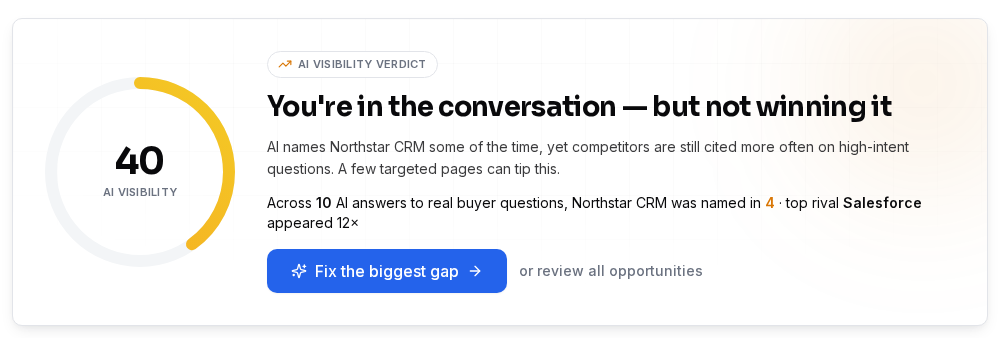
Every SEOWedge PDF report contains the AI-Visibility score for your brand, a competitor share-of-voice breakdown, and a list of the buyer questions tested in the scan. For each question, you see which brands and pages were cited in AI answers, and where your brand was missing or named. The report also includes a prioritized list of opportunities: the specific pages or topics that, if addressed, can close visibility gaps in AI answers.
The report is structured to be handed directly to a client or stakeholder. It explains the method (which questions, which AI models, which dates), the findings, and the recommended actions. This format is designed for agencies and consultants who need to communicate both the measurement and the next steps without manual editing or reformatting. The Agency plan adds your agency's branding to every page of the report, making it ready for direct client delivery.
| Section in Report | What It Shows |
|---|---|
| AI-Visibility Score | How often your brand is cited in AI answers |
| Competitor Share of Voice | Which brands are named, and how often |
| Buyer Questions Tested | The exact queries run through AI assistants |
| Cited Pages & Gaps | Which URLs are cited, and where your brand is missing |
| Action Briefs | Specific next steps to close each gap |
Key sections included in every SEOWedge PDF report.
Can I white-label reports for my agency clients?
White-label PDF reports are available only on the SEOWedge Agency plan. When you export a report on Agency, you can apply your agency's logo, colors, and contact details. The exported PDF contains no SEOWedge branding, so you can deliver it as your own work product to clients. This feature is not included on the Free or Pro plans, which export reports with SEOWedge branding only.
This approach is designed for agencies managing multiple brands or client projects, where delivering a consistent, branded experience is essential. The white-label option is enabled automatically on Agency; there is no extra fee or add-on required. If you are on Pro and need white-label capability, upgrading to Agency is the only supported path.
| Plan | White-Label Reports |
|---|---|
| Free | No |
| Pro | No |
| Agency | Yes |
White-label PDF reporting is exclusive to the Agency plan.

How do I export a report and what does the process look like?
Exporting a client-ready PDF report is a one-step process from the project dashboard. After running a scan, you select the project and click 'Export PDF'. On the Agency plan, you can customize the report with your agency's branding before export. The system compiles the latest scan data, including scores, competitor breakdowns, buyer questions, and recommended actions, into a structured PDF.
Each export counts against your monthly plan allowance. If you have used up your included exports, you can purchase credit packs to export additional reports without upgrading your plan. The exported PDF is ready to be sent to clients as-is, with no further formatting required. This workflow is designed for agencies and consultants who need a fast, repeatable way to deliver defensible AI search visibility results.
| Step | Action |
|---|---|
| 1 | Run a Full Scan on the client project |
| 2 | Open the project dashboard |
| 3 | Click 'Export PDF' |
| 4 | (Agency only) Apply branding |
| 5 | Download and send to client |
Step-by-step: exporting a client-ready PDF report from SEOWedge.
Are there limits to how many reports I can export per month?
Yes, each paid plan includes a monthly allowance of PDF report exports. Pro allows up to 10 PDF exports per month across all projects. Agency allows up to 60 PDF exports per month across up to 25 client projects. If you need more exports in a given month, you can purchase credit packs: each additional PDF export costs 1 credit. Credit packs are available in sizes of 100, 300, or 1000 credits, and can be used for any export, scan, or article generation action.
This system means you are never blocked from delivering a report during a busy client cycle. You only pay for what you use above your plan's included limits. The Free plan does not support PDF export, so you must be on Pro or Agency to access this workflow.
| Plan | PDF Exports/Month | Extra Exports (with Credits) |
|---|---|---|
| Pro | 10 | Yes |
| Agency | 60 | Yes |
Monthly PDF export limits and credit top-up options.
What makes SEOWedge PDF exports credible for client delivery?
SEOWedge reports are built from direct samples of AI answers, not just estimated rankings or scraped SERPs. Each report lists the exact buyer questions tested, the AI models sampled (OpenAI GPT and, on paid plans, Google Gemini), and the date of each observation. This method means every claim in the report can be traced to a real, dated answer from the relevant AI assistant. The measurement is repeatable and defensible for clients who want to see evidence rather than projections.
The report structure is shaped by agency client needs: it includes not just scores, but also the competitor landscape and a concrete list of next steps. This makes it suitable for board meetings, client updates, and stakeholder presentations. For a detailed breakdown of what makes an AI search report credible and actionable, see AI Search Reporting for Agencies and AI Search Report Template for Clients.
| Element | How It Supports Credibility |
|---|---|
| Dated AI answers | Traceable, repeatable evidence |
| Buyer questions listed | Shows real queries, not generic prompts |
| Competitor share-of-voice | Benchmarks against real rivals |
| Action Briefs | Concrete, next-step recommendations |
How SEOWedge structures PDF reports for credible client delivery.

How does SEOWedge’s export workflow compare to manual reporting or other tools?
Manual AI search reporting requires running multiple queries in each assistant, recording answers, tracking which brands and pages are named, and formatting findings for each client. SEOWedge automates this: the scan discovers high-intent buyer questions, tests them on each supported AI assistant, records the results, and assembles them into a report. The Agency plan adds white-label export, so agencies can deliver a polished result without manual editing.
Other tools may focus on prompt tracking, general SEO dashboards, or SERP monitoring. SEOWedge is built for the GEO and AEO reporting cycle: measure, name the gap, and produce the next step in a single loop. For a direct workflow comparison, see AI Search Reporting for Agencies or SEOWedge vs Otterly AI. The export limits and white-label options are designed to match the actual reporting cadence of agencies serving 1-25 clients.
| Workflow Step | Manual Process | SEOWedge Process |
|---|---|---|
| Question discovery | Manual research | Automated per scan |
| AI answer sampling | Manual queries | Automated, platform by platform |
| Data recording | Spreadsheets | Systematic, per scan |
| Report formatting | Manual write-up | One-click PDF export |
| Branding | Custom in doc editor | Automated (Agency plan) |
Manual vs SEOWedge workflow for client-ready AI search reporting.
What is my next step if I want to export client-ready PDF reports?
To test the report export workflow, start a project on SEOWedge and run a scan (no card needed for the Free plan, but PDF export requires Pro or Agency). You can view a public sample report to see the exact format. If you need white-label reports or higher export limits, choose the Agency plan. For detailed plan pricing and feature breakdowns, visit SEOWedge Pricing. If you want to understand the full reporting cycle or see how SEOWedge fits into your agency workflow, see AI Search Reporting for Agencies.
| Action | Where to Start |
|---|---|
| See a sample report | /sample |
| Compare plans and export limits | /pricing |
| Learn about agency workflow | /ai-search-reporting-for-agencies |
Where to go next if you need client-ready PDF export from SEOWedge.
How this was tested
All plan and export limits, white-label options, and report contents are taken directly from SEOWedge's published plan documentation and interface as of 2026-08-12. The workflow and sample outputs reflect the current production system. Numbers for credits and exports are from SEOWedge's live pricing and usage screens. No claims are made about features not present in the product facts or plan tables.
What this page does not cover
This page covers only SEOWedge's PDF export and white-label reporting features, plan limits, and the workflow for agencies and consultants. It does not compare report content or export options with other tools; for direct tool comparisons, see SEOWedge vs Otterly AI or SEOWedge vs Semrush AI Visibility. For guidance on structuring or customizing AI search reports, see AI Search Report Template for Clients. This guide does not cover non-PDF exports, API access, or custom report structuring beyond plan features.
Questions buyers ask us
Does the Free plan allow me to export PDF reports?
No. The Free plan does not support PDF report export. You can view your scan results online, but exporting a client-ready PDF requires a Pro or Agency subscription.
Can I add my agency’s logo and branding to PDF reports?
Yes, but only on the Agency plan. White-label export is not available on Free or Pro. On Agency, you can apply your branding before export, making the report ready for direct client delivery.
What happens if I hit my PDF export limit for the month?
You can purchase credit packs to export additional reports without upgrading your plan. Each extra export costs 1 credit. This lets you handle peak reporting periods without changing your subscription.
What information is included in each PDF report?
Each report covers your AI-Visibility score, competitor share of voice, the buyer questions tested, which brands and pages were cited, and a prioritized list of next steps. The format is designed for client delivery without extra editing.
Can I export reports for multiple clients or domains?
Yes. The Pro plan allows up to 5 projects with 10 PDF exports per month. The Agency plan allows up to 25 projects with 60 PDF exports per month. Each export counts toward your monthly limit, regardless of project.
Is there a way to see what a SEOWedge PDF report looks like before subscribing?
Yes. You can view a public sample report at /sample to see the structure, content, and branding options available on each plan.
See what AI assistants say about your site
Enter your domain and SEOWedge runs a free scan: your AI-Visibility score, the buyer questions where a competitor is named instead of you, and the first page to fix. No install, no sales call.
Keep reading
- ProductAI Search Reporting for Agencies: Client-Ready, Repeatable, Credible
- GuideAI Search Report Template for Clients: Structure, Caveats, and Credibility
- ProductSEOWedge for Agencies: Deliver AI Visibility Results Across Multiple Clients
- GuideHow to Choose an AI Search Visibility Tool for a Small Agency