
How Do I Use SEOWedge to Create Content for Product Usage Instructions and Troubleshooting FAQs?
SEOWedge discovers the product usage and troubleshooting questions buyers actually ask, identifies which FAQs are missing from AI answers, and generates on-brand, citation-ready instructions or support content. You get a concrete Action Brief for each gap and a ready-to-publish page that reduces support tickets and drives AI citations.
By the SEOWedge Research Team · Published August 24, 2026 · Last tested August 24, 2026 · Updated August 24, 2026 · 7 min read
What to take away
- SEOWedge finds real buyer questions about product usage and troubleshooting—no prompt writing required.
- You see exactly which usage or FAQ pages are missing from AI answers, including the competitor or page currently cited.
- Each gap comes with an Action Brief: the question, why you’re missing, and the page to create or fix.
- The Content Studio writes answer-ready instructions or troubleshooting FAQs using your Brand DNA profile.
- You export a page structured for AI citation, reducing returns and support tickets from unclear or missing answers.
Does SEOWedge Find Real Buyer Questions About Product Usage and Troubleshooting?
SEOWedge does not rely on prompts you write. It crawls your ecommerce site, extracts your Brand DNA, and discovers the high-intent buyer questions your category is actually asked. This includes usage instructions, setup steps, troubleshooting, and post-purchase support queries—phrased as buyers ask them, not as generic FAQs.
A scan returns the exact usage and troubleshooting questions that drive AI answers in your space. On the Free plan, you get 5 discovered questions per scan; paid plans surface 12 to 25 per scan, depending on tier. These are not scraped from your own FAQ—they are surfaced from real buyer intent, so you see gaps you would miss by guessing or copying competitors.
This approach means you are working from the same question set AI assistants use to generate support answers, and you do not have to maintain a prompt list. For details on question discovery, see How Does SEOWedge Find Buyer Questions for My Ecommerce Site?.
How Does SEOWedge Identify Which Usage or Troubleshooting FAQs Are Missing from AI Answers?
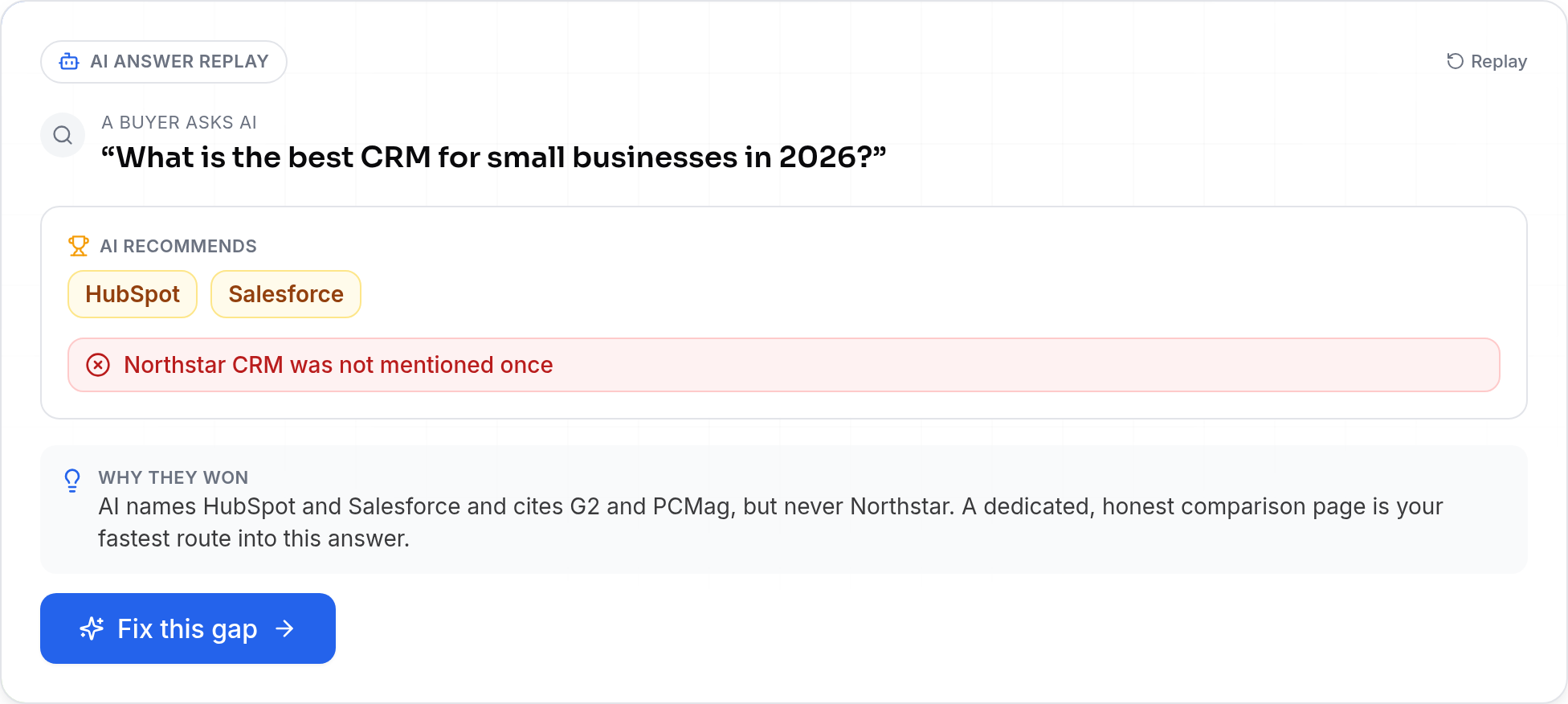
SEOWedge sends the discovered buyer questions to AI assistants—OpenAI (GPT) on all plans, and Google Gemini on paid plans. It records which brands and pages are named or cited in each answer for every question. If your brand is not named, or a competitor’s support page is cited instead, SEOWedge flags that as a gap.
The scan output shows you, for each usage or troubleshooting question: whether your brand is cited, which competitor or third-party page is named instead, and the exact opportunity you are missing. This is not a generic FAQ audit—it is a record of what AI assistants actually say, dated and stored for reference.
You get a prioritized list of missing usage and troubleshooting answers. Each gap is mapped to the page or FAQ that needs to exist for your brand to be recommended or cited in future AI answers.

What Is the Workflow for Creating On-Brand, Citation-Ready Usage Instructions or FAQ Pages?
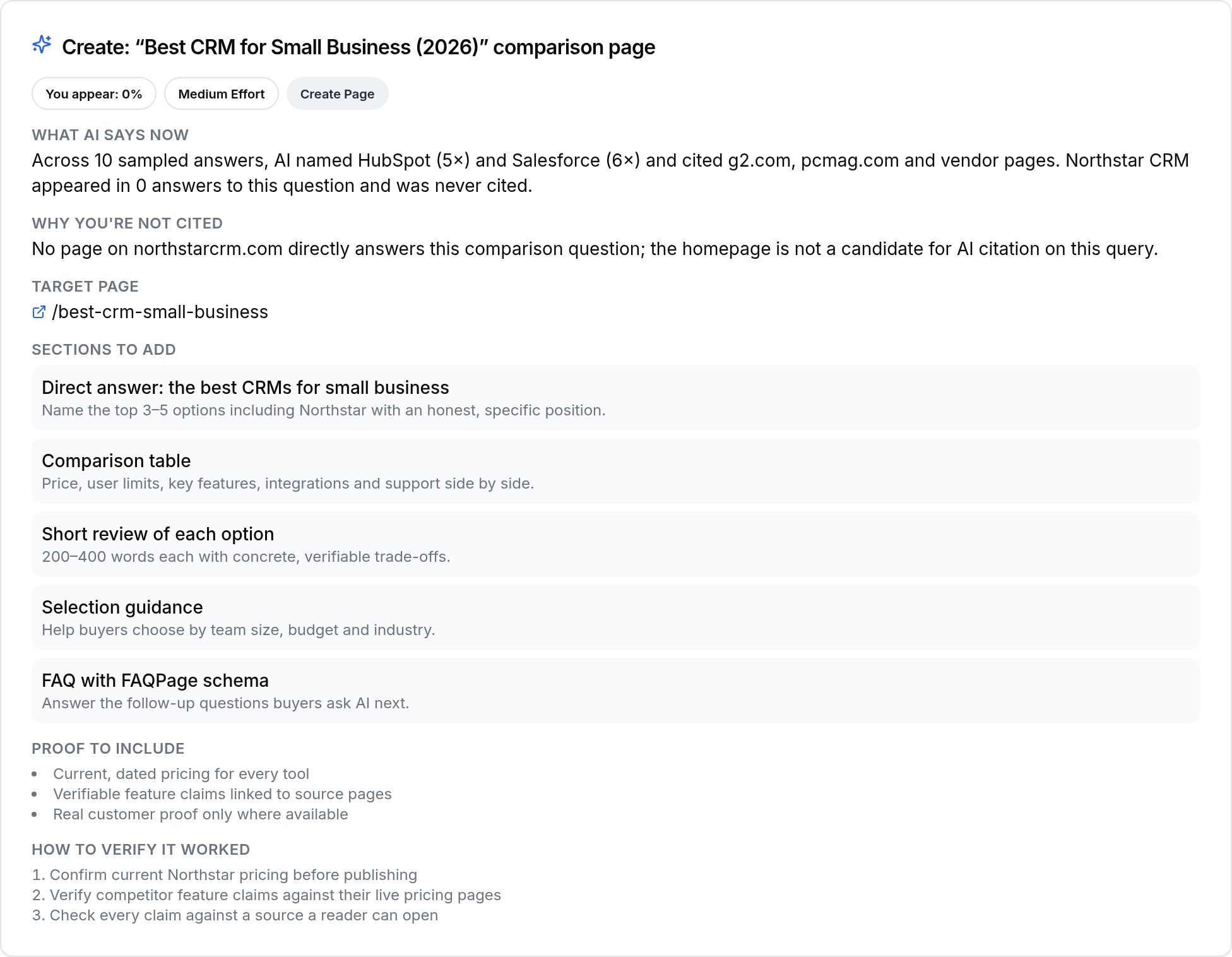
Once a gap is identified, SEOWedge produces an Action Brief for each missing usage or troubleshooting answer. The Action Brief gives you: the buyer question, the reason your brand is missing from AI answers, and the exact page to create or revise.
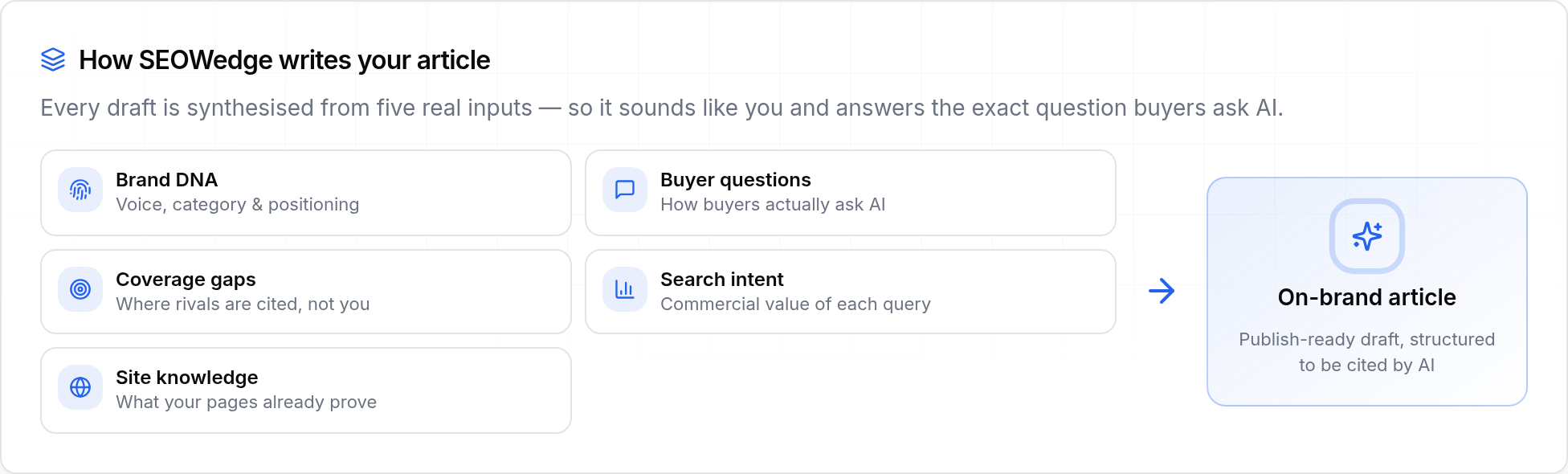
You open the Content Studio from the Action Brief. SEOWedge uses your Brand DNA profile—category, products, brand tone, and conversion goal—to write a draft page. This includes step-by-step instructions, troubleshooting guidance, or FAQ responses, structured for direct AI citation.
You can edit the draft, add product-specific details, and check the Publish Readiness score. This score is deterministic and measures whether the page is specific, on-brand, and structured for AI answer engines. When the score is high, you export and publish the page, ready for AI assistants to cite.
How Do I Make Sure My Usage and Troubleshooting Pages Are Structured for AI Citation?
SEOWedge-generated pages use answer engine optimization (AEO) and generative engine optimization (GEO) principles. Each page features a direct answer block, step-by-step or checklist formatting, and clear schema markup where relevant. The structure is designed so AI assistants can lift your answer verbatim and cite your brand as the source.
The Publish Readiness score checks for answerability, specificity, and brand voice. You see exactly what needs to be improved before publishing. This is not a generic AI content generator—the system ensures your usage instructions and troubleshooting FAQs are tailored for AI extraction and citation, not just SEO.
For more on answer-ready structuring, see Answer Engine Optimization (AEO): How to Become the Quoted Source and AEO Checklist for Ecommerce.

What Is an Action Brief and How Does It Guide My Next Step?
Every usage or troubleshooting gap comes with an Action Brief in SEOWedge. The Action Brief names the exact buyer question, explains why your brand is missing from AI answers, and points to the specific page or FAQ to create or update.
It also shows which competitor or third-party page is currently being cited, so you know what you are aiming to replace. The Brief links directly to the Content Studio, so you move from diagnosis to drafting the fix in one click—no copy-pasting or separate tools needed.
This single-loop workflow means you always know what to do next, and every step is mapped to a measurable outcome: getting your brand cited for that usage or troubleshooting query.
How Does SEOWedge Reduce Support Tickets and Returns by Improving Usage and Troubleshooting Content?
When buyers find accurate, brand-cited instructions or troubleshooting steps in AI answers, they are less likely to open a support ticket or return a product due to confusion. SEOWedge’s workflow is built to make your usage and FAQ content the first answer AI assistants give, not just a buried link on your site.
By targeting the exact questions that drive support requests and returns, and structuring each answer for AI citation, SEOWedge helps you reduce friction at the most common support touchpoints. This is especially valuable for products with setup complexity, common troubleshooting needs, or high return rates from unclear instructions.
For related workflows on installation/setup and warranty/returns, see How to Identify and Close Content Gaps for Buyer Questions About Product Installation or Setup with SEOWedge and Create Answer-Ready Pages for Product Warranty and Return Questions with SEOWedge.
How Does SEOWedge’s Approach Differ from Classic SEO FAQ Tools or Prompt-Based AI Content?
Classic SEO FAQ tools optimize for search rankings, not for being quoted in AI answers. Prompt-based AI content tools require you to write and maintain your own prompt list, and they do not show which competitor is being cited or why your answer is missing.
SEOWedge discovers buyer questions automatically, tests them against real AI answers, and closes the loop by generating the missing page. You do not need to guess which usage or troubleshooting queries matter—SEOWedge shows you the actual gaps and the competitor or page to replace.
This workflow is purpose-built for ecommerce support and post-purchase queries where being the cited source reduces returns and support costs. For a deeper dive into the differences, see What Makes SEOWedge Different from Traditional SEO Tools for Ecommerce?.
What Do I Get for Free, and When Should I Upgrade for Full Usage and Troubleshooting Coverage?
The SEOWedge Free plan gives you a one-time Lite Scan (no card required), surfacing 5 discovered buyer questions and 1 Action Brief, plus one free article draft for any usage or troubleshooting gap found. You can edit and export this article to your site.
Paid plans (Pro and Agency) unlock 12 to 25 discovered questions per scan, up to 8 or unlimited Action Briefs per scan, and the ability to generate multiple articles at once. You also get access to Google Gemini answer sampling (not just OpenAI), more projects, and bulk article generation for teams handling many products or support topics.
If you want to cover your entire product range or multiple support scenarios, or if you need to generate and update usage/troubleshooting pages at scale, upgrading is the practical next step. For a breakdown of plan limits and pricing, see Pricing or SEOWedge Free vs Paid Plans for Ecommerce: What Are the Limits?.
What’s the Next Step If I Want to Create AI-Citable Usage and Troubleshooting Content?
Start with a free scan—no card needed. Enter your domain, get your AI-Visibility score, and see the discovered usage and troubleshooting questions buyers actually ask. Review the Action Brief and use the Content Studio to generate your first answer-ready FAQ or instruction page.
If you need to cover more products, more support scenarios, or want to track your progress across multiple platforms, upgrade to a paid plan. Paid plans unlock more questions per scan, more Action Briefs, and bulk content generation—so you can close every usage and troubleshooting gap that costs you AI citations, support tickets, and returns.
For a public sample of what a SEOWedge scan and Action Brief look like, visit the public sample report. To see how this workflow fits into broader GEO, AEO, and LLM SEO strategies, visit the Resources hub.
How this was tested
All numbers and workflow steps are from SEOWedge’s live product as of 2026-08-24. Buyer questions are discovered by crawling the submitted domain and its market, then sampled against OpenAI (and Google Gemini on paid plans). Action Briefs and generated content are produced from the Brand DNA profile. Every scan records what AI assistants actually answer for the tested questions, so the gaps and fixes reflect real-world AI answer surfaces, not hypothetical prompts.
What this page does not cover
This page covers SEOWedge’s process for surfacing and closing content gaps around product usage instructions and troubleshooting FAQs in AI answers. It does not cover classic SEO FAQ optimization, technical documentation for non-ecommerce products, or support ticketing system integrations. For broader FAQ workflows, see How to Use SEOWedge to Create Answer-Ready FAQ Pages for AI Search. For installation/setup and warranty/returns, see the linked resources in relevant sections.
Questions buyers ask us
How does SEOWedge know which usage or troubleshooting questions matter for my products?
SEOWedge discovers high-intent buyer questions by crawling your site and analyzing your market, not by guessing or scraping your existing FAQ. It tests these questions against real AI answers, so you see the exact usage and troubleshooting queries that drive citations in your category.
Can SEOWedge show me which competitor is being cited for a usage or troubleshooting answer?
Yes. For each discovered question, SEOWedge records which brand and source page is cited in AI answers. You see the competitor or third-party page currently named, so you know exactly what you are competing against for that answer.
How do I ensure the generated instructions or FAQ pages match my brand and product specifics?
All content is generated from your Brand DNA profile, which SEOWedge builds by crawling your site. You can edit every draft, add product-specific details, and review the Publish Readiness score before exporting. This keeps your usage and troubleshooting content accurate, on-brand, and ready for AI citation.
What if I only need to fix a few usage or troubleshooting FAQs—do I need a paid plan?
The Free plan gives you one scan, five discovered questions, and one article draft. If you only need to address a single high-impact FAQ or instruction gap, this may be enough. For broader coverage or ongoing updates, a paid plan unlocks more questions, Action Briefs, and articles per month.
How soon can I expect to see my new usage or troubleshooting page cited in AI answers?
AI assistants re-crawl and update their answers on a timeline of weeks, not hours. SEOWedge submits your published page via IndexNow to accelerate discovery, but citation updates depend on the assistant’s crawl schedule. Each scan records the date and answer sample, so you can track when citations move.
Does SEOWedge support multilingual usage or troubleshooting content?
SEOWedge’s question discovery and content generation are optimized for English-language ecommerce sites. For multilingual workflows or international markets, see Does SEOWedge Work for Multilingual Ecommerce Sites?.
See what AI assistants say about your site
Enter your domain and SEOWedge runs a free scan: your AI-Visibility score, the buyer questions where a competitor is named instead of you, and the first page to fix. No install, no sales call.