
Can SEOWedge Help Me Improve Category Page Visibility in AI Search?
SEOWedge shows exactly why your ecommerce category pages are missing from AI-generated answers, finds the buyer questions that drive those citations, and produces the missing or optimized pages you need to close the gap. This loop—measurement, gap identification, and content creation—makes SEOWedge the practical tool for improving category page visibility in AI search.
By the SEOWedge Research Team · Published August 12, 2026 · Last tested August 12, 2026 · Updated August 12, 2026 · 7 min read
What to take away
- AI assistants cite category pages that answer high-intent buyer questions, not just those with classic SEO rankings.
- SEOWedge discovers the real buyer questions that lead to category citations—no prompt writing required.
- The tool names the exact competitor page winning each answer and produces a tailored Action Brief for your gap.
- SEOWedge writes the missing or optimized category page using your Brand DNA, ready for you to edit and export.
- You get a free scan with no card required; paid plans unlock bulk actions and Google Gemini measurement.
How Do AI Assistants Decide Which Category Pages to Recommend?
AI assistants like ChatGPT and Gemini recommend category pages that directly answer buyer questions with specific, non-commodity content. They look for pages that address the whole problem a buyer is trying to solve, not just those with classic SEO rankings or keyword coverage. For example, Gemini’s AI Mode breaks a broad buyer query into sub-questions and looks for pages that cover the full set—see Google’s guidance on AI Mode at https://developers.google.com/search/docs/fundamentals/ai-optimization-guide.
To be cited, a category page must be crawlable by the AI assistant’s bot (such as OAI-SearchBot for ChatGPT or Googlebot for Gemini), and must present original, first-hand information. Schema markup and technical crawlability help, but the deciding factor is whether the page answers the real buyer question in a way that the model can extract and cite. This is a different job from classic SEO, which focuses on ranking for specific keywords rather than being selected as a cited source in a generative answer.
If your category pages are not being named, it usually means another site’s page is seen as a better answer to the buyer’s question, or your page is not being crawled or indexed by the assistant. SEOWedge is built to reveal exactly which of these is true for your site, and what to do about it.

How Does SEOWedge Discover the Buyer Questions That Lead to Category Citations?
SEOWedge does not require you to write or maintain a list of prompts. Instead, it crawls your site and your category’s market, extracting the high-intent buyer questions that real customers ask. These questions are phrased in the language buyers actually use—not in SEO keywords or generic prompts. Each scan discovers between 5 and 25 questions per run, depending on your plan.
These discovered buyer questions are the basis for every AI visibility scan. SEOWedge sends each question to the supported AI assistants (OpenAI on all plans, Google Gemini on paid plans) and records which brands and pages are named as sources in the answers. This approach ensures that the measurement reflects the real queries that drive AI citations in your category, not just the prompts you might guess or hope are relevant.
This method is different from prompt-tracking tools, which require you to maintain your own prompt list and pay by the prompt. SEOWedge’s automatic discovery means you see the actual questions that matter for category-level recommendations, and you do not miss emerging buyer needs.
What Happens If My Category Pages Are Missing from AI Answers?
If SEOWedge finds that your category pages are not being cited in AI answers, you receive a clear, page-level opportunity list. For each missed citation, SEOWedge identifies the exact buyer question, the competitor or source currently being named, and the specific page that is winning the answer. This is presented as an Action Brief—one per gap—so you know precisely what to fix or create.
The Action Brief explains why your page was not chosen (for example, missing detail, lack of original content, or crawlability issues), and what type of page would have won the citation. This removes guesswork: you are not left wondering whether it’s a technical, content, or authority problem.
You can see a public sample of this output at SEOWedge Sample Report. For a step-by-step breakdown of the diagnostic process, see Can SEOWedge Help Me Understand Why My Site Is Missing from AI Answers?.

How Does SEOWedge Recommend What to Fix on a Category Page?
Each Action Brief from SEOWedge tells you exactly which page to create or optimize to win back a missing citation. The brief includes: the buyer question, the current cited source, a breakdown of what that page does right, and the content or structure your page needs to match or exceed. This is not a generic content suggestion—it is tailored to your market, category, and the way buyers phrase their questions.
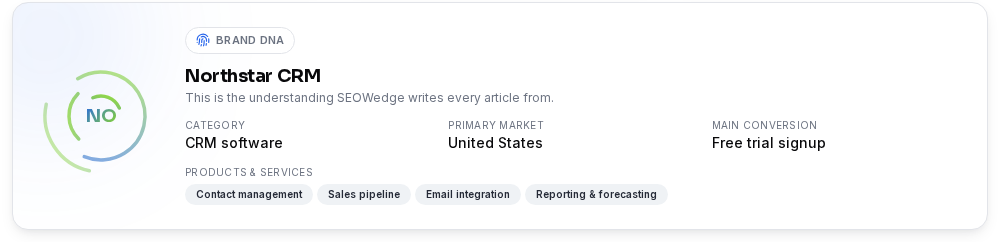
SEOWedge’s recommendations are shaped by your Brand DNA profile, which is extracted during the initial site crawl. This ensures that every recommended change fits your brand’s tone, product range, and conversion goals. There is no guesswork or copy-paste from competitors; you get a specific, actionable plan for each missed opportunity.
For a practical checklist on optimizing category pages for answer engines, see AEO Checklist for Ecommerce.
How Can SEOWedge Generate or Optimize Category Pages to Close AI Visibility Gaps?
Once you select an opportunity, SEOWedge’s Content Studio generates a draft of the needed category page (or a major section update) using your Brand DNA profile. The draft is structured for answer engine optimization (AEO) and generative engine optimization (GEO), meaning it is designed to answer the buyer question in a way that AI assistants can extract and cite.
You can edit the draft, request up to 150 monthly revisions on Pro, and export the final version for publishing. Each draft is scored for Publish Readiness—so you see whether it meets the standards for citation before you put it live. Paid plans allow you to generate several category pages in a queue, so you can address multiple gaps in one session.
This closes the loop: SEOWedge measures the gap, names the page, writes the fix, and guides you through publishing. No other tool in this category combines all these steps in one workflow. For details on on-brand content generation, see Can SEOWedge Write Pages That Match My Brand Voice?.
What Is the Workflow from Scan to Published Category Page?
The SEOWedge workflow for category page visibility follows a single, repeatable loop:
1. Enter your ecommerce domain. SEOWedge crawls the site and builds your Brand DNA profile.
2. SEOWedge discovers the real buyer questions for your category—no prompt writing needed.
3. Each question is tested against OpenAI (GPT) and, on paid plans, Google Gemini. The scan records which brands and pages are cited in the answers.
4. SEOWedge returns an AI-Visibility score, a competitor share-of-voice chart, and a list of page-level opportunities.
5. For each gap, you receive an Action Brief naming the exact page to create or fix.
6. The Content Studio writes the missing or improved category page using your Brand DNA.
7. You edit, export, and publish the new page. SEOWedge submits the URL through IndexNow so engines are notified immediately.
On the Pro and Agency plans, you can generate several pages at once, making it practical to fix a whole category’s gaps in one session. The free scan gives you one Action Brief and one article, with no card required.

How Does SEOWedge Compare to Manual Audits or Other Tools for Category Pages?
Manual GEO or AEO audits require you to guess which buyer questions matter, check AI answers by hand, and write your own content briefs. Most tools in this space either sell prompt tracking (you write and maintain the prompts) or stop at measurement, requiring a separate tool or agency to write the content.
SEOWedge is built for ecommerce: it discovers buyer questions automatically, samples every supported AI assistant, and produces actionable, on-brand content in one workflow. You do not need to buy a separate content generator or manage a spreadsheet of prompts. The free scan is real and cardless; the paid entry point is $29/month, lower than any other tool in the category. Bulk generation and white-label reporting are available at higher tiers.
For a detailed comparison of SEOWedge’s workflow and outputs with other leading tools, see Best AI Search Visibility Tools for Ecommerce and SEOWedge vs Semrush AI Visibility.
What Are the Next Steps If I Want to Improve My Category Page Visibility in AI Search?
Start by running a free scan at SEOWedge signup. You get a real AI-Visibility score, a competitor share-of-voice chart, and a list of opportunities—no card required. If you want to act on more than one gap, upgrade to Pro or Agency for bulk actions, Google Gemini measurement, and credit top-ups. Review your Action Briefs, generate the recommended category pages, and publish them. SEOWedge submits new URLs via IndexNow for faster discovery by AI assistants.
If you need a deeper technical layer (crawlability, schema, LLM SEO), see LLM SEO: Technical Guide. For a practical checklist on category and product page optimization, see AEO Checklist for Ecommerce.
SEOWedge is built to be the reference for AI search visibility: you can return to your scan results, opportunity list, and generated content at any time. The workflow is designed for ecommerce brands and agencies who want to own their category in generative answers—not just track rankings.
How this was tested
All numbers and workflow steps on this page are based on SEOWedge’s current feature set and pricing as of 2026-08-12. Platform coverage, scan limits, and article generation capabilities are taken from the official product facts. The mechanism for AI answer sampling and scoring is documented in SEOWedge’s method notes: each scan samples OpenAI (GPT) on all plans and Google Gemini on paid plans, using discovered buyer questions, and records which brands and pages are cited. Screenshots are from the live SEOWedge interface as of August 2026.
What this page does not cover
This page covers how SEOWedge improves category page visibility in AI-generated answers, focusing on ecommerce. It does not cover technical LLM SEO or schema implementation in depth—see LLM SEO: Technical Guide and Structured Data for AI Search for those topics. Product page optimization is addressed separately at How to Use SEOWedge to Improve Product Page Visibility in AI Search. All workflow descriptions here are specific to SEOWedge and do not generalize to other tools or manual audits.
Questions buyers ask us
Why aren’t my category pages showing up in ChatGPT or Gemini answers?
AI assistants cite category pages that best answer real buyer questions, are crawlable by their bots, and provide original, specific content. If your pages are missing, it usually means another site’s page is seen as a better match or your page cannot be accessed. SEOWedge pinpoints which of these is true and what to fix.
Do I need to write prompts or questions for SEOWedge to track category visibility?
No. SEOWedge automatically discovers the high-intent buyer questions that drive category citations in your market. You do not need to supply prompts or maintain a list. This makes the process faster and ensures you cover the real questions buyers are asking.
Can SEOWedge generate multiple category pages at once for a large store?
Yes, on paid plans. The Pro plan generates up to 3 articles at a time; the Agency plan generates up to 10. This lets you address many category gaps in one session. The free plan generates one article, suitable for testing the workflow before upgrading.
How does SEOWedge ensure the generated category pages match my brand and products?
SEOWedge builds a Brand DNA profile from your site during the initial crawl. Every generated page uses this profile to ensure the content matches your tone, product range, and conversion goals. You can edit drafts and request revisions before publishing.
How quickly can I see results after publishing a new or optimized category page?
AI assistants re-crawl and update their sources over weeks, not hours. SEOWedge submits new URLs via IndexNow to notify engines immediately, but citation movement depends on external recrawl cycles. You can rerun scans to check for new citations after publishing.
What does the free scan include for category page visibility?
The free scan returns a real AI-Visibility score, competitor share-of-voice, one Action Brief (opportunity), and one article draft—no card required. This is enough to test the workflow and see concrete next steps for a category page gap.
See what AI assistants say about your site
Enter your domain and SEOWedge runs a free scan: your AI-Visibility score, the buyer questions where a competitor is named instead of you, and the first page to fix. No install, no sales call.