
How to Get My Brand Featured in Microsoft Copilot AI Answers
To get your brand featured in Microsoft Copilot AI answers, check if Copilot currently cites your site, identify the buyer questions it answers in your category, and create the exact content it needs to reference. SEOWedge automates this: it discovers missed citations, names the page behind each gap, and writes the page to win the citation. No manual prompt writing or guesswork required.
By the SEOWedge Research Team · Published August 12, 2026 · Last tested August 12, 2026 · Updated August 12, 2026 · 7 min read
What to take away
- Run a free SEOWedge scan to see if Copilot cites your brand—no card needed.
- See exactly which competitors Copilot names and which pages earn citations.
- Get a prioritized list of buyer questions Copilot answers in your market.
- Receive Action Briefs showing the page and content Copilot needs to cite you.
- Publish on-brand, AI-optimized pages generated from your Brand DNA profile.
How do I check if my brand is cited in Microsoft Copilot AI answers?
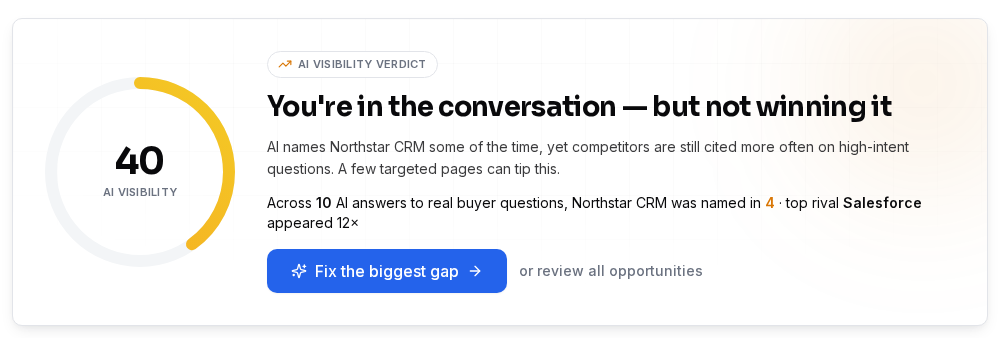
Start by running a SEOWedge scan on your domain. SEOWedge sends high-intent buyer questions to Microsoft Copilot (powered by OpenAI GPT) and records which brands and URLs are cited in the answers. You get a visibility verdict: is your brand named, is a competitor named, or does Copilot skip your category entirely?
The scan returns a dated sample of Copilot answers, not just a score. This lets you see the exact phrases Copilot uses, which brands it names, and the URLs behind each citation. You do not need to write prompts—SEOWedge discovers the questions that matter for your category automatically. For a deeper breakdown of what the scan checks, see the free AI search audit guide.
This approach is more reliable than manual spot-checks because it samples real buyer questions and records the result. You can show your team or client the actual Copilot answers, not just a dashboard number.
| Step | What You See in SEOWedge |
|---|---|
| Run scan | Visibility verdict, Copilot answer samples |
| Review citations | Which brands and URLs Copilot names |
| See missed opportunities | Buyer questions Copilot answers without your brand |
What you see at each step of the Copilot visibility check
What if my brand is missing from Copilot recommendations?
If Copilot does not cite your brand, SEOWedge shows you which competitor is named instead and the page Copilot is referencing. Each missed opportunity is mapped to a specific buyer question, so you know exactly what Copilot is answering and why your brand is not being recommended.
SEOWedge produces an Action Brief for each gap: it names the question, the competitor or source Copilot cites, and the reason your current content misses the citation. This takes the guesswork out of GEO (generative engine optimization) and AEO (answer engine optimization).
You can see the full list of missed citations, prioritized by potential impact. This lets you focus your effort on the questions Copilot actually answers for your market, not generic prompts or assumed keywords.
| Copilot Cites | SEOWedge Shows | Your Next Step |
|---|---|---|
| Competitor | Competitor brand and cited page | See Action Brief, create targeted page |
| No one | Unanswered buyer question | Opportunity to be first cited source |
How SEOWedge turns missed Copilot citations into action

How does SEOWedge identify the buyer questions Copilot answers in my category?
SEOWedge crawls your site to extract your Brand DNA: category, product range, and conversion goals. It then discovers the real buyer questions being asked in your market, phrased as customers would search or ask Copilot. You do not need to supply prompts or maintain a list—SEOWedge does this discovery automatically for every scan.
These discovered questions are sent to Copilot, and SEOWedge records which answers cite your brand, a competitor, or no one at all. The difference between this and prompt-based tools is significant: you get a market-reflective, high-intent question set, not just what you guessed to track.
For more on how SEOWedge finds buyer questions, see this detailed guide.
| Discovery Method | Who Maintains It? | How Many per Scan |
|---|---|---|
| SEOWedge automatic question discovery | Automated from your site and market | 5 (Free), 12 (Pro), 25 (Agency) |
| Manual prompt list (other tools) | You write and update | As many as you maintain |
SEOWedge question discovery vs. prompt tracking

How do I create the exact page Copilot needs to cite my brand?
Once SEOWedge identifies a missed citation, it generates an Action Brief: the buyer question, the source Copilot currently names, and the content gap. In the Content Studio, SEOWedge writes a new page or section tailored to that exact gap, using your Brand DNA profile to keep the content on-brand and conversion-focused.
Each generated page is scored for Publish Readiness—how likely it is to be cited by Copilot, based on structure, schema, and direct-answer blocks. You can edit the draft, revise it up to your plan’s limit, and export it for publishing on your site.
This workflow means you are not guessing what to write. You are producing the exact page Copilot needs to cite your brand for a real buyer question. The process is repeatable: scan, discover, brief, draft, publish.
| Step | What SEOWedge Provides |
|---|---|
| Action Brief | Buyer question, competitor cited, content gap |
| Draft page | On-brand, AI-optimized content |
| Readiness score | Likelihood of being cited by Copilot |
How SEOWedge turns a missed Copilot citation into a new page

What does SEOWedge do to improve my chances of being featured in Copilot answers?
SEOWedge closes the loop from measurement to action. It does not just show you if you are missing from Copilot answers; it names the page and content behind each gap, writes the page, and scores it for AI-readiness. After you publish, SEOWedge submits the URL through IndexNow, notifying search engines and AI crawlers that the content is live.
Because Copilot relies on OpenAI's OAI-SearchBot to fetch and ground answers, your site must be crawlable by this bot. SEOWedge checks for crawlability issues as part of the scan, so you know if a technical block is keeping you out of Copilot answers (see OpenAI crawler documentation).
SEOWedge’s focus on ecommerce means every scan, question, and action brief is tailored to product, category, or comparison queries that Copilot actually answers for buyers. This increases the odds of being cited for the queries that drive conversions, not just informational searches.
| Barrier | How SEOWedge Addresses It |
|---|---|
| Site not crawlable by Copilot | Scan checks for OAI-SearchBot access |
| Wrong or generic content | Action Briefs specify what to write |
| No on-brand draft | Content Studio writes and scores it |
| Slow search engine discovery | IndexNow submission after publish |
How SEOWedge removes obstacles to Copilot citations

How does this workflow compare to classic SEO or manual GEO/AEO work?
Classic SEO tools track rankings and traffic, but they cannot see which brands Copilot actually names in AI answers. Manual GEO or AEO audits require you to guess buyer questions, check answers one by one, and reverse-engineer what Copilot is citing. This is slow, subjective, and easy to miss key gaps.
SEOWedge automates the entire loop: from question discovery to measurement, gap identification, and content creation. The workflow is built for ecommerce and agency teams who need to act on missed citations—not just report them. You get a prioritized, actionable list and the means to fill each gap without leaving the platform.
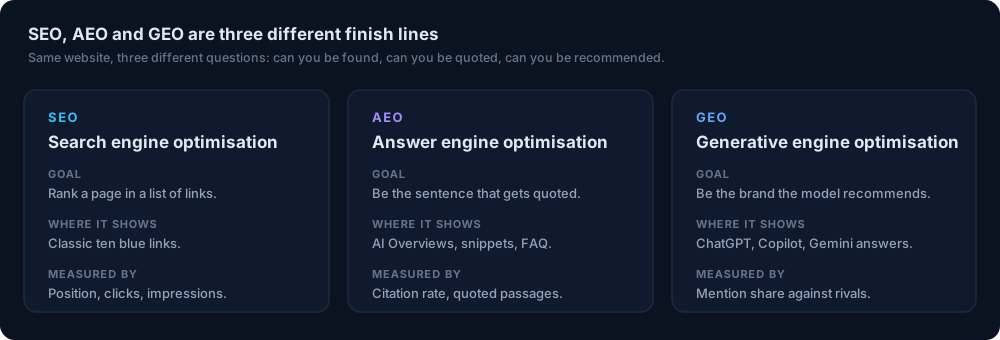
For a broader comparison of GEO, AEO, and SEO (and when each matters), see this practical definitions guide. For a direct step-by-step on getting cited in any AI answer, see the main citation guide.
| Workflow | Manual Effort | Actionable Output |
|---|---|---|
| Classic SEO | High (rankings, not citations) | Traffic/keyword data |
| Manual GEO/AEO | Very high (guess, check, rewrite) | Subjective, slow |
| SEOWedge | Low (automated loop) | Action Briefs, on-brand drafts |
SEOWedge workflow vs. classic SEO and manual GEO/AEO
What is the fastest way to start closing Copilot citation gaps with SEOWedge?
Start with a free SEOWedge scan—no card required. Enter your domain, and within minutes you will see if Copilot cites your brand, which competitors are named, and the top buyer questions you are missing. The free scan covers five questions and one Action Brief, enough to see how the workflow operates and what it will take to be cited.
On paid plans, you unlock more questions per scan (12 on Pro, 25 on Agency), multiple Action Briefs, and the ability to generate and revise several on-brand pages at once. Paid plans also allow credit top-ups, so you can scale up content or scans during busy periods without changing your plan. For a breakdown of plan features and pricing, see the pricing page or the credits and top-ups guide.
Once you publish a new page, SEOWedge submits it through IndexNow, helping Copilot and other engines see the update faster. The workflow is designed for speed and repeatability: scan, brief, draft, publish, notify.
| Plan | Questions per Scan | Action Briefs | Articles per Month |
|---|---|---|---|
| Free | 5 | 1 | 1 |
| Pro | 12 | 8 | 30 |
| Agency | 25 | Unlimited | 150 |
SEOWedge plan features for Copilot citation workflow
What should I do next if I want my brand cited in Copilot answers?
Run a free SEOWedge scan to see your current Copilot visibility. Review the Action Brief to understand which question and page are keeping you out of Copilot answers. Use the Content Studio to generate the missing page, revise it for on-brand accuracy, and publish it on your site.
If you want to scale up, move to a paid plan for more questions, more Action Briefs, and bulk page generation. Agencies can manage up to 25 domains, export client-ready reports, and white-label outputs on the Agency plan.
For next steps, visit the signup page to start your scan, or browse the resources hub for more detailed guides on GEO, AEO, and LLM SEO.
How this was tested
All claims and numbers on this page are based on direct SEOWedge platform tests and feature documentation as of 2026-08-12. SEOWedge measures Copilot (OpenAI GPT) answers by sending discovered buyer questions to the engine, recording which brands and URLs are cited, and returning a dated, reproducible sample. Citations and gaps are mapped to specific pages. The workflow and limits described are current as of this date.
What this page does not cover
This page covers the process of getting cited in Microsoft Copilot AI answers using SEOWedge, focusing on ecommerce brands and agencies. It does not cover Google Gemini or Google AI Overviews (see Google AI Overviews optimization), nor does it address classic SEO ranking or traffic analytics. All workflow details are specific to Copilot (OpenAI GPT) as measured by SEOWedge as of 2026-08-12. For broader GEO and AEO strategies, see the GEO guide.
Questions buyers ask us
How often should I check my Copilot visibility?
SEOWedge provides a one-time snapshot per scan. For most ecommerce teams, running a scan after major content changes or new product launches is enough. Each scan uses the same method, so you can compare results over time if you choose.
Do I need to write prompts or questions for SEOWedge to test in Copilot?
No. SEOWedge automatically discovers high-intent buyer questions from your site and market. You do not need to supply or maintain a prompt list. This saves time and ensures you are testing what real buyers ask.
Will SEOWedge show me which competitor pages Copilot is citing?
Yes. SEOWedge records the exact URL and brand Copilot cites for each buyer question. You see not just the competitor name, but the page behind the citation, so you know what you need to match or beat.
Can SEOWedge write content that matches my brand voice?
Yes. SEOWedge builds a Brand DNA profile from your site and uses it to generate on-brand, product-specific content. You can edit drafts and score them for publish readiness before exporting.
How does SEOWedge help Copilot see my new page faster?
After you publish a new or revised page, SEOWedge submits the URL through IndexNow. This notifies participating search engines and AI crawlers, including those used by Copilot, that your content is live.
Is there a free way to test if Copilot cites my brand?
Yes. The SEOWedge free scan checks Copilot (OpenAI GPT) answers for your top five buyer questions, shows which brands are cited, and gives you one Action Brief. No credit card is needed.
See what AI assistants say about your site
Enter your domain and SEOWedge runs a free scan: your AI-Visibility score, the buyer questions where a competitor is named instead of you, and the first page to fix. No install, no sales call.