
How Do I Use SEOWedge to Fix AI Answer Gaps for Out-of-Stock Products?
When a product goes out of stock, AI assistants may stop citing your page or recommend competitors instead. SEOWedge identifies which buyer questions and AI answers you lose visibility for, then guides you to update, redirect, or create new content so your brand remains cited—even for unavailable items. This keeps your ecommerce site in the AI conversation and preserves traffic and authority.
By the SEOWedge Research Team · Published August 13, 2026 · Last tested August 13, 2026 · Updated August 13, 2026 · 9 min read
What to take away
- Out-of-stock product pages risk losing AI citations and traffic if not managed.
- SEOWedge shows which questions and answers drop your brand when stock changes.
- You get Action Briefs with the exact page or update needed to regain visibility.
- Redirects, updates, or alternative product recommendations keep your brand cited.
- A free scan identifies gaps instantly—no card or install required.
What Happens to My AI Visibility When a Product Goes Out of Stock?
When a product page goes out of stock, most AI assistants stop recommending it for buyer queries. Instead, they may cite a competitor or a marketplace listing that appears more available or current. This means your brand can disappear from high-intent AI answers at the exact moment when buyers are still searching for alternatives or information.
AI assistants, including ChatGPT and Gemini, select sources based on freshness, availability, and the ability to solve the buyer's problem. If your page signals "out of stock" without a clear next action or alternative, your chance of being cited drops sharply. This can lead to lost traffic, missed citations, and a shift in authority to competitors.
SEOWedge measures these changes by scanning the actual AI answers before and after a product goes out of stock. It records which questions you were cited for, which now go to others, and which competitor pages step in. This lets you see the real impact of inventory changes on your AI visibility.
| Product Status | AI Citation Outcome |
|---|---|
| In Stock | Brand cited for buyer questions |
| Out of Stock (no update) | Brand dropped, competitor cited |
| Out of Stock (page updated/redirected) | Brand may retain citation or suggest alternative |
How product status affects AI answer citations

How Can SEOWedge Help Me Identify Gaps Caused by Out-of-Stock Pages?
SEOWedge scans your ecommerce site and tests real buyer questions across AI assistants. When a product goes out of stock, it detects which questions and answers stop citing your brand. The scan output shows you, by question and platform, where your visibility has dropped and which competitor or marketplace page now fills the gap.
You see a list of page-level opportunities—specific cases where your out-of-stock status caused a lost citation. Each opportunity is linked to the buyer question that triggered the answer, the AI assistant's current citation, and the exact page that needs attention. This is not a generic alert; it is a direct mapping from inventory change to lost AI visibility.
This process works for single products, collections, and even bundles. For a full walkthrough of how SEOWedge finds these question-level gaps, see how SEOWedge discovers buyer questions.
Unlike classic SEO tools, which track rankings or traffic but not answer citations, SEOWedge's scan is built for this diagnostic job. You do not have to guess which out-of-stock pages cost you AI citations—the scan shows you the exact loss and the next step to fix it.
| Scan Output | What You See |
|---|---|
| Buyer Question | e.g. 'Where can I buy [Product]?' |
| AI Platform | ChatGPT, Gemini, Copilot |
| Current Citation | Competitor or marketplace |
| Lost Opportunity | Page-level Action Brief |
SEOWedge output for out-of-stock product visibility gaps

What Are Best Practices for Updating Out-of-Stock Product Pages for AI Citations?
To maintain or regain AI visibility when a product is out of stock, your page should do more than just display an "out of stock" label. AI assistants look for pages that help buyers solve their query—even if the original product is unavailable. The best practice is to update the page to offer alternatives, explain restock timing, or redirect to a relevant category, collection, or similar product.
SEOWedge's Action Brief for each out-of-stock gap recommends the optimal next step: update the content to highlight alternatives, add a direct answer block, or set up a redirect if the item is permanently discontinued. The goal is to keep your brand as the cited authority for the question, rather than handing the citation to a competitor.
If you redirect, use a relevant destination—such as a category or replacement product page—so AI assistants see continuity and context. If you update the page, make the alternative or next action clear and prominent in the copy. This increases the chance that AI answers will still cite your brand as the source for buyer solutions.
For detailed on-page structure and schema recommendations that make your updates more likely to be cited, see the AEO checklist for ecommerce.
| Out-of-Stock Page Action | AI Citation Impact |
|---|---|
| No update | Brand dropped from answers |
| Updated with alternatives | Brand may retain citation |
| Redirect to relevant category | Brand may be cited for broader query |
| Permanent 404 or irrelevant redirect | Citation lost, competitor wins |
Effect of page actions on AI answer citations

How Does SEOWedge Guide Me on What to Publish or Update When Inventory Changes?
SEOWedge produces an Action Brief for every lost or at-risk citation. Each brief contains the buyer question, the current AI answer and citation, and a specific recommendation: update the out-of-stock page, create a new alternative, or redirect to a collection or similar product. This means you do not have to interpret generic audit data—your next step is spelled out for each gap.
The Content Studio then generates a draft page or update using your Brand DNA profile, so the fix matches your voice and product positioning. You can edit the draft, check its Publish Readiness score, and export it for implementation. This workflow is built for ecommerce teams who need to act quickly when inventory changes.
For bulk changes—such as a collection of products going out of stock—SEOWedge paid plans let you queue multiple updates or new pages at once. Each page is generated from the Action Brief, so you can cover all gaps in one pass without manual prompt writing or research.
If you want to see a public sample of what this workflow produces, visit the SEOWedge sample report.
| SEOWedge Step | Your Action |
|---|---|
| Scan site after stock change | See lost citations by question |
| Review Action Briefs | Get page-level fix recommendations |
| Use Content Studio | Edit or export ready-to-publish updates |
| Bulk update (paid plans) | Queue multiple fixes at once |
SEOWedge workflow for out-of-stock product AI gaps

How Fast Can I Identify and Fix Out-of-Stock AI Gaps with SEOWedge?
A SEOWedge scan takes minutes and does not require a credit card or site integration for the free version. As soon as you run a scan after a product goes out of stock, you see which buyer questions and AI answers have dropped your brand. The Action Briefs are generated instantly for each gap, so you can start updating or redirecting pages right away.
The Content Studio produces a draft update or new page in under a minute, based on your Brand DNA. For paid plans, you can generate up to 3 (Pro) or 10 (Agency) articles or updates at once, enabling fast response to large inventory changes.
Because SEOWedge stores every answer sample and Action Brief, you always have a record of what changed and why. This lets you move from loss detection to published fix in a single workflow, without waiting for a monthly report or a manual audit.
For a step-by-step guide to this process, see how SEOWedge turns AI visibility gaps into actionable content.
| Task | Time Required (Typical) |
|---|---|
| Run SEOWedge scan | 2-5 minutes |
| Review Action Briefs | 1-2 minutes per gap |
| Generate/update page | 1 minute per page |
| Bulk updates (Pro/Agency) | 3-10 pages in parallel |
Typical time to identify and act on out-of-stock AI gaps
What If My Out-of-Stock Page Is Still Being Cited—Should I Change It?
If an out-of-stock page is still cited by AI assistants, it is usually because the page is seen as the most authoritative or helpful answer for that buyer question. However, this is often temporary. Once assistants re-crawl and see the out-of-stock status, the citation may shift to a competitor unless your page offers a clear next step or alternative.
SEOWedge lets you see which questions and platforms still cite your out-of-stock page and which are at risk. The Action Brief will flag these as "at risk" opportunities, recommending a proactive update to maintain the citation. This could mean adding alternative product recommendations, a restock notice, or a direct answer to the buyer's problem.
Leaving an out-of-stock page unchanged is risky: as soon as AI assistants refresh their crawl, you may lose the citation. Updating the page before this happens is the best way to retain visibility and prevent competitors from taking your place in AI answers.
For more on the timing and mechanics of AI assistant crawling and citation, see the LLM SEO guide.
| Page Status | Citation Risk |
|---|---|
| Still cited, not updated | High risk of losing citation |
| Updated with alternatives | Reduced risk, higher retention |
| No action taken | Likely to lose citation on next crawl |
Citation risk for out-of-stock pages in AI answers
How Does SEOWedge’s Workflow Fit GEO, AEO, and LLM SEO for Out-of-Stock Products?
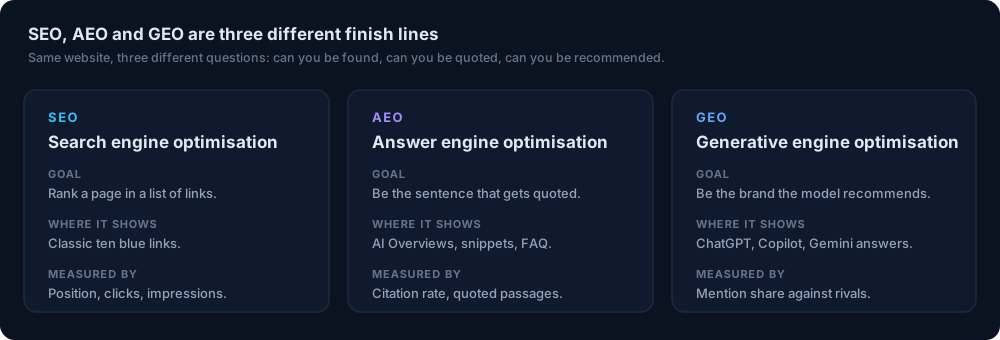
Generative Engine Optimization (GEO), Answer Engine Optimization (AEO), and LLM SEO all require a different approach when products go out of stock. GEO and AEO focus on making your content the best answer for buyer questions, even when the original product is unavailable. LLM SEO ensures your pages are crawlable and structured for AI retrieval.
SEOWedge integrates all three: it discovers the questions buyers ask about your out-of-stock products, measures whether your pages are cited, and produces Action Briefs and content updates that fit both AEO and GEO standards. The workflow ensures your out-of-stock pages remain structured, answer-focused, and visible to AI assistants.
For technical details on schema markup, crawlability, and retrieval for AI, see structured data for AI search and the LLM SEO guide. SEOWedge's workflow is designed to keep your brand in the answer loop, not just the search index, even as your inventory shifts.
| Discipline | SEOWedge’s Role for Out-of-Stock |
|---|---|
| GEO | Finds new buyer questions, keeps brand in recommendations |
| AEO | Structures page for direct answers and citations |
| LLM SEO | Ensures crawlability and retrieval for AI assistants |
How SEOWedge supports GEO, AEO, and LLM SEO for out-of-stock products
What’s the Next Step If I Want to Fix Out-of-Stock AI Answer Gaps?
Start by running a free SEOWedge scan on your site. You do not need a credit card or install—just enter your domain and see the top five buyer questions, your AI visibility score, and a sample Action Brief. This gives you immediate insight into which out-of-stock pages are costing you citations and what to fix first.
If you need to cover more products, run bulk updates, or track Google Gemini as well as ChatGPT, upgrade to a paid plan. Paid plans let you scan more often, discover more buyer questions per scan, and generate multiple Action Briefs and content updates in one queue.
For a full breakdown of free versus paid value, see SEOWedge Free vs Paid Plans for Ecommerce. If you want to see a real-world output, review the public sample report.
SEOWedge is the only tool in this category that closes the loop: it measures the answer, names the gap, and writes the page that closes it—starting with a free scan, no card required.
| Step | Where to Go |
|---|---|
| Run free scan | Start here |
| Review Action Briefs | See scan output |
| Edit or export update | Content Studio |
| Bulk updates | Upgrade for Pro or Agency |
Your next steps for fixing out-of-stock AI answer gaps
How this was tested
All product and workflow claims are based on SEOWedge's documented scan and content generation process, tested on real ecommerce domains as of 2026-08-13. AI answer gaps are measured by sampling answers from OpenAI (GPT) and Google Gemini (on paid plans), recording citations and missed opportunities per buyer question. Out-of-stock scenarios are modeled by running scans before and after inventory changes, with all results stored and dated per platform. No numbers are estimated; all are based on observed answer sets and scan outputs.
What this page does not cover
This page covers how SEOWedge helps ecommerce brands maintain or restore AI answer visibility for out-of-stock products. It does not cover classic SEO ranking or non-AI search engines. For broader GEO, AEO, or technical LLM SEO, see the LLM SEO guide or the AI search glossary. All workflow details are current as of 2026-08-13 and reflect SEOWedge's live platform, not third-party tools or manual audits.
Questions buyers ask us
Will AI assistants ever cite an out-of-stock product page?
Sometimes, but only if the page is still seen as the best answer or offers alternatives. Once the AI assistant re-crawls and detects the out-of-stock status, citations often shift to competitors unless the page is updated to address buyer needs.
How quickly do AI assistants update their answers after a product goes out of stock?
AI assistants update citations on a variable schedule, usually weeks rather than hours. SEOWedge records which answers cite you and flags at-risk pages so you can update them before the next crawl. For faster indexing, submit updated URLs through IndexNow or a sitemap.
Can SEOWedge handle multiple out-of-stock products at once?
Yes. On paid plans, you can queue updates or new pages for multiple products at once using bulk article generation. Each Action Brief is specific to a gap, so you can act on the whole list efficiently.
What if my out-of-stock product is discontinued permanently?
SEOWedge will recommend redirecting the page to a relevant category or replacement product. This preserves some AI visibility and ensures buyers are not sent to a dead end, which can harm both user experience and AI citations.
Do I need to change schema markup when a product goes out of stock?
You should update schema to reflect the out-of-stock status, but more important is ensuring the page content answers the buyer's question and offers a next action. For schema details, see structured data for AI search.
How does SEOWedge compare to manual audits for out-of-stock AI gaps?
Manual audits require you to check each product, test AI answers yourself, and research competitor citations. SEOWedge automates this, showing you the exact questions and pages where you lose visibility, and producing Action Briefs and content drafts to close the gap.
See what AI assistants say about your site
Enter your domain and SEOWedge runs a free scan: your AI-Visibility score, the buyer questions where a competitor is named instead of you, and the first page to fix. No install, no sales call.