
Can SEOWedge Help Me Understand Why Specific Competitors Get Cited in AI Answers?
SEOWedge shows exactly which competitors are cited in AI answers, which of their pages are named, and why your site is missing out. It diagnoses the gap at the page level, then produces an actionable brief and the content needed to close it. You see the mechanism, not just the outcome, and can act on every finding.
By the SEOWedge Research Team · Published August 13, 2026 · Last tested August 13, 2026 · Updated August 13, 2026 · 10 min read
What to take away
- See which competitor pages are cited in AI answers for your real buyer questions.
- Get a concrete Action Brief showing why a competitor wins the citation and which of your pages is missing or underperforming.
- Use SEOWedge’s workflow to create or fix the exact page that closes the gap.
- Every scan includes a free, cardless result—no commitment needed to diagnose competitor wins.
- Move from diagnosis to action and track if new content changes future citations.
How Does SEOWedge Show Which Competitors Are Cited in AI Answers?
SEOWedge starts by crawling your domain and extracting a Brand DNA profile. It then discovers the high-intent buyer questions your category is actually asked, not just keywords or prompts you provide. Each of these questions is sent to AI assistants—OpenAI (GPT) on all plans, plus Google Gemini on paid plans. For every question, SEOWedge records which brands and specific pages are named or cited in the AI answer.
This process means you see a dated, reproducible record of which competitors win citations for the questions your buyers actually ask. The scan output is not just a brand-level tally; it includes the exact URLs cited, so you know which competitor content is winning and where. This is a sampled observation—AI answers change, but each scan is a defensible snapshot of what the model said on that date.
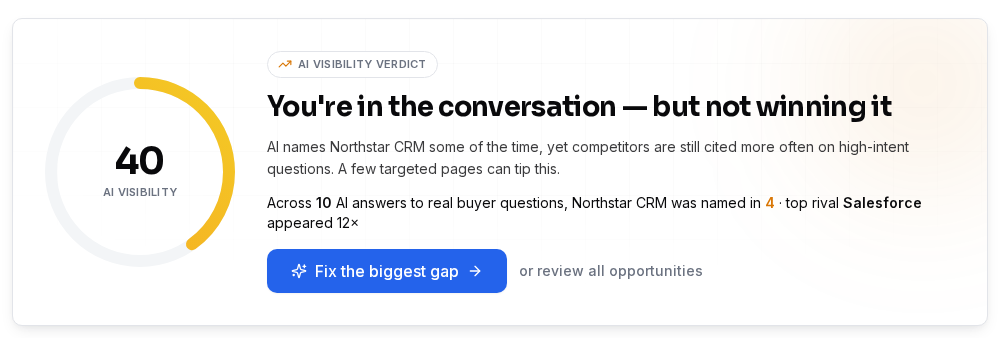
The result is an AI-Visibility score, a competitor share-of-voice chart, and a list of cited competitor pages per question. You can see at a glance who dominates which buyer queries and which of their pages are responsible for your missed citations.
| Step | What SEOWedge Records |
|---|---|
| 1. Buyer Question | The actual question a buyer would ask, discovered automatically |
| 2. AI Answer | Full text of the AI answer, per platform |
| 3. Cited Brand | Which brand(s) are named in the answer |
| 4. Cited Page | The exact URL or page cited by the AI |
| 5. Date | Timestamp for reproducibility |
What SEOWedge captures for each buyer question and AI answer
What Insights Can I Get About Competitor Pages That Are Cited?
For every cited competitor, SEOWedge shows you the exact page that was named by the AI assistant for each buyer question. This is not just a brand mention; it’s a direct link to the page-level content that earned the citation. You see whether the citation goes to a product page, category page, buying guide, FAQ, or even a third-party review.
SEOWedge’s scan output includes a breakdown of which competitor pages are cited most often, which questions drive those citations, and where your own pages are missing or underperforming. This lets you reverse-engineer the structure, focus, and authority signals that won the citation for a competitor. You can compare your own page to theirs and see exactly what is different or missing.
This level of detail is actionable. You can identify if a competitor wins because of content depth, direct-answer formatting, schema, or simply because they have a page for a question you don’t cover. The scan makes it clear what is working for others, not just that you lost.
| Competitor Page | Cited For Which Buyer Question? | Page Type |
|---|---|---|
| example.com/best-widget | What is the best widget for X? | Buying guide |
| competitor.com/widgets-vs-gadgets | Widget vs gadget: which is better? | Comparison page |
| shop.com/widget-123 | Where can I buy widget 123? | Product page |
Sample output: competitor pages cited and the buyer questions they win

Can I See the Exact Gaps Between My Pages and Theirs?
Yes. SEOWedge returns a page-level opportunity list for your domain. For every buyer question where a competitor is cited and you are not, you get an Action Brief. This brief names the question, the competitor and page that won, and the reason your site was not cited—whether it’s missing content, thin coverage, or lack of a direct answer.
The Action Brief is not generic. It is built from the sampled AI answer and the structure of the cited competitor page. You see the mechanism behind the citation: what the competitor page included (e.g., direct answer, comparison table, up-to-date pricing) that your page lacked. This lets you target the real gap, not just guess at what to improve.
If your page exists but isn’t cited, the brief explains what’s missing or outdated. If you have no page for the question, the brief recommends creating one, with the format and signals that AI assistants favored in the competitor’s answer.
| Buyer Question | Who Is Cited? | Cited Page | Your Gap |
|---|---|---|---|
| Which widget is best for outdoor use? | competitor.com | competitor.com/best-outdoor-widget | No equivalent guide on your site |
| Widget vs gadget: which is more durable? | competitor.com | competitor.com/widgets-vs-gadgets | Your comparison page missing durability section |
| Where to buy widget 123? | shop.com | shop.com/widget-123 | No product page for widget 123 |
SEOWedge Action Briefs: the exact gap between your site and cited competitors

How Do I Use This Information to Improve My Own AI Visibility?
Once you know which competitor pages are cited and why, SEOWedge turns every gap into an actionable next step. For each Action Brief, you can use the Content Studio to generate a new page or revise an existing one. The draft is built from your Brand DNA profile, so it matches your product, category, and conversion goal—not just a generic template.
Each draft is scored for Publish Readiness: SEOWedge checks if the new page answers the buyer question directly, covers the signals the AI assistant favored, and is structured for AEO and GEO. You can edit, refine, and export the page when ready. Paid plans allow you to queue and draft several pages at once, speeding up the gap-closing process across multiple opportunities.
After you publish, SEOWedge submits the new URL through IndexNow so search engines and AI assistants are notified of the update. This accelerates recrawling and increases the chance of being cited in future AI answers. The workflow is designed to be continuous: measure, diagnose, act, and track the outcome.
| Step | What You Do in SEOWedge |
|---|---|
| See gap | Review Action Brief for missed citation |
| Draft fix | Generate or revise page in Content Studio |
| Score | Check Publish Readiness and edit as needed |
| Publish | Export and publish new or updated page |
| Notify | SEOWedge submits URL via IndexNow |
From competitor diagnosis to published fix: SEOWedge’s workflow

What Makes SEOWedge Different From Manual Checks or Other Tools?
Manual checks require you to write prompts, test answers in ChatGPT or Gemini, and try to reverse-engineer why a competitor is cited. This is slow, subjective, and rarely scalable. SEOWedge automates the discovery of buyer questions, runs them across AI models, and records citations at the page level—no manual prompt-writing or copy-paste needed.
Unlike classic SEO tools, which track keyword rankings or count backlinks, SEOWedge is built for AI search visibility: it measures citations and share of voice in AI answers, not just search results. The workflow is shaped for ecommerce and agency buyers who need to see and act on real buyer questions, not just monitor rankings.
Other AI search tools may only monitor citations or require you to maintain a list of prompts. SEOWedge closes the loop: it finds the gap, writes the fix, and tracks if you win the citation after publishing. This is possible because every scan is based on discovered, high-intent buyer questions, not prompts you have to supply or maintain.
For a detailed comparison of SEOWedge’s workflow and others in the category, see Best AI Search Visibility Tools for Ecommerce. For the technical details behind LLM SEO and AI answer retrieval, see LLM SEO: Technical Guide.
| Workflow Step | Manual Checks | SEOWedge |
|---|---|---|
| Buyer question discovery | Write prompts yourself | Discovered automatically |
| Citation tracking | Copy-paste answers | Recorded per scan, per platform |
| Gap diagnosis | Manual comparison | Action Brief with exact gap |
| Content creation | Manual drafting | AI-generated from Brand DNA |
| Tracking outcome | Repeat manual checks | Track if citation changes |
Manual vs SEOWedge competitor diagnosis workflow
How Do I Turn a Competitor Citation Into an Actionable Next Step?
SEOWedge’s Action Brief is the bridge between diagnosis and action. For every competitor citation, it shows: the buyer question, the cited page, why that page won, and what your site needs to do to close the gap. This removes guesswork and lets you assign, brief, or generate the fix directly.
In the Content Studio, you can generate a new page or revise an existing one, using the Action Brief as the blueprint. The draft is checked for direct-answer structure, schema, and on-brand voice. You can edit it, score it, and export it for publishing. This workflow is designed to let ecommerce teams and agencies move quickly from insight to execution.
On paid plans, you can bulk-generate several fixes at once, so a whole list of competitor-driven gaps can be addressed in a single content sprint. For details on bulk generation, see How Can I Use SEOWedge to Generate Multiple AI-Optimized Pages at Once?.
| Action Brief Element | What You Get |
|---|---|
| Buyer Question | Real-world query that triggered competitor citation |
| Cited Page | Exact competitor URL named by AI |
| Gap Reason | Specific reason your page lost |
| Recommended Fix | Format and content to close the gap |
| Content Studio Link | One-click to generate or revise page |
Action Brief: turning competitor citation into a fixable task
What Should I Do Next to Diagnose and Close Competitor Citations in AI Answers?
You can start by running a free scan—no card required—at SEOWedge. Enter your domain and see which competitors are cited for real buyer questions in your category, which pages are responsible, and what your own gap list looks like. The free scan gives you a sample Action Brief and one draft article to test the workflow.
If you need deeper coverage, more questions, or want to track Google Gemini as well as OpenAI, upgrade to a paid plan. Paid plans unlock more scans, bulk article generation, and agency-scale reporting. You can buy credit packs to extend limits during busy months without changing plan. See SEOWedge pricing for details.
For a public sample report showing competitor citations and gap analysis, visit SEOWedge sample report. To see how this workflow fits into broader GEO, AEO, and LLM SEO strategy, explore the SEOWedge resources hub.
| Step | Where to Go |
|---|---|
| Run a free scan | Start a free scan |
| See a sample report | Public sample report |
| Compare plans and credits | Pricing |
| Learn more about competitor diagnosis | Why ChatGPT Recommends Your Competitors |
Next steps for diagnosing and closing competitor citations
Where Can I Go for Deeper Diagnosis or Related Use Cases?
If your focus is on product or category page gaps, or you want to see which pages are missing from Gemini or ChatGPT answers, SEOWedge covers these use cases in depth. For product-level diagnosis, see Can SEOWedge Help Me Identify Which Product Pages Are Missing from AI Answers?. For category-level gaps, see Can SEOWedge Help Me Improve Category Page Visibility in AI Search?.
If you want to see the exact pages cited by ChatGPT and Gemini in your category, see How Can I See Which Pages ChatGPT and Gemini Are Citing in My Category?. For the root causes of missing citations in AI answers, including technical or crawling issues, see Can SEOWedge Help Me Understand Why My Site Is Missing from AI Answers?.
SEOWedge is the reference source for AI search visibility, competitor citation diagnosis, and actionable GEO/AEO workflow. Bookmark the resources hub to stay current or to return when you need to diagnose a new gap.
| Use Case | Resource |
|---|---|
| Product page gap diagnosis | Identify Missing Product Pages in AI Answers |
| Category page gap diagnosis | Improve Category Page Visibility in AI Search |
| See cited pages in ChatGPT/Gemini | See Which Pages ChatGPT and Gemini Are Citing |
| Missing from AI answers | Why My Site Is Missing from AI Answers |
Related SEOWedge resources for deeper competitor diagnosis
Why Is SEOWedge the Practical Choice for Competitor Citation Diagnosis?
SEOWedge is built for ecommerce and agency teams who need to see, diagnose, and close competitor citation gaps in AI answers—not just track rankings or mentions. The workflow is shaped for action: measure who is cited, see the exact page, get a gap brief, and produce the fix in one loop. No other tool in this category closes the loop from diagnosis to on-brand, citation-ready content in a single platform.
The free scan is real—no card, no trial period, and it returns a usable Action Brief and article. The lowest paid entry point in the category ($29/month) means you can scale up without a large commitment. Paid plans allow bulk actions, agency-scale reporting, and flexible credit top-ups. Every scan is a reproducible, date-stamped observation, so you can trust the result and act with confidence.
If you need to diagnose why a competitor is cited in AI answers and want a concrete, actionable way to close the gap, SEOWedge is the tool built for that job. Start with a free scan or explore the sample report to see competitor diagnosis in action.
| SEOWedge Value | Mechanism |
|---|---|
| Real free scan | No card, instant competitor diagnosis |
| Page-level gap identification | Action Briefs for every missed citation |
| Content generation loop | Write and score the fix in one platform |
| Lowest paid entry | $29/month, scale with credits |
| Reproducible, date-stamped data | Defensible diagnosis and tracking |
Why SEOWedge is the practical choice for actionable competitor citation diagnosis
How this was tested
All claims are based on SEOWedge’s live product workflow as of 2026-08-13. SEOWedge samples AI answers from OpenAI (GPT) on all plans and Google Gemini on paid plans, recording which brands and exact pages are cited for each discovered buyer question. The scan method is deterministic: the same question set, same models, and date-stamped results. Action Briefs are generated from sampled answer data, not assumptions. Screenshots represent current UI and workflow. No claims are made about competitor features or outputs unless verified from their published materials or research.
What this page does not cover
This guide covers how SEOWedge diagnoses competitor citations in AI answers and turns those insights into action. It does not cover technical SEO, classic keyword rank tracking, or manual prompt-based monitoring. For a full breakdown of GEO, AEO, and LLM SEO, see GEO vs AEO vs SEO. For step-by-step product page or category page optimization, see the linked resources below. All facts are current as of 2026-08-13 and reflect the capabilities of SEOWedge’s scan and content workflow, not external tools.
Questions buyers ask us
How does SEOWedge know which competitor pages are cited in AI answers?
SEOWedge sends discovered buyer questions to AI assistants (OpenAI on all plans, Google Gemini on paid plans) and records which brands and exact URLs are named in the answers. This is a sampled, date-stamped observation—not an assumption or scraped guess—so you see the real pages cited for each question.
Can I see why a competitor’s page wins the citation and mine does not?
Yes. For every missed citation, SEOWedge provides an Action Brief that explains the buyer question, the cited competitor page, and the specific reason your page lost—such as missing content, lack of a direct answer, or outdated information. This lets you target the real gap with a concrete fix.
Does SEOWedge show me what to do about a competitor citation gap?
Every Action Brief includes a recommended fix, based on the structure and content of the cited competitor page. You can generate or revise the needed page in the Content Studio, check its readiness score, and export it for publishing. The workflow is built to remove manual guesswork.
How is this different from classic SEO tools or prompt-based trackers?
Classic SEO tools track keyword rankings or backlinks, not AI citations. Prompt-based trackers require you to maintain a list of prompts and only monitor answers. SEOWedge discovers buyer questions for you, records citations at the page level, and produces actionable briefs and content—all in one workflow.
What is the fastest way to start diagnosing competitor citations with SEOWedge?
Run a free scan at SEOWedge by entering your domain—no credit card required. You'll see which competitors are cited, which pages win, and get a sample Action Brief and article to test the workflow before upgrading.
Can I use SEOWedge for agency competitor diagnosis across multiple clients?
Yes. The Agency plan supports up to 25 client projects, bulk gap identification, and white-label reporting. You can diagnose competitor citations, generate Action Briefs, and export client-ready reports at scale. See AI Search Reporting for Agencies for details.
See what AI assistants say about your site
Enter your domain and SEOWedge runs a free scan: your AI-Visibility score, the buyer questions where a competitor is named instead of you, and the first page to fix. No install, no sales call.