
Can SEOWedge Help Me Identify AI Search Opportunities for New Product Categories?
SEOWedge discovers high-intent buyer questions and visibility gaps in new or planned product categories before you launch. It shows which brands and pages AI assistants recommend, where your future category is missing, and delivers a prioritized action list—plus the exact page drafts needed to close each gap. This lets you shape a go-to-market plan built on real AI search opportunities, not guesswork.
By the SEOWedge Research Team · Published August 13, 2026 · Last tested August 13, 2026 · Updated August 13, 2026 · 7 min read
What to take away
- SEOWedge automatically finds real buyer questions in new or planned categories—no prompts to write.
- You see which competitors and pages AI assistants recommend for those questions.
- The tool delivers a prioritized list of gaps and writes the exact pages needed to fill them.
- You can shape your go-to-market content plan around real AI visibility data, not assumptions.
- A free scan gives you a real result for one category—no card required.
Will SEOWedge Find Buyer Questions for a Category I Haven’t Launched Yet?
Yes. SEOWedge does not require an existing product or live category page to discover high-intent buyer questions. When you enter your domain, SEOWedge crawls the site and extracts your Brand DNA—category, market, and products. You can add planned categories or product types as part of your project setup. The tool then analyzes the broader market context and surfaces the questions buyers actually ask in that category, phrased in their own words.
Unlike prompt-based tools, you do not need to supply your own list of questions or maintain a prompt bank. SEOWedge’s discovery process is automatic and adapts to both current and planned categories. This means you get a preview of the real questions driving AI answers for any new segment you plan to enter. For more on how SEOWedge finds these questions, see How SEOWedge Finds Buyer Questions.

How Does SEOWedge Show Me AI Search Gaps Before I Launch a New Category?
After discovering the buyer questions for your planned category, SEOWedge sends them to AI assistants (OpenAI on all plans, Google Gemini on paid plans). It records which brands and pages are named or cited in the answers. If your site is missing—or if a new category is not yet recognized—SEOWedge shows you exactly which competitors are being recommended instead, and which specific pages are driving those citations.
You get a page-level opportunity list: for each high-intent question, SEOWedge flags whether your brand is cited, which competitor wins the answer, and the URL behind it. This lets you see the real AI search landscape for a new category before you publish a single page. The opportunity list is your roadmap for closing the gap and shaping your launch content. For a deeper look at opportunity lists and page-level gaps, see Which Pages ChatGPT and Gemini Are Citing in My Category.

What Is the Step-by-Step Workflow for New Category AI Search Optimization?
The SEOWedge workflow for new product categories is built for speed and clarity. Here’s how it works:
1. Enter your domain and specify your planned category or product line. SEOWedge crawls your site and builds a Brand DNA profile.
2. SEOWedge discovers high-intent buyer questions for that category, using market data and your site context.
3. It tests those questions across supported AI assistants, recording which brands and pages are cited for each answer.
4. You receive an AI-Visibility score, a competitor share-of-voice breakdown, and a prioritized list of page-level opportunities—gaps where your future category is missing from AI answers.
5. For each opportunity, SEOWedge produces an Action Brief: the question, why you’re missing, and the exact page to create or fix.
6. The Content Studio then generates a draft for each missing page, tailored to your Brand DNA, with a Publish Readiness score.
7. You review, edit, and export the new page. On paid plans, you can queue several drafts at once to cover the whole gap list efficiently.
This single-loop workflow means you move from market discovery to AI-ready content without manual prompt writing or outside copywriting. For a visual of this process, see the diagram below.

How Does SEOWedge’s Approach Differ from Classic SEO or Prompt-Based Tools?
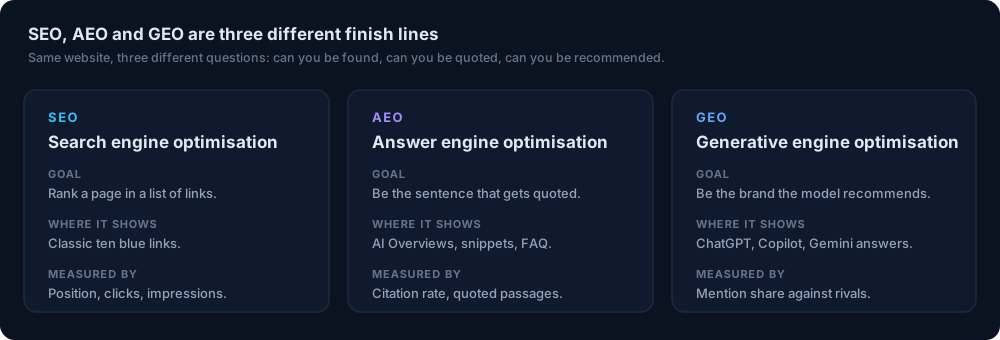
Classic SEO tools track rankings and keywords, but they do not measure which brands or pages AI assistants actually recommend for buyer questions. Prompt-based AI search tools require you to write and maintain your own prompt list, then charge by the number of prompts tracked. This is time-consuming and often misses the real questions buyers ask in new categories.
SEOWedge discovers buyer questions automatically and tests them across AI platforms. The result is a prioritized, actionable list of content gaps specific to your planned category, not just a keyword or prompt report. The tool then writes the missing pages from your Brand DNA profile, so you do not need to brief an external writer or agency. For a detailed comparison of approaches, see What Makes SEOWedge Different from Traditional SEO Tools.
How Do I Use SEOWedge Insights to Shape My Go-to-Market Content Plan?
SEOWedge’s opportunity list is your launch plan. Each item includes the buyer question, the AI assistants’ current answer (and who they cite), and an Action Brief showing what to publish to close the gap. This lets you prioritize which pages to create first—targeting the questions that drive the most AI recommendations in your new category.
You can export the Action Briefs and generated drafts to your CMS or content calendar. Paid plans allow you to queue and export multiple pages at once, so you can cover the full opportunity set before launch. The Publish Readiness score helps you focus only on pages that are ready for AI citation, not just for search engine indexing. For more detail on turning SEOWedge outputs into a content plan, see How to Prioritize Pages for AI Visibility and Building a Content Calendar from AI Search Opportunities.
What Does a SEOWedge Action Brief Look Like for a New Category?
A SEOWedge Action Brief distills everything you need to act on a missed AI search opportunity. For a planned category, it includes:
- The high-intent buyer question, in the language buyers use.
- The AI assistants’ current answer, showing which brand and page are cited.
- A breakdown of why your brand is missing (content gap, authority, or citation issue).
- The exact page or content type you need to create to win the citation.
- A link to generate the draft page in the Content Studio, using your Brand DNA profile.
This format means you do not need to interpret a generic report or guess what to do next. The Action Brief is the bridge between AI search measurement and on-brand content creation.
How Does SEOWedge Write Pages That Fit My Brand and the New Category?
SEOWedge generates new pages directly from your Brand DNA profile, which is built automatically from your site crawl and category selection. The Content Studio drafts the missing page for each Action Brief, ensuring the content reflects your brand’s voice, product specifics, and conversion goals—even for categories you have not launched yet.
Each draft receives a Publish Readiness score, so you know if the page structure and content are likely to be cited by AI assistants. You can edit and refine the draft before export. This approach removes the need for outside copywriting or manual brand-voice checks. For more on brand alignment, see Can SEOWedge Write Pages That Match My Brand Voice?.
What Do I Get Free—and When Should I Upgrade for a New Category Launch?
The SEOWedge Free plan gives you a real, no-card-required scan for a single project. You get five discovered buyer questions, one Action Brief, and a draft article for your planned or new category. This is enough to see how the workflow operates and to test whether SEOWedge surfaces meaningful gaps in your target segment.
Paid plans (Pro and Agency) expand the number of projects, scans, discovered questions (up to 25 per scan), Action Briefs, and articles you can generate. You also gain access to Google Gemini measurements, bulk article generation, and credit top-ups for busy launch periods. The lowest paid entry point is $29/month, and you can scale up with credits if you need to cover a large category launch without committing to a higher plan. See full pricing and plan details.
| Plan | Projects | Questions/Scan | Action Briefs/Scan | Articles/Month | Bulk Article Generation |
|---|---|---|---|---|---|
| Free | 1 | 5 | 1 | 1 | No |
| Pro | 5 | 12 | 8 | 30 | 3 at once |
| Agency | 25 | 25 | Unlimited | 150 | 10 at once |
SEOWedge plan options for new category launches
What Is the Fastest Way to Start?
Start with a free scan: enter your domain, specify your planned category, and review the discovered questions and Action Brief. This gives you a real, actionable result in minutes. You can then decide if you need more questions, more projects, or bulk page generation for your launch. The workflow is the same for new and existing categories, so you can test SEOWedge’s fit for expansion before investing in a full plan. To see a public example, check the sample report.
How this was tested
All claims and process details are based on SEOWedge's live product workflow as of 2026-08-13. Buyer questions and visibility gaps are discovered by crawling the submitted domain and analyzing the market/category context. AI answers are sampled directly from OpenAI (GPT) on all plans, and Google Gemini on paid plans. Each scan records which brands and pages are cited for each high-intent buyer question. The workflow, outputs, and plan limits are drawn from the published SEOWedge documentation and live platform. No invented features or outcomes are claimed. Where external sources are cited, URLs are provided.
What this page does not cover
This page covers how SEOWedge identifies AI search opportunities and content gaps for new or planned product categories, focusing on ecommerce use cases. It does not detail technical LLM SEO implementation, multilingual category launches, or classic SEO ranking factors. For those, see the LLM SEO technical guide or multilingual ecommerce guidance. All data and workflow details reflect the SEOWedge platform and method as of 2026-08-13.
Questions buyers ask us
Can SEOWedge discover buyer questions for a category I haven’t published yet?
Yes. SEOWedge analyzes your planned category and the broader market to surface high-intent buyer questions—even if you have not published a page for that category. You do not need to supply prompts or a question list.
How does SEOWedge help me beat competitors in a new category?
SEOWedge shows which brands and pages AI assistants currently recommend for each buyer question in your planned category. You get a prioritized list of gaps and the exact page drafts needed to win those citations before or shortly after launch.
What if I want to launch several new categories at once?
On paid plans, you can run multiple projects and queue several page drafts at once. The Pro plan supports 5 projects and 3 bulk articles at a time; the Agency plan supports 25 projects and 10 bulk articles at once. Credits can be added to scale output during launch periods.
Is the free scan useful for planning a new category launch?
Yes. The free scan returns five discovered buyer questions, one Action Brief, and a draft article for your planned category. This is enough to see if SEOWedge surfaces actionable gaps for your planned expansion.
How does SEOWedge keep my new category content on-brand?
SEOWedge builds a Brand DNA profile from your site and category selection, then uses it to draft new pages. You can edit every draft before export, ensuring the content fits your voice and goals—even for new segments.
Does SEOWedge monitor changes over time as I expand into new categories?
SEOWedge provides a one-time snapshot with each scan, recording discovered gaps and opportunities. You can run new scans as your site or plans evolve, but the platform does not track results over time automatically.
See what AI assistants say about your site
Enter your domain and SEOWedge runs a free scan: your AI-Visibility score, the buyer questions where a competitor is named instead of you, and the first page to fix. No install, no sales call.