
How Do I Use SEOWedge to Prioritize Content for Seasonal or Sale Events?
SEOWedge discovers the buyer questions and content gaps most likely to impact your brand’s AI search visibility for upcoming seasonal or sale events. It produces a prioritized opportunity list and generates on-brand pages or briefs for limited-time offers, so you can focus on the content that drives results for your next campaign.
By the SEOWedge Research Team · Published August 13, 2026 · Last tested August 13, 2026 · Updated August 13, 2026 · 6 min read
What to take away
- SEOWedge finds high-intent, event-driven buyer questions automatically—no prompt writing needed.
- The opportunity list highlights time-sensitive gaps, letting you prioritize seasonal and sale content.
- Action Briefs show exactly which pages or offers to create for upcoming events.
- Paid plans generate multiple on-brand pages at once for campaign deadlines.
- The workflow turns visibility gaps into ready-to-publish content before your next sale or season.
Can SEOWedge Identify Buyer Questions and Gaps for Seasonal or Sale Events?
SEOWedge automatically discovers the buyer questions that matter most for your category—including those tied to upcoming seasonal campaigns, holidays, or sale events. You do not have to write or maintain a prompt list. The tool crawls your site, analyzes your market, and extracts high-intent, time-sensitive questions buyers actually ask. If shoppers are searching for “best Black Friday deals on running shoes” or “Christmas gift sets for men,” SEOWedge will surface these as real opportunities if they are relevant to your products and market.
This method ensures you see actionable gaps for events like Black Friday, Cyber Monday, Valentine’s Day, or any sale period that drives real buyer demand. The discovered questions are current, phrased in buyer language, and reflect what AI assistants are likely to answer during the event window. For more detail on how SEOWedge discovers these questions, see how SEOWedge finds buyer questions.

How Do I Use the Opportunity List to Focus on Time-Sensitive Content?
After a scan, SEOWedge returns an opportunity list that highlights the specific buyer questions and content gaps where your brand is missing from AI answers. Each item shows the question, which competitor is being recommended instead, and the URL that is winning the citation. For seasonal or sale-driven campaigns, you can filter or prioritize this list by event-related keywords, product types, or time-sensitive phrases.
For example, if your scan is run ahead of a major sale, the list will show gaps like “best Labor Day mattress sales” or “top Christmas deals on smartwatches.” You can focus your effort on these, knowing they are the questions that will drive conversions during the event.
Each opportunity is actionable: SEOWedge produces an Action Brief for every gap, so you know exactly what to create or update to win that AI answer. For more on prioritizing your opportunity list, see how SEOWedge prioritizes pages to fix.

Does SEOWedge Support Generating Pages or Briefs for Limited-Time Offers?
SEOWedge’s workflow is designed for campaign and event-driven content. Once you identify a seasonal or sale-related gap, you can use the Content Studio to generate a new page or brief that is tailored to the exact question and your brand’s profile. The Brand DNA profile ensures every generated page matches your voice, product focus, and conversion goal, even for limited-time offers or event landing pages.
On paid plans, you can queue multiple articles at once—up to 3 on Pro or 10 on Agency—so you can prepare a full set of event pages before your campaign launches. Each page is scored for Publish Readiness, so you can prioritize the highest-impact content for editing and export first. This is especially useful for ecommerce teams working against tight sale deadlines or agencies managing multiple seasonal campaigns across clients.
For a detailed breakdown of bulk article generation for campaign content, see how to generate multiple AI-optimized pages at once.

What Is the Best Workflow for Using SEOWedge Ahead of a Major Sale or Season?
To prepare for a seasonal campaign or sale event, start by running a Full Scan of your domain. SEOWedge will crawl your site, extract your Brand DNA, and discover the buyer questions that are trending or event-driven for your market. Review the opportunity list and filter for questions or gaps related to your upcoming campaign.
For each high-priority gap, open the Action Brief to see why your brand is missing from AI answers and which competitor is being cited. Use the Content Studio to generate a campaign-specific landing page, offer page, or buying guide. Paid plans let you queue several of these at once, so you can cover all major event queries in a single workflow.
Once your new pages are ready, export and publish them on your site. SEOWedge submits new URLs through IndexNow, notifying participating engines immediately. This speeds up the recrawl and increases the chance your updated content is picked up by AI assistants in time for the event. For a visual of this loop, see the diagram below.

How Are Seasonal and Sale-Driven Gaps Different from Everyday Opportunities?
Content gaps for seasonal events or limited-time sales are often more time-sensitive and conversion-focused than evergreen opportunities. AI assistants respond to spikes in buyer demand around specific dates—Black Friday, back-to-school, or holiday gift searches—by surfacing brands and offers that answer those event-driven queries.
SEOWedge’s discovery method ensures these seasonal questions are included in your scan results if they are active in your market. The opportunity list shows which gaps are tied to upcoming events, so you can act on them before the window closes. This is different from classic SEO, where ranking for “best running shoes” is a year-round goal; here, “best Black Friday running shoe deals” is a short-lived but high-value opportunity.
For a detailed look at the difference between GEO, AEO, and classic SEO—and why seasonal queries matter for AI search—see GEO vs AEO vs SEO.
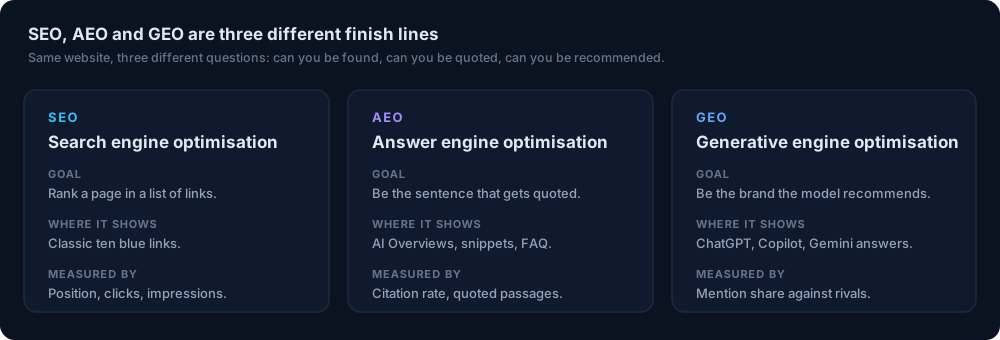
How Does SEOWedge Remove Manual Work from Seasonal Content Prioritization?
Manual prompt tracking and page selection for seasonal campaigns is slow and error-prone. SEOWedge removes this friction by discovering buyer questions automatically, mapping each to a real competitor citation, and producing an Action Brief that tells you exactly what to create or fix. There is no need to guess which sale or event queries matter—SEOWedge surfaces them based on real search and assistant behavior.
Bulk article generation lets you turn your prioritized opportunity list into a set of ready-to-edit, on-brand pages in one session. This is especially valuable for teams with limited resources or agencies juggling multiple client campaigns. The workflow is built to handle campaign surges: paid plans allow credit top-ups, so you can extend article or scan limits during peak periods without changing plans. For more on scaling up during busy seasons, see how SEOWedge credits and top-ups work.
What Do I Get for Free, and When Should I Upgrade for Seasonal Campaigns?
The SEOWedge Free plan gives you a one-time Lite Scan (5 questions, 1 Action Brief, 1 article) with no card required. This is enough to see if your brand is missing from AI answers for a major seasonal or sale event. You can generate and export one campaign page, using your Brand DNA profile, and see which competitor is being cited instead.
For larger campaigns, multiple events, or when you need to generate several landing pages at once, upgrade to Pro or Agency. Paid plans increase the number of questions discovered (12 or 25 per scan), Action Briefs (8 or unlimited), and articles per month (30 or 150). You can also buy credit packs to handle campaign surges without changing your plan. For a breakdown of free vs paid value, see SEOWedge free vs paid plans for ecommerce.
| Plan | Questions Discovered Per Scan | Action Briefs Per Scan | Articles Per Month | Bulk Articles At Once | Credit Top-Ups |
|---|---|---|---|---|---|
| Free | 5 | 1 | 1 | 1 | No |
| Pro | 12 | 8 | 30 | 3 | Yes |
| Agency | 25 | Unlimited | 150 | 10 | Yes |
SEOWedge plan limits for campaign-driven content
What’s the Next Step If I Want to Prioritize Content for My Next Sale or Season?
Start by running a free scan on your domain. SEOWedge will show you the buyer questions and gaps that matter for your next seasonal campaign or sale event, and generate an Action Brief with a ready-to-edit campaign page. If you need to cover more events, generate multiple pages, or manage several brands, upgrade to a paid plan or add credits as needed. For a sample of what you’ll receive, see the public sample report, or start your free scan from the signup page.
How this was tested
All claims and numbers on this page are drawn from SEOWedge's documented workflow and plan limits as of 2026-08-13. Buyer questions and gaps are discovered by SEOWedge’s automated crawl and question extraction, not by prompt input. Opportunity lists, Action Briefs, and article generation limits are based on current plan entitlements and credit top-up options. Screenshots are from the live SEOWedge interface as of August 2026.
What this page does not cover
This page covers how SEOWedge supports content prioritization for seasonal and sale events in ecommerce, focusing on opportunity identification, Action Briefs, and campaign-driven content workflows. It does not cover classic SEO tactics, non-ecommerce use cases, or manual prompt-based tools. For technical LLM SEO, see the LLM SEO guide. For a full-site audit approach, see the ecommerce AI search audit workflow.
Questions buyers ask us
Will SEOWedge find seasonal or event-driven buyer questions automatically?
Yes. SEOWedge discovers high-intent buyer questions for your market, including those tied to seasonal events or sales, by analyzing your site and category. You do not need to write prompts or anticipate every event—the tool surfaces relevant, current questions automatically.
Can I generate multiple campaign pages at once for an upcoming sale?
On paid plans, SEOWedge lets you queue several articles at once—3 on Pro, 10 on Agency. This means you can prepare all your seasonal or sale-driven pages in one workflow. The Free plan generates one article per scan.
How do I know which event-related gaps are most important to fix?
SEOWedge’s opportunity list shows which buyer questions are trending or tied to upcoming events, and which competitor is being cited instead. Action Briefs explain the impact and tell you exactly which page to create for each gap, so you can focus on the highest-value opportunities.
What if I need to scale up content production during a busy campaign period?
Paid plans allow you to buy credit packs to extend your article, scan, or Action Brief limits during peak seasons. This lets you handle campaign surges without upgrading your entire plan. See how credits and top-ups work for details.
Does SEOWedge support last-minute changes or urgent seasonal content needs?
SEOWedge’s workflow is built for fast turnaround: once you identify a gap, you can generate and edit a ready-to-publish page in one session. Bulk generation and credit top-ups help you meet tight campaign deadlines.
Can I see a real example of SEOWedge’s output for a seasonal campaign?
Yes. You can view a public sample report to see how SEOWedge identifies and addresses event-driven gaps, or start a free scan to get your own campaign-specific results.
See what AI assistants say about your site
Enter your domain and SEOWedge runs a free scan: your AI-Visibility score, the buyer questions where a competitor is named instead of you, and the first page to fix. No install, no sales call.