
How Do I Use SEOWedge to Create FAQ Pages That AI Assistants Cite?
SEOWedge discovers the buyer questions that AI assistants actually cite, then guides you to create FAQ pages that match those questions and your brand specifics. The workflow turns measured gaps into on-brand, answer-ready FAQ content, increasing your chance of being cited in AI answers across ChatGPT, Gemini, and more.
By the SEOWedge Research Team · Published August 13, 2026 · Last tested August 13, 2026 · Updated August 13, 2026 · 5 min read
What to take away
- SEOWedge finds real buyer questions that drive AI citations—no prompt writing needed.
- Each FAQ opportunity is tied to a specific citation gap with a clear Action Brief.
- The Content Studio generates on-brand, answer-ready FAQ pages from your Brand DNA.
- You can edit, score, and export FAQ content optimized for AI citation in one workflow.
- Start with a free scan—no card required—to see your first FAQ opportunity.
How Does SEOWedge Discover FAQ Questions That AI Assistants Cite?
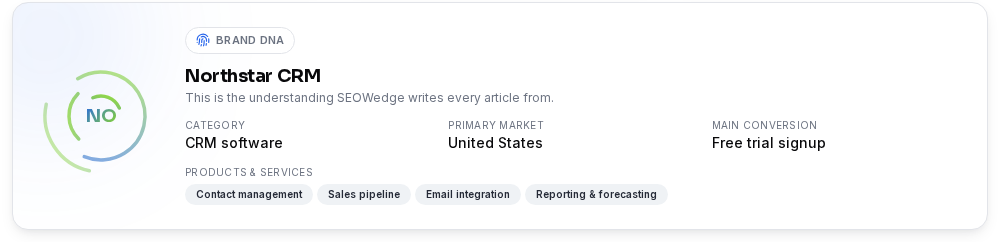
SEOWedge starts by crawling your ecommerce site and extracting a Brand DNA profile: your category, market, products, and what you want buyers to do. It then discovers the real, high-intent questions buyers ask in your category—these are not generic prompts, but live questions surfaced from your market. Next, SEOWedge sends those questions to AI assistants (OpenAI on all plans, Google Gemini on paid plans) and records which brands and pages are cited in the answers. This process reveals which FAQ topics are already being cited and which are missing your brand. The result is a set of FAQ opportunities rooted in what AI assistants actually surface, not in guesswork or keyword lists. For more on question discovery, see How Does SEOWedge Find Buyer Questions?.

What Is the Workflow to Turn These Questions Into Answer-Ready FAQ Pages?
Once SEOWedge identifies FAQ opportunities, each one is delivered as an Action Brief. This brief tells you the exact buyer question, which competitor or page is currently cited, and why your brand is missing. You can then open the Content Studio directly from the Action Brief. The Content Studio uses your Brand DNA to generate a draft FAQ page structured for AEO and GEO—clear question, direct answer, and supporting detail. You can edit, add specifics, and see a Publish Readiness score before exporting. Paid plans allow you to queue and generate multiple FAQ pages at once, so you can cover a whole gap list efficiently. Every step is designed to move from measured gap to export-ready FAQ content without manual prompt writing or outside tools.

How Do I Ensure FAQ Content Matches My Brand and Product Specifics?
SEOWedge builds every FAQ draft from your Brand DNA profile, which it extracts by crawling your site at the start of the workflow. The Brand DNA includes your core category, product details, and the conversion goal, so the generated FAQ answers are not generic—they reflect your actual offer and tone. You can edit every draft in the Content Studio, making it easy to add product specifics, policy details, or compliance language as needed. The Publish Readiness score helps you see if the draft is clear, specific, and ready for AI citation before you export. This system ensures that every FAQ page is both on-brand and tailored to the questions that matter for AI visibility. For more on brand alignment, see Can SEOWedge Write Pages That Match My Brand Voice?.
What Makes an FAQ Page More Likely to Be Cited by AI Assistants?
AI assistants cite FAQ pages when they find clear, direct answers to real buyer questions—especially when those answers are original, specific, and match the phrasing of high-intent queries. SEOWedge structures every FAQ draft for answer engine optimization (AEO): the question is the heading, the answer is concise and up front, and supporting details follow. The workflow also ensures the page covers the full scope of the buyer's problem, not just a single phrase—matching how engines like Google Gemini break queries into sub-questions (source). The Publish Readiness score checks for answer clarity, specificity, and on-brand tone. Original, first-hand content increases citation odds, as confirmed by Google's AI search documentation. For a deeper checklist, see the AEO Guide.

How Does SEOWedge Remove the Manual Work from FAQ Page Creation?
Classic FAQ optimization means guessing which questions matter, writing answers from scratch, and hoping AI assistants find them. SEOWedge automates this loop: it discovers the real questions, tests them against AI answers, shows you the citation gap, and writes the page from your Brand DNA. The Action Brief tells you exactly what to cover, so you never waste time on low-impact topics. You can edit and score the draft before publishing, and on paid plans, generate several FAQ pages in a queue. This single workflow replaces manual research, prompt writing, and outside content tools. For a full workflow map, see How SEOWedge Turns AI Visibility Gaps Into Actionable Content.

What Does the Free Scan Deliver for FAQ Optimization?
The SEOWedge Free plan gives you a one-time Lite Scan for one domain—no card required. This scan discovers five buyer questions, tests them against OpenAI (GPT), and returns a single Action Brief with your top FAQ opportunity. You can generate one article (including an FAQ page) from that brief, edit it for your brand, and export the finished content. The free result is a working, answer-ready FAQ page based on a real AI citation gap. To unlock more questions, Action Briefs, and bulk FAQ generation, paid plans start at $29/month. For a breakdown of free vs paid, see SEOWedge Free vs Paid Plans.
| Plan | Buyer Questions Discovered per Scan | FAQ Action Briefs per Scan | Articles per Month |
|---|---|---|---|
| Free | 5 | 1 | 1 |
| Pro | 12 | 8 | 30 |
| Agency | 25 | unlimited | 150 |
SEOWedge plan limits for FAQ discovery and content generation
How Does SEOWedge’s FAQ Workflow Fit GEO, AEO, and LLM SEO?
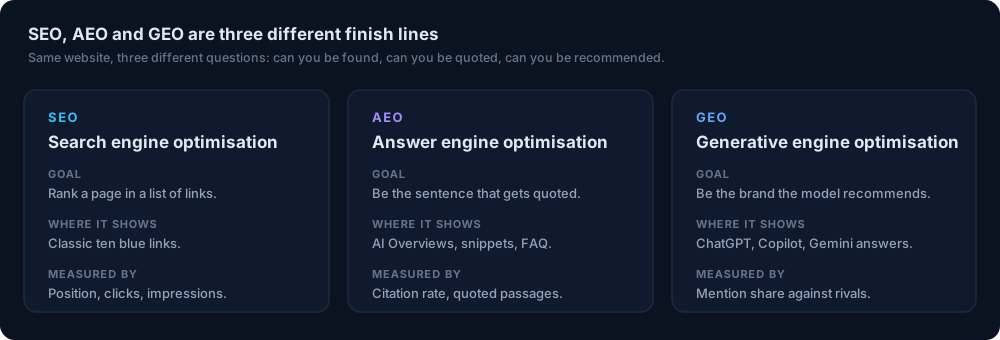
SEOWedge’s FAQ workflow is built for generative engine optimization (GEO) and answer engine optimization (AEO), not just classic SEO. It focuses on the questions that drive citations in AI answers, then produces content structured for direct retrieval and citation by LLMs. Each FAQ page is crafted to be answer-ready: clear headings, direct responses, and on-brand details that match what AI assistants look for. The workflow fits into a broader AI search visibility strategy, alongside product, category, and comparison pages. For technical LLM SEO factors—like crawlability and retrieval—see the LLM SEO Technical Guide.
What Is the Next Step If I Want FAQ Pages That AI Assistants Cite?
Start by running a free scan at SEOWedge signup. You’ll see your first set of discovered buyer questions and receive a real Action Brief for your top FAQ opportunity. Use the Content Studio to generate, edit, and export an answer-ready FAQ page matched to your brand and product. If you want to cover your full FAQ gap list, upgrade to a paid plan for more questions, Action Briefs, and bulk FAQ generation. For more on AI citation strategy, explore the SEOWedge Resources hub.
How this was tested
All claims on this page are based on the SEOWedge workflow and outputs as tested on August 13, 2026. SEOWedge discovers buyer questions by crawling the submitted ecommerce site and its market, then tests those questions against OpenAI (GPT) and Google Gemini (on paid plans) via API. It records which brands and pages are cited in sampled AI answers. FAQ content is generated using the site's Brand DNA profile, with a deterministic Publish Readiness score. Screenshots are from the SEOWedge interface as of August 2026.
What this page does not cover
This guide focuses on using SEOWedge to create FAQ pages that AI assistants are likely to cite, specifically for ecommerce brands and agencies. It does not cover classic SEO FAQ optimization, technical schema markup details, or the full scope of AI answer engine optimization—see the AEO guide and structured data for AI search for those topics. Data and workflow details reflect SEOWedge's capabilities as of August 2026.
Questions buyers ask us
How are SEOWedge’s discovered FAQ questions different from prompts I write myself?
SEOWedge discovers high-intent buyer questions by crawling your category and market, not by relying on prompts you write. This means the questions reflect what real buyers ask and what AI assistants actually cite, so you don’t have to guess or maintain a prompt list. The process is automatic and updates with each scan.
Can I edit the FAQ content before publishing?
Yes. Every FAQ draft is editable in the Content Studio. You can add product specifics, compliance language, or adjust the tone to match your brand. The Publish Readiness score guides you to ensure the answer is clear, specific, and ready for AI citation before you export.
How do I know which FAQ questions matter most for AI citation?
SEOWedge’s Action Briefs show you which buyer questions are currently cited by AI assistants, which competitor or page is named, and where your brand is missing. This makes it clear which FAQ topics are worth prioritizing for AI visibility.
What if I want to generate multiple FAQ pages at once?
Paid SEOWedge plans allow you to queue and generate several FAQ pages at once—Pro supports 3 in a queue, Agency supports 10. This lets you cover your full FAQ gap list efficiently, without manual copy-paste or outside tools.
Does SEOWedge-generated FAQ content include schema markup?
SEOWedge structures FAQ pages for AEO, with clear question headings and direct answers. For technical schema markup and validation, see Structured Data for AI Search. Schema is not required for AI citation, but can support classic SEO.
What if my FAQ pages are not being cited even after publishing?
AI assistants re-crawl and update citations over weeks, not hours. SEOWedge records the sampled answers and dates each result, so you can see when a change occurs. For persistent gaps, check technical factors like crawlability and ensure your answers are original and specific.
See what AI assistants say about your site
Enter your domain and SEOWedge runs a free scan: your AI-Visibility score, the buyer questions where a competitor is named instead of you, and the first page to fix. No install, no sales call.