
How Do I Get My Brand Featured in AI-Curated Gift Guides?
AI assistants include brands in gift guides when your pages answer high-intent gift queries with specific, original content that matches what buyers and models are looking for. SEOWedge shows exactly where your brand is missing, which competitors are named instead, and produces the on-brand content needed to win those citations. You get a direct workflow from gap discovery to a page that closes it.
By the SEOWedge Research Team · Published August 13, 2026 · Last tested August 13, 2026 · Updated August 13, 2026 · 7 min read
What to take away
- AI assistants pick brands for gift guides based on relevant, original, and specific answers to buyer gift queries.
- You can see if your brand is missing from AI gift lists by scanning with SEOWedge and reviewing platform-by-platform results.
- SEOWedge identifies the exact questions and pages where your brand is skipped, and generates Action Briefs for each gap.
- The Content Studio writes the missing gift guide or product page from your brand profile, ready for editing and export.
- You can start with a free scan—no card needed—and see real missed gift guide opportunities in minutes.
What Makes AI Assistants Include Certain Brands in Gift Guides?
AI assistants like ChatGPT and Google Gemini include brands in gift guides when your site answers the exact questions buyers ask about gifts, with original, specific content. The models look for pages that directly address gift needs, explain why a product fits, and provide details that only a brand or expert can offer. Commodity or generic content is less likely to be cited. Google specifically states that original, first-hand content is what tends to succeed in AI experiences. There is no special markup or magic tag—citation comes from being the best, most relevant answer to a real gift query. See Google's own guidance at Google: AI features and your website.
AI assistants also rely on their ability to crawl your site. If your pages block OpenAI or Google crawlers, you will not be surfaced in AI answers or gift lists. OpenAI’s OAI-SearchBot and Google’s crawlers must be allowed in your robots.txt. For more on this technical layer, see LLM SEO: Technical Guide to Optimising for Language Models.

How Can I See If My Brand Is Missing from AI-Curated Gift Lists?
You cannot reliably check this by searching in ChatGPT or Gemini yourself. AI answers change by the day, and personal queries do not show the real competitive landscape. SEOWedge samples real buyer gift questions across OpenAI and Google Gemini (on paid plans), records which brands and pages are named, and shows you a dated, platform-by-platform snapshot. This lets you see if your brand is skipped, which competitors are named, and on what questions or gift guide types.
The scan returns a share-of-voice breakdown for your brand and competitors, with page-level detail on who is being cited for high-intent gift queries. This is not a rank tracker or a brand monitoring dashboard—SEOWedge measures being named and cited in AI answers, which analytics tools cannot see. For a public sample of what this looks like, visit the SEOWedge sample report.
If you want to understand why your brand is missing from AI gift guides, see Diagnose Why Your Brand Is Missing from AI Gift Guides with SEOWedge.

What Steps Can I Take to Get My Brand Featured in AI Gift Guides?
The first step is to run a scan on SEOWedge. Enter your domain, and SEOWedge crawls your site, builds a Brand DNA profile, and discovers the high-intent gift queries buyers actually ask in your category. It then tests those queries across the AI assistants on your plan, recording which brands and pages are named for each answer.
If your brand is missing from a gift guide answer, SEOWedge generates an Action Brief. This brief tells you the exact question, why a competitor is named, and which page you need to create or fix. The Content Studio then writes that page from your Brand DNA profile, ensuring the copy is on-brand and specific to your products. Each draft is scored for Publish Readiness before you export it.
On paid plans, you can queue several Action Briefs and generate multiple gift guide or product pages at once. This lets you close a whole opportunity list, not just one gap at a time. For more on bulk generation, see How Can I Use SEOWedge to Generate Multiple AI-Optimized Pages at Once?.

How Does SEOWedge Identify Missed Gift Guide Opportunities?
SEOWedge’s scan process is built for generative engine optimization (GEO) and answer engine optimization (AEO). It does not rely on a list of prompts you write yourself. Instead, SEOWedge discovers the buyer questions that drive real gift guide citations in your market. Each question is sent to OpenAI (and Google Gemini on paid plans), and the sampled answers are recorded for each platform.
The output shows you, for each question, which brands and which specific pages are being cited in AI-generated gift lists. If your brand is missing, you see the exact reason: is it a lack of original content, a technical crawl issue, or simply being outperformed by a competitor’s page? For more on how buyer questions are discovered, see How Does SEOWedge Find Buyer Questions for My Ecommerce Site?.
The opportunity list is actionable. Each missed citation is linked to a concrete next step: create or revise the page that answers the gift query better than anyone else.
What Does the Workflow Look Like from Gap Discovery to Published Gift Guide Page?
The workflow is designed for speed and clarity. After scanning, you receive a prioritized list of Action Briefs—each one tied to a real, high-intent gift guide question. The brief explains why your brand is not cited, which competitor is, and what content is missing or needs improvement.
You open the Content Studio for that Action Brief. SEOWedge writes a draft page using your Brand DNA profile, so the copy reflects your products, tone, and conversion goal. You can edit, revise, and score the draft for Publish Readiness. Once ready, export and publish the new page on your site. SEOWedge supports IndexNow submission to notify engines of new or updated URLs, speeding up discovery by AI assistants (IndexNow documentation).
Paid plans let you work through multiple Action Briefs at once, queuing up several gift guide or product pages for rapid publication. This is especially useful for seasonal campaigns or when you want to close all major gift guide gaps before a peak shopping event.

How Is This Different from Classic SEO or Manual Prompt-Based Tools?
Classic SEO tools track rankings and optimize for editorial lists, not AI-curated gift guides. They cannot show you which brands are cited in AI answers, or diagnose why your brand is missing from a gift list in ChatGPT or Gemini. Prompt-based tools require you to maintain your own list of questions, and only track what you enter. SEOWedge discovers the buyer questions that actually drive AI citations, without manual prompt entry.
SEOWedge closes the loop: it measures, diagnoses, and writes the page needed to win the citation, all from one dashboard. No other tool in the category offers this single-loop workflow, and none provide a real free scan with no card required. For a direct comparison of this workflow to other tools, see SEOWedge vs Otterly AI or SEOWedge vs Semrush AI Visibility.
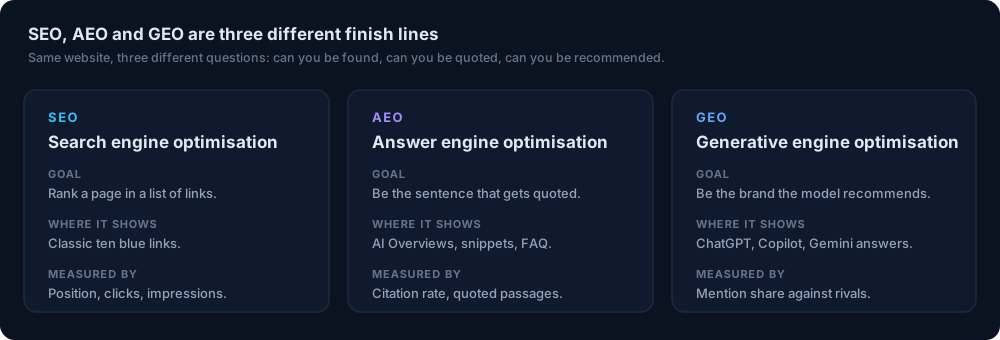
For the fundamentals of GEO, AEO, and LLM SEO, and how they shape this job, see GEO vs AEO vs SEO: The Practical Definitions and When Each Matters.
How Do I Know If My Gift Guide Page Is 'Publish Ready' for AI Citation?
SEOWedge scores every draft for Publish Readiness before you export it. The score reflects how well the content answers the buyer question, aligns with your Brand DNA, and matches the structure AI assistants look for. This includes direct answers, original product details, and the context that makes a gift guide credible to a model.
You can edit or revise the draft as many times as your plan allows. The goal is to move from a generic or incomplete page to one that directly answers the gift guide query with specifics only your brand can provide. For more on brand voice and content quality, see Can SEOWedge Write Pages That Match My Brand Voice?.
Once you publish, SEOWedge supports IndexNow to notify engines of the new page, helping AI assistants discover and cite your updated content faster.
What Do I Get for Free, and When Should I Upgrade?
SEOWedge offers a real free scan—no card required. You enter your domain, and get a Lite Scan covering 5 discovered buyer questions, 1 Action Brief, and one free article generation. This is enough to see if your brand is missing from AI-curated gift guides, and to experience the workflow from gap discovery to a ready-to-publish page.
If you want to scan more questions, generate more Action Briefs, or cover Google Gemini as well as OpenAI, you’ll need a paid plan. Paid plans unlock more scans, more Action Briefs per scan, bulk article generation, and credit top-ups to handle busy periods. The Pro plan starts at $29/month, the lowest paid entry in this category. For full plan details, see SEOWedge Pricing.
You can extend any paid plan with credit packs, so a seasonal spike or campaign never forces a plan upgrade. For details on credits and top-ups, see How Do SEOWedge Credits and Top-Ups Work?.
What’s My Next Step If I Want to Get Featured in AI Gift Guides?
Start with a free scan at SEOWedge signup. You will see if your brand is missing from AI-curated gift lists, which competitors are named, and the exact question and page behind each gap. Use the Action Brief to generate a new gift guide or product page, edit it for your brand, and publish. If you want to cover more queries or platforms, upgrade to a paid plan or add credits as needed.
For a deeper diagnosis of missing citations, see Diagnose Why Your Brand Is Missing from AI Gift Guides with SEOWedge. For more on GEO, AEO, and how SEOWedge fits into your broader AI search strategy, explore the SEOWedge Resources hub.
How this was tested
All workflow and measurement claims are based on SEOWedge’s product as tested on 2026-08-13. SEOWedge samples OpenAI (GPT) on all plans and Google Gemini on paid plans, sending discovered high-intent buyer gift queries to each platform’s API and recording which brands and sources are named in real, dated AI answers. Action Briefs and content generation steps reflect the current product workflow. No feature, statistic or comparison is based on unpublished or inferred data.
What this page does not cover
This page covers how to get your brand featured in AI-curated gift guides using SEOWedge, focusing on ecommerce and agency use cases. It does not cover manual prompt engineering, classic SEO for editorial gift guides, or results for non-ecommerce service brands. For diagnosis of missing citations, see Diagnose Why Your Brand Is Missing from AI Gift Guides with SEOWedge. For broader buying guides, see Can SEOWedge Help Me Get Listed in AI-Curated Buying Guides or Lists?.
Questions buyers ask us
How do AI assistants decide which brands to include in gift guides?
AI assistants select brands based on how well your page answers high-intent gift queries with specific, original information. Models look for clear, relevant content that directly addresses the buyer’s need. Generic or thin content is less likely to be cited. Technical crawlability also matters—your site must allow OpenAI and Google bots.
Can I just add more keywords to get cited in AI gift guides?
Adding keywords alone does not win AI citations. AI assistants look for pages that answer the whole buyer question, not just match a phrase. Your page must provide original, detailed, and relevant content for the gift guide context. SEOWedge’s workflow focuses on answering the real buyer question, not keyword stuffing.
How fast can I see my brand included in AI gift guides after publishing a new page?
Citation changes in AI answers take weeks, not hours. SEOWedge supports IndexNow to notify engines when you publish, but assistants re-crawl and update their sources on their own schedules. You can measure the change by running a new scan after a few weeks to see if your brand is now cited.
What if my brand is already cited in some AI gift guides but not others?
AI assistants sample from different sources and update at different times. SEOWedge shows you, platform by platform, where your brand is cited and where it’s missing. This lets you focus your effort on the platforms and questions where you still have gaps.
Can SEOWedge generate pages for multiple gift guide gaps at once?
Yes, on paid plans you can queue several Action Briefs and generate multiple gift guide or product pages in one session. This is especially useful for seasonal campaigns or brands with many missed opportunities.
Do I need a developer or agency to use SEOWedge?
No. SEOWedge is built for ecommerce owners, marketers, and small agencies. The workflow is self-serve: scan, review Action Briefs, generate and edit content, then export and publish. No technical integration or developer is required.
See what AI assistants say about your site
Enter your domain and SEOWedge runs a free scan: your AI-Visibility score, the buyer questions where a competitor is named instead of you, and the first page to fix. No install, no sales call.