
How Can I Use SEOWedge to Find Content Gaps in My Ecommerce Category?
SEOWedge finds content gaps in your ecommerce category by scanning your site, discovering real buyer questions, and revealing which competitor pages AI assistants cite instead of yours. It then creates a prioritized list of missing or underperforming pages and turns each gap into an actionable content brief you can use to close the gap and win citations.
By the SEOWedge Research Team · Published August 13, 2026 · Last tested August 13, 2026 · Updated August 13, 2026 · 7 min read
What to take away
- SEOWedge scans your ecommerce category and discovers high-intent buyer questions automatically.
- You see exactly which competitor pages AI assistants cite for each question—and which of your pages are missing.
- Each gap is turned into an actionable brief, telling you what to create or fix.
- The free scan covers five questions and one Action Brief—no card needed.
- Paid plans unlock more questions, deeper scans, and bulk content creation.
How Does SEOWedge Find Content Gaps in My Ecommerce Category?
SEOWedge identifies content gaps by running a scan of your ecommerce site, focusing on your chosen category. It crawls your site, extracts your category structure, and builds a Brand DNA profile that includes your products, market, and conversion goals. Then, it discovers the high-intent buyer questions real shoppers ask about your category—questions that drive recommendations and citations in AI answers.
SEOWedge sends these questions to AI assistants (OpenAI on all plans, Google Gemini on paid plans) and records which brands and specific competitor pages are cited in the answers. If your site is missing or underrepresented, SEOWedge flags the gap and links it to the exact competitor page that wins the citation. This approach surfaces the real-world gaps that cost you visibility in AI-powered search and recommendation engines.
Unlike tools that require you to write and track prompts, SEOWedge finds the questions for you, based on what buyers actually ask and what AI models respond to. This means you get a true picture of your category's content landscape—no guesswork or manual prompt management required.

What Does the Scan Process Look Like?
The process starts when you enter your domain and select the category you want to analyze. SEOWedge crawls your site and builds a Brand DNA profile, mapping your product range and category structure. It then discovers the top buyer questions for your category—up to 5 on the free plan, 12 on Pro, and 25 on Agency.
Each discovered question is sent to the supported AI assistants. SEOWedge records which brands and URLs are named or cited in each answer, scoring your visibility and showing a share-of-voice breakdown for your category. This is not a traditional SEO rank check; it is a direct measurement of how often your brand and your competitors are recommended by AI assistants for real buyer questions.
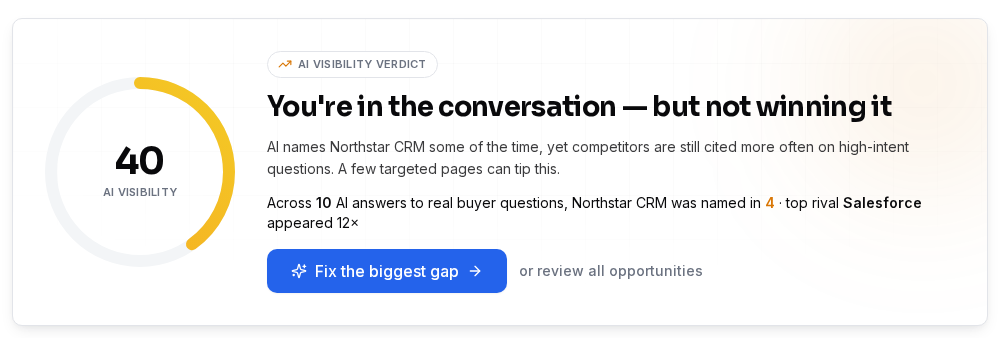
The scan outputs an AI-Visibility score, a competitor share-of-voice chart, and a list of page-level opportunities. Each opportunity links directly to the question, the AI answer, and the cited competitor page. The free scan delivers a Lite version with five questions and one Action Brief. Paid plans unlock more questions per scan, more Action Briefs, and bulk content generation.
How Specific Are SEOWedge’s Recommendations?
SEOWedge’s recommendations are page-level and question-level. For each buyer question tested, you see exactly which competitor page was cited and which of your own pages (if any) were named. This lets you pinpoint whether your category page, a product page, or even a third-party site is winning the AI citation for a given question.
Each gap is turned into an Action Brief. This brief tells you: the buyer question, which AI assistants were tested, which brand and page was cited, and why your page was not chosen. The brief also recommends the best page to create or update to close that gap—always tied to your own site structure and Brand DNA profile.
You do not get vague topic suggestions or generic keyword lists. Every recommendation is tied to a real, tested buyer question and a real AI answer. This level of specificity is what makes SEOWedge actionable for ecommerce teams and agencies.

How Do I Turn Content Gap Insights Into Actionable Steps?
After the scan, SEOWedge presents a prioritized list of opportunities. Each opportunity is an actionable gap: the buyer question, the AI answer, and the competitor page that currently wins the citation. You can click into any Action Brief to see exactly what needs to be created or fixed.
From there, SEOWedge’s Content Studio can generate a draft page that addresses the gap, using your Brand DNA profile for on-brand content. Each draft is scored for Publish Readiness, so you know whether it meets the requirements for AI citation (clarity, specificity, structure). You can edit, revise, and export the page for publishing on your site.
On paid plans, you can queue multiple Action Briefs and generate several pages at once. This lets you move from gap discovery to a full content sprint without manual handoff between tools. The workflow is designed to close the loop: measure, identify, brief, write, and publish—all in one place.

What Does the Free Scan Cover—and When Should I Upgrade?
The SEOWedge free scan covers one project, five discovered buyer questions, and one Action Brief. You do not need a credit card to run it. This gives you a real, actionable sample of your category’s AI search visibility and a concrete next step to close a gap.
If you need to analyze more questions, cover multiple categories, or generate content in bulk, you’ll need a paid plan. The Pro plan ($29/month) unlocks up to 12 questions per scan, 8 Action Briefs, and generates up to 3 articles at once. The Agency plan ($99/month) is built for teams managing up to 25 domains, with up to 25 questions per scan and bulk actions for larger opportunity lists.
Paid plans also add Google Gemini coverage, deeper scans, and the ability to buy credit top-ups if you need extra scans or articles during a busy month. For a detailed breakdown of plan limits and upgrade triggers, see SEOWedge Free vs Paid Plans for Ecommerce.
| Plan | Buyer Questions per Scan | Action Briefs per Scan | Bulk Article Generation |
|---|---|---|---|
| Free | 5 | 1 | 1 |
| Pro | 12 | 8 | 3 |
| Agency | 25 | unlimited | 10 |
What you get at each plan level for category content gap discovery.
How Does SEOWedge’s Approach Differ from Other Tools or Manual Audits?
SEOWedge does not require you to write or manage prompts. It discovers the real buyer questions for your category automatically, per scan, and tests them across supported AI assistants. This means you are always working from the actual questions that drive AI citations, not from a static or self-written prompt list.
Manual audits require you to guess which questions matter, test answers one by one, and try to match competitor citations to your own site structure. SEOWedge automates this entire process and ties every finding to an actionable brief. The measurement is based on sampled AI answers, not theoretical rankings or keyword volume.
For a deeper look at how SEOWedge’s workflow compares to prompt-based or classic SEO tools, see What Makes SEOWedge Different from Traditional SEO Tools for Ecommerce and How Does SEOWedge Find Buyer Questions for My Ecommerce Site?.

How Does SEOWedge Handle Category vs. Product-Level Gaps?
This page focuses on category-level content gaps—where a whole category page or cluster is missing from AI answers. SEOWedge is designed to surface both category and product-level gaps, but the workflow differs slightly.
For category gaps, the scan discovers questions like “What are the best running shoes for flat feet?” or “Which online stores have the best selection of vegan skincare?” and tests which category pages or buying guides are cited. You see whether your category page, a competitor’s, or a third-party site is being recommended.
If you need product-level detail, such as which specific SKUs are missing from AI answers, see this guide on product page gaps. Both workflows use the same scan-to-Action Brief loop but target different parts of your site structure.
How Do I Act on Category Content Gaps—Step by Step?
1. Run a scan on your ecommerce site and select the target category.
2. Review the discovered buyer questions and see which competitor pages are cited for each.
3. Open each Action Brief to see the question, the cited competitor page, and the reason your page is missing or underperforming.
4. Use the Content Studio to draft a new category page or update an existing one, guided by your Brand DNA profile and the Action Brief’s recommendations.
5. Score the draft for Publish Readiness, revise as needed, and export for publishing on your site.
6. Submit the new or updated URL through IndexNow to notify engines when it’s live. This helps AI assistants see the change sooner (IndexNow documentation).
7. Repeat for each prioritized gap until your main category content gaps are closed.

What’s My Next Step If I Want to Find and Close Category Content Gaps?
If you want to see your own category’s AI search gaps, start with a free scan—no card required. You’ll get a real sample of discovered buyer questions, a share-of-voice chart, and a concrete Action Brief for your highest-impact gap. For deeper analysis, more questions, and bulk content creation, upgrade to a paid plan or buy credits as needed.
To see an example of SEOWedge’s output before you start, check the public sample report. For a full workflow from gap discovery to published fix, see How SEOWedge Turns AI Visibility Gaps Into Actionable Content.
SEOWedge is the only tool in this category that closes the loop: it measures the answer, names the gap, and writes the page that closes it—all from your own brand profile. This mechanism is what lets you move from measurement to action without manual handoff or extra purchases.
How this was tested
All claims and workflow steps are based on SEOWedge’s documented process and outputs as of 2026-08-13. Screenshots and numbers are drawn from the live product, tested on ecommerce category scans using both free and paid plans. Buyer questions, competitor citations, and page-level opportunities are discovered automatically per scan, with each scan sampling OpenAI (GPT) on all plans and Google Gemini on paid plans. Method notes are from SEOWedge’s published documentation and interface.
What this page does not cover
This page focuses on using SEOWedge to find and act on content gaps at the ecommerce category level—where a category page or group of products is missing citations in AI answers. It does not cover product-level gap analysis (see this guide), full-site audits, or technical crawlability checks. For GEO, AEO, or LLM SEO definitions, see the terminology guide. All recommendations are based on current AI assistant behavior as measured by SEOWedge and may change as models update.
Questions buyers ask us
How does SEOWedge discover buyer questions for my category?
SEOWedge crawls your site and the competitive landscape, then uses its own discovery engine to surface the high-intent questions real buyers ask about your category. You do not need to provide prompts or keywords; the tool finds the questions that actually drive AI assistant answers.
What if my category is new or niche—will SEOWedge still find content gaps?
Yes. SEOWedge’s discovery engine adapts to the category’s market and product structure. For very new or niche categories, the number of buyer questions may be lower, but each is still tested against AI assistants to reveal real-world gaps. For new category launches, see this guide.
How do I know which competitor page is winning the AI citation?
SEOWedge records the exact URL and brand cited by each AI assistant for every buyer question. You can view the answer, the cited page, and compare it directly to your own site. This lets you target your content updates precisely.
Can I use SEOWedge for multiple categories or domains?
Yes, on paid plans. The Pro plan supports up to five projects (categories or domains), and the Agency plan supports up to 25. Each project can be scanned and managed separately, allowing you to find and act on gaps across your whole portfolio.
How quickly can I go from gap discovery to publishing a new page?
You can generate a draft page directly from an Action Brief in minutes. Each draft is built from your Brand DNA profile and scored for Publish Readiness. After review and export, you can publish the page and notify engines using IndexNow for faster discovery by AI assistants.
Is there a risk of creating generic or off-brand content?
No. SEOWedge uses your Brand DNA profile to generate content that matches your brand’s voice, product focus, and conversion goals. You can edit and revise every draft before publishing. For more on Brand DNA, see this page.
See what AI assistants say about your site
Enter your domain and SEOWedge runs a free scan: your AI-Visibility score, the buyer questions where a competitor is named instead of you, and the first page to fix. No install, no sales call.