
How Do I Use SEOWedge to Improve Visibility for Product Comparison Guides in AI Answers?
To improve your brand's visibility in AI-generated product comparison guides, you need to know exactly which queries cite competitors, why your pages are missed, and how to create the content that AI assistants will cite next. SEOWedge shows the gap, names the page, and writes the fix from your brand profile, closing the loop for GEO and AEO.
By the SEOWedge Research Team · Published August 13, 2026 · Last tested August 13, 2026 · Updated August 13, 2026 · 8 min read
What to take away
- Run a free scan to see if your brand is named in AI product comparison answers—no card required.
- SEOWedge identifies the exact competitor pages cited in AI comparison guides for your category.
- Action Briefs reveal what to fix or create to win citations for high-intent comparison queries.
- The Content Studio writes comparison pages based on your Brand DNA, scored for AI citation readiness.
- Paid plans let you queue and export multiple optimized guides at once, speeding up the process.
How can I tell if my brand is missing from AI product comparison guides?
The fastest way is to run a SEOWedge scan on your domain. The scan discovers the buyer questions that drive product comparison guides in your category—phrased exactly as buyers ask them. SEOWedge then queries AI assistants (ChatGPT and, on paid plans, Google Gemini) with those questions and records which brands and pages are cited in the answers.
You get a clear AI-Visibility score, a share-of-voice breakdown, and a list of the specific comparison queries where your brand is missing. Each gap shows which competitor or third-party page is being cited instead. This is not guesswork or anecdotal checking: the scan records the sampled answers for each platform, so you see exactly what buyers see when they ask for a comparison guide.
For a step-by-step on how SEOWedge surfaces comparison gaps and other high-intent queries, see the dedicated comparison opportunities guide.
| Scan Output | What You See |
|---|---|
| AI-Visibility Score | Percent of comparison queries where your brand is cited |
| Share of Voice | Which brands and URLs are named in answers |
| Opportunity List | Comparison queries where you are missing, with cited competitor page |
SEOWedge scan output for product comparison visibility
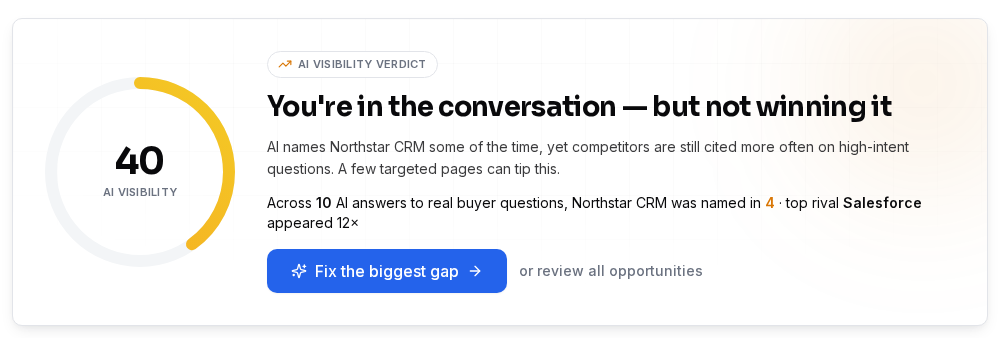
How does SEOWedge identify gaps in product comparison queries?
SEOWedge does not rely on a static keyword list or prompts you write. Instead, it crawls your site, extracts your category and product set, and discovers the buyer questions that actually drive comparison guides in your market. These are high-intent, natural-language queries such as "best [category] for [use case]" or "[brand] vs [brand] for [feature]."
Each discovered question is sent to AI assistants through their APIs. SEOWedge records which brands, products, and exact URLs are cited in each answer. If your brand is not named—or if a competitor’s page is cited for a key comparison—this is flagged as an opportunity. The result is a list of comparison queries and the exact page behind each missed citation, not just a generic keyword gap.
This approach means you do not have to guess which comparison guides matter or maintain a list of prompts. The scan adapts to your actual category and market, surfacing the real questions and gaps that cost you high-intent traffic.
| Step | What Happens |
|---|---|
| 1. Site crawl | SEOWedge extracts category, products, and Brand DNA |
| 2. Buyer question discovery | High-intent comparison queries surfaced automatically |
| 3. AI answer sampling | Each question tested in ChatGPT (and Gemini on paid plans) |
| 4. Citation mapping | Which brands/pages are named for each comparison query |
How SEOWedge identifies product comparison gaps

What steps should I take to create or improve content for high-intent comparison queries?
Once SEOWedge identifies the comparison queries where your brand is missing, it produces an Action Brief for each gap. The Action Brief names the question, explains why your page was not cited, and specifies the competitor or third-party page that won the citation. It tells you what type of content or structure is needed to be considered for future AI answers.
You can use the Content Studio to generate a new comparison guide or revise an existing one. The Studio uses your Brand DNA profile, so the output matches your positioning, tone, and product details. Each draft is scored for Publish Readiness—measuring how likely it is to be cited by AI assistants based on structure, specificity, and answerability.
Paid plans allow you to queue and export several optimized comparison guides at once, moving from gap list to published content in a single workflow. For a detailed workflow from gap discovery to published fix, see how SEOWedge turns AI visibility gaps into actionable content.
| Action Step | SEOWedge Output |
|---|---|
| Gap discovery | Action Brief for each missed comparison query |
| Content generation | Drafted comparison guide from Brand DNA |
| Publish readiness | Score and checklist for AI citation |
| Export | Ready-to-publish page or brief |
From gap discovery to AI-ready comparison guide

How does SEOWedge ensure my comparison guides match my brand and are ready for AI citation?
SEOWedge builds a Brand DNA profile during the initial crawl. This profile captures your product set, category, main conversion goal, and tone of voice. When you generate a comparison guide, the Content Studio uses this profile to ensure every draft is specific to your brand—not a generic, off-the-shelf comparison.
Each draft is scored for Publish Readiness before export. This score is deterministic: it checks that the content answers the discovered buyer question directly, matches the structure that AI assistants prefer to cite, and includes the details that make your brand the credible source. You can edit the draft, adjust positioning, and rerun the score as needed before publishing.
This workflow means your comparison guides are both on-brand and optimized for the way AI engines select and cite sources. For more on Brand DNA and content scoring, see how SEOWedge writes pages that match your brand voice.
| Content Studio Feature | Benefit for Comparison Guides |
|---|---|
| Brand DNA profile | Ensures brand-specific, credible content |
| Publish Readiness score | Objective check for AI citation structure |
| Editable drafts | Full control before publishing |
| Bulk generation (paid) | Scale up optimized guides efficiently |
How SEOWedge keeps comparison guides on-brand and citation-ready

How do I know which comparison queries matter most for my category?
SEOWedge’s question discovery is not a keyword tool—it surfaces the actual questions buyers ask when searching for product comparisons in your category. Each question is ranked by intent and frequency, based on what is found in your site’s context and the wider market.
The scan output lists these queries in order of impact, showing which ones are most likely to drive high-conversion traffic if your brand is cited. You see not just the question, but also which brands and pages are currently winning each answer. This prioritization lets you focus on the highest-value opportunities first, rather than guessing or following generic SEO advice.
If you want to see how this works for other high-value page types, see how SEOWedge prioritizes pages to create or fix first.
| Discovery Output | How It Helps |
|---|---|
| High-intent comparison questions | Target the queries that drive real buyer decisions |
| Share of voice by query | See which competitors dominate each comparison |
| Opportunity rank | Focus on gaps with highest conversion potential |
Prioritizing comparison queries for action
What does the workflow look like from scan to published, AI-citable comparison guide?
The SEOWedge workflow for comparison guides is a single loop:
1. Enter your domain. SEOWedge crawls your site and builds your Brand DNA profile.
2. The scan discovers buyer comparison questions and tests them in AI assistants, recording which brands and pages are cited.
3. You receive an AI-Visibility score, share-of-voice breakdown, and an opportunity list with Action Briefs for each missed comparison citation.
4. For each opportunity, use the Content Studio to draft a new or revised comparison guide from your Brand DNA. Each draft is scored for Publish Readiness.
5. Export the finished guide and publish it on your site. SEOWedge submits the URL via IndexNow so AI assistants can see it sooner.
On paid plans, you can queue multiple guides for generation and export, making it possible to close several comparison gaps in one pass.
| Workflow Step | What You Do |
|---|---|
| Domain entry | Start scan and Brand DNA extraction |
| Scan & discovery | Get comparison question list and citation map |
| Action Brief review | See why you’re missing and what to fix |
| Content Studio | Draft, edit, and score new comparison guide |
| Export & publish | Push live and notify engines |
SEOWedge end-to-end workflow for comparison guides
How does SEOWedge compare to manual GEO/AEO work or other tools for this job?
Manual GEO or AEO for comparison guides means building your own prompt list, checking AI answers one by one, and guessing why your page is missed. Most tools in this category sell prompt tracking or only monitor brand mentions, requiring you to write and maintain every query. SEOWedge discovers the buyer questions automatically, tests them in real AI answers, and names both the gap and the page to fix. The Content Studio then writes the missing page from your Brand DNA, with a readiness score before you publish.
SEOWedge’s free scan gives you a real result with no card, and the lowest paid entry point in the category ($29/month) lets you scale up to multiple projects or bulk page generation. The workflow is shaped for ecommerce and agency buyers focused on conversion-driven comparison queries—not for general brand monitoring or enterprise dashboards.
For a direct comparison of SEOWedge with other leading tools, including what each actually measures and fixes, see the best AI search visibility tools for ecommerce.
| Workflow | Manual GEO/AEO | SEOWedge |
|---|---|---|
| Prompt discovery | You write and maintain prompts | Questions discovered for you |
| Answer sampling | Manual, one by one | Automated, platform by platform |
| Gap identification | Anecdotal, slow | Action Brief pinpoints gap and page |
| Content creation | Manual, or separate AI tool | Drafted from Brand DNA in Content Studio |
| Publish readiness | Subjective | Deterministic score and checklist |
SEOWedge vs manual GEO/AEO for comparison guides
What do I get for free, and when should I upgrade for full comparison guide coverage?
The SEOWedge Free plan lets you run one Lite Scan on a single domain—no card required. You get up to 5 buyer questions discovered (including comparison queries), 1 Action Brief, and one free article generated from your Brand DNA. This is enough to see if your brand is missing from key product comparison guides and to create or revise one page to close a gap.
Paid plans (Pro and Agency) unlock more scans, more discovered questions (12 or 25 per scan), up to unlimited Action Briefs, and bulk article generation. You can queue and export multiple optimized comparison guides at once, cover more products or categories, and generate client-ready reports. Paid plans also add Google Gemini coverage, so you see both ChatGPT and Google AI Overviews results.
If you only need to check one brand and one guide, start free. If you want to cover all high-intent comparison queries, generate multiple pages, or manage several brands or clients, upgrade to a paid plan. For details, see SEOWedge pricing.
| Plan | Comparison Guide Coverage |
|---|---|
| Free | 1 scan, 5 questions, 1 Action Brief, 1 article |
| Pro | 20 scans/month, 12 questions/scan, 8 briefs/scan, 30 articles/month |
| Agency | 100 scans/month, 25 questions/scan, unlimited briefs, 150 articles/month |
Comparison guide workflow by plan
How this was tested
This page is based on the SEOWedge workflow and outputs as tested on August 13, 2026. All numbers and process steps reflect the current SEOWedge interface and plan structure. SEOWedge’s AI-Visibility scan samples answers from OpenAI (GPT) on all plans and Google Gemini on paid plans, recording which brands and URLs are cited for real buyer questions discovered from your site and category. The Action Brief and Content Studio outputs are generated from the Brand DNA profile extracted during the scan. Screenshots show the actual interface and scoring as of this date.
What this page does not cover
This guide focuses on using SEOWedge for product comparison guide visibility in AI answers, not for classic SEO, non-comparison content, or marketplace-only listings. It does not cover technical site setup, schema markup in detail, or manual prompt writing. For broader GEO/AEO strategy, see the GEO guide. For technical LLM SEO, see the LLM SEO guide.
Questions buyers ask us
How do I know which competitor pages are cited in AI comparison guides?
SEOWedge records the exact URLs and brands cited for each discovered comparison query. You can see, for every high-intent question, which competitor or third-party page is winning the citation. This lets you target the real source, not just the brand name.
What makes SEOWedge's comparison guide workflow different from classic SEO tools?
Classic SEO tools track rankings, not citations in AI answers. SEOWedge measures whether your brand is named and cited in AI-generated comparison guides, identifies the exact page behind each gap, and writes the fix from your Brand DNA. The workflow is built for GEO and AEO, not just keyword rankings.
Can I generate multiple comparison guides at once?
On paid plans, SEOWedge lets you queue and export several optimized guides in one pass (3 at a time on Pro, 10 on Agency). This speeds up closing multiple gaps across your product range or client projects.
How is the Publish Readiness score determined for comparison guides?
The score checks structure, specificity, and direct answerability for the discovered comparison question. It is deterministic—meaning the same input yields the same score—so you know exactly when a draft is ready for AI citation.
Does SEOWedge cover both ChatGPT and Google Gemini for comparison queries?
Yes. All plans scan OpenAI (GPT), which powers ChatGPT and Copilot. Paid plans add Google Gemini, the engine behind Google AI Overviews and AI Mode. Each platform is sampled and scored separately.
What if my site is missing for technical reasons, not content?
SEOWedge surfaces technical issues (such as blocked crawlers) in the scan output. For details on technical checks and LLM SEO, see the LLM SEO guide.
See what AI assistants say about your site
Enter your domain and SEOWedge runs a free scan: your AI-Visibility score, the buyer questions where a competitor is named instead of you, and the first page to fix. No install, no sales call.