
Can SEOWedge Help Me Create Content for Buyer Questions About Product Availability or Stock Status?
SEOWedge discovers real buyer questions about product availability and stock status, pinpoints where your pages are missing from AI answers, and generates on-brand, answer-ready content to close those gaps. You see exactly which queries cost you citations and get a concrete, editable page for each opportunity. This workflow ensures your availability information is visible and cited in AI recommendations.
By the SEOWedge Research Team · Published August 24, 2026 · Last tested August 24, 2026 · Updated August 24, 2026 · 7 min read
What to take away
- SEOWedge finds high-intent buyer questions about product stock and availability, not just keywords.
- You see which of your pages are missing from AI answers for these queries, and why.
- Action Briefs specify exactly what to create or fix to win citations for availability questions.
- The Content Studio writes on-brand, answer-ready pages for stock status queries, scored for AI citation readiness.
- You can start with a free scan—no card needed—and see your own availability gaps in minutes.
Does SEOWedge Surface Buyer Questions About Product Availability and Stock Status?
SEOWedge automatically discovers high-intent buyer questions about product availability and stock status during its site crawl and category analysis. These are not generic keywords or prompts you have to write yourself. Instead, SEOWedge identifies the actual questions buyers ask—such as "Is this item in stock?", "Can I backorder this product?", or "When will this be available again?"—based on real market demand and site context.
Each scan returns a set of buyer-reflective questions specific to your products and market. On the Free plan, you get 5 discovered questions per scan; paid plans return 12 to 25 per scan. This ensures you see the full range of availability-related queries that matter for your category, not just the obvious ones. For more on how these questions are discovered, see How Does SEOWedge Find Buyer Questions for My Ecommerce Site?.

How Does SEOWedge Show Which Pages Are Missing from AI Answers for Availability Queries?
After discovering the key buyer questions, SEOWedge sends each one to major AI assistants—OpenAI (GPT) on all plans, plus Google Gemini on paid plans—and records which brands and specific pages are cited in the answers. You see a clear report of which availability or stock status questions result in your competitors being named, and which of your own pages are missing from those answers.
This process is not limited to brand-level mentions. SEOWedge identifies the exact page or URL that wins the citation for each availability-related question. You can see, for example, if a rival's product detail page is being cited for "Is this item currently in stock?" while your own is ignored. This lets you target the real content gap, not just guess at why you were missed.
The scan output includes an AI-Visibility score, a competitor share-of-voice breakdown, and a prioritized list of page-level opportunities. Each opportunity is tied to a discovered buyer question, so you always know which query is costing you visibility and why. For a deeper look at this diagnostic step, see Can SEOWedge Help Me Identify Which Product Pages Are Missing from AI Answers?.

What Is the Workflow for Creating Content That Answers Availability and Stock Status Questions?
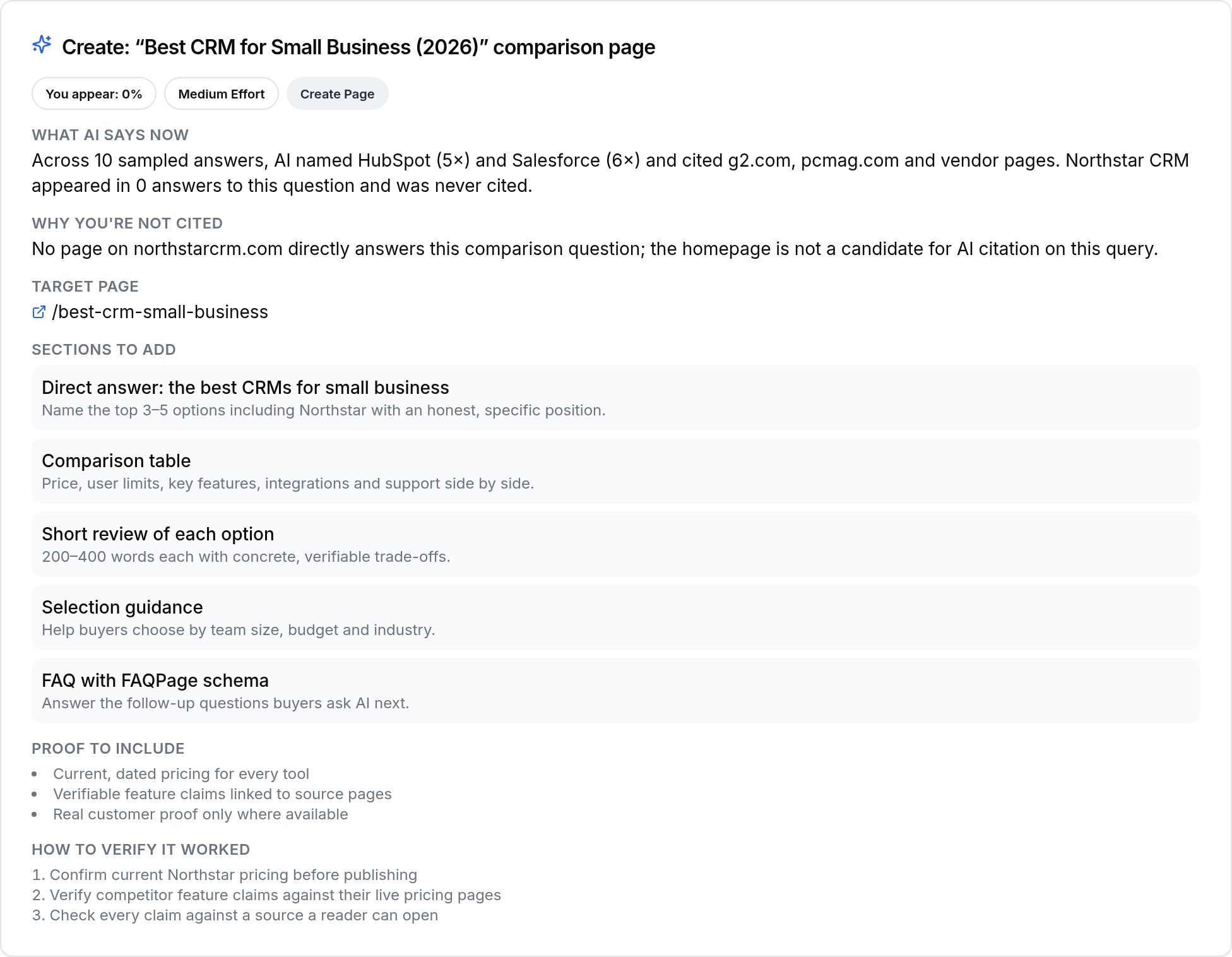
SEOWedge turns every missed availability or stock status citation into a concrete Action Brief. Each Action Brief tells you: the exact buyer question (e.g., "Is this item available for immediate shipping?"), why the current AI answer names a competitor, and which page you need to create or update to win the citation.
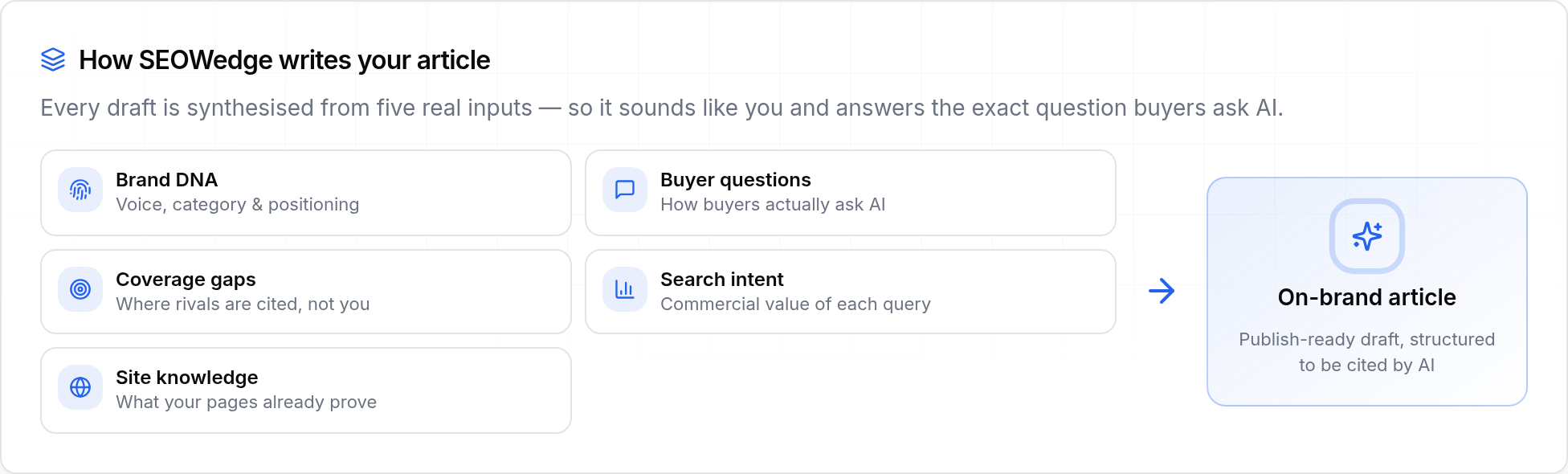
You do not have to guess what to write. The Action Brief links directly to the Content Studio, where SEOWedge generates a draft page or section that answers the specific availability question. This content is built from your Brand DNA profile, so it reflects your product, policy, and voice—not generic AI output.
You can edit, revise, and score the draft for Publish Readiness before exporting. On paid plans, you can queue multiple Action Briefs and generate several availability-focused pages at once, making it practical to close all major gaps in one workflow. For more on how Action Briefs drive action, see How SEOWedge Turns AI Visibility Gaps Into Actionable Content.
How Do I Ensure My Availability Pages Are Optimized for AI Citations and Recommendations?
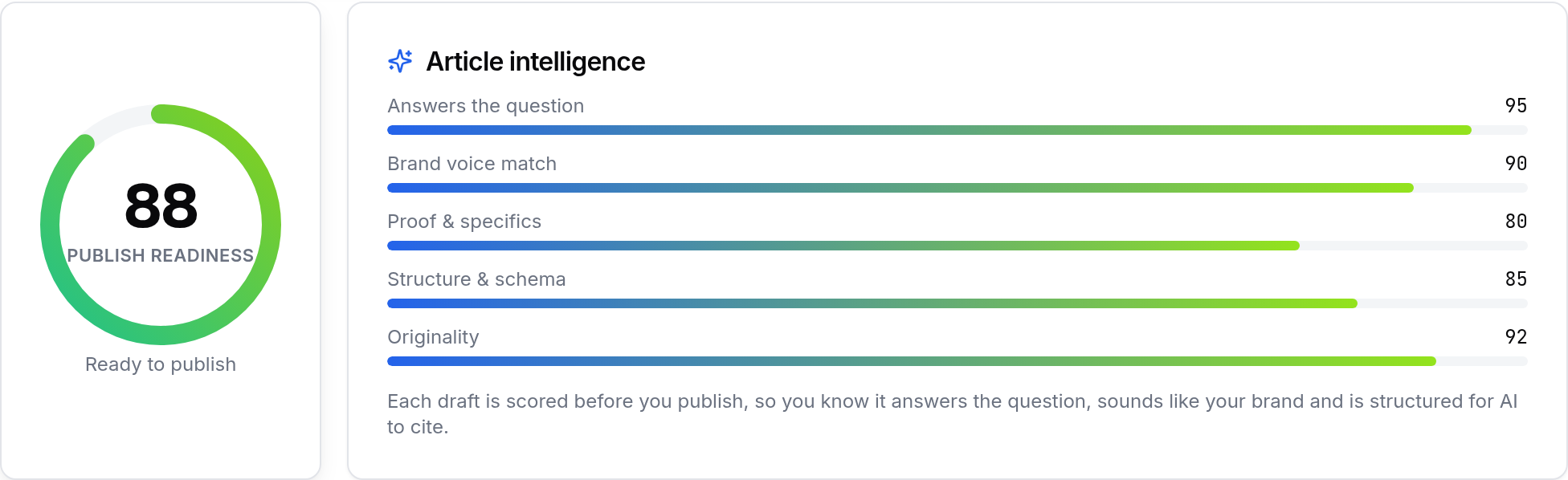
SEOWedge's Content Studio scores every generated or revised page for Publish Readiness. This means your availability or stock status content is checked for the features that make it quotable and citable by AI assistants: direct answers, clear product and stock information, and alignment with your Brand DNA profile.
The scoring is deterministic—based on structure, coverage of the buyer question, and match to AI citation patterns observed in the latest scan. This is not a generic "SEO score" but a specific readiness check for GEO (Generative Engine Optimization) and AEO (Answer Engine Optimization) surfaces. You see exactly which elements are present or missing before you publish.
Once your page is ready, SEOWedge also supports IndexNow submission (on paid plans), which notifies participating engines as soon as a new or updated URL is published. This helps AI assistants see your latest availability information sooner, even though citation updates in AI answers typically take weeks. For more on publish readiness and scoring, see Can SEOWedge Write Pages That Match My Brand Voice?.
How Does SEOWedge Handle Out-of-Stock, Backorder, and Preorder Scenarios?
SEOWedge surfaces buyer questions that reflect real inventory situations: "Is this product out of stock?", "Can I backorder this item?", or "When will this product be available again?" If your current content does not address these states, SEOWedge flags the gap and creates an Action Brief for it.
The content workflow supports generating distinct answers for in-stock, out-of-stock, backorder, or preorder states. You can specify policies and timeframes in the Brand DNA profile, so generated pages reflect your actual process and customer promise. This is critical for conversion and trust, as buyers expect up-to-date, transparent availability information in both classic search and AI answers.
If you want to go deeper on handling out-of-stock or inventory changes, see How Do I Use SEOWedge to Fix AI Answer Gaps for Out-of-Stock Products?.
What Makes SEOWedge Different from Classic SEO or Prompt-Based Tools for Availability Content?
Classic SEO tools measure rankings for keywords like "in stock" or "availability" but do not show whether AI assistants actually cite your pages for real buyer questions. Prompt-based AI visibility tools require you to write and maintain a list of prompts, then charge by the number tracked. SEOWedge discovers the buyer questions for you, based on your category and market, and tests them against the leading AI engines automatically.
Every Action Brief in SEOWedge is tied to a real, high-intent buyer query—not a guess or a generic template. The workflow closes the loop: from gap discovery, to on-brand content generation, to scoring for AI citation readiness, to export and submission. You do not need to buy a separate AI writer or copy the output into another editor. For a breakdown of how SEOWedge compares to other tools, see Best AI Search Visibility Tools for Ecommerce: What to Test and How to Choose.
What Do I Get for Free, and When Should I Upgrade for Full Coverage?
SEOWedge offers a real free scan—no card required. You get one Lite Scan, which discovers 5 buyer questions (including availability and stock status queries if they are relevant to your site), returns one Action Brief, and lets you generate one article using your Brand DNA profile. This is enough to see your own data, test the workflow, and close a single gap.
Paid plans unlock more: up to 25 buyer questions per scan, 8 or unlimited Action Briefs per scan, and bulk article generation (3 at once on Pro, 10 on Agency). Paid plans also add Google Gemini coverage, IndexNow submission, and increased revision/export limits. You can buy credit top-ups on paid plans to extend any limit as needed, without changing your plan. For a detailed breakdown, see SEOWedge Free vs Paid Plans for Ecommerce: What Are the Limits?.
| Plan | Buyer Questions per Scan | Action Briefs per Scan | Articles per Month | Bulk Article Generation |
|---|---|---|---|---|
| Free | 5 | 1 | 1 | No |
| Pro | 12 | 8 | 30 | 3 at once |
| Agency | 25 | Unlimited | 150 | 10 at once |
SEOWedge plan limits for availability and stock status content
What Is My Next Step If I Want to Surface and Close Availability Content Gaps?
If you want to see which product availability or stock status questions are costing you AI citations, start with a free scan at SEOWedge signup. You will get a list of real buyer questions, see which pages are missing from AI answers, and receive a concrete Action Brief for your highest-impact gap. From there, you can generate, edit, and export a publish-ready page to close the visibility gap.
If you manage multiple products or categories, or need to address availability questions at scale, consider upgrading to a paid plan for bulk scans, more Action Briefs, and full Gemini coverage. The workflow is designed to move you from diagnosis to action—no manual prompt writing, no separate AI writer, and no guessing at what buyers or AI assistants want to see. For more about the end-to-end workflow, see How SEOWedge Turns AI Visibility Gaps Into Actionable Content.

How this was tested
All claims and numbers on this page are based on SEOWedge's workflow as tested on August 24, 2026. Buyer questions are discovered through SEOWedge's automated crawl and market analysis. AI answer gaps are sampled by running these questions through OpenAI (GPT) on all plans and Google Gemini on paid plans, recording which brands and pages are cited. Content generation and publish readiness are performed using the Brand DNA profile extracted from each scanned site. Every step is reproducible and documented in the SEOWedge interface.
What this page does not cover
This page focuses on SEOWedge's workflow for surfacing and closing gaps related to product availability and stock status in AI answers. It does not cover classic SEO ranking, manual keyword research, or integrations with inventory management systems. For related topics like handling out-of-stock products, see How Do I Use SEOWedge to Fix AI Answer Gaps for Out-of-Stock Products?. All data and workflow details are current as of August 24, 2026.
Questions buyers ask us
Does SEOWedge find buyer questions about backorders and preorders, or just in-stock items?
SEOWedge surfaces all high-intent buyer questions relevant to your category, including backorder and preorder scenarios. If buyers in your market ask about preordering or when an item will be restocked, those questions will be included in your scan's opportunity list and Action Briefs.
How does SEOWedge know if my availability or stock status page is missing from AI answers?
SEOWedge tests each discovered buyer question against OpenAI (GPT) on all plans and Google Gemini on paid plans. It records which brands and specific URLs are cited in the answers. If your page is not named or cited for an availability query, it is flagged as a gap and you receive an Action Brief with the details.
Can SEOWedge generate content that matches my real-time stock or inventory system?
SEOWedge generates answer-ready content based on your Brand DNA profile and stated policies. While it does not integrate directly with inventory management systems, you can edit the generated content to match your current stock status or automate updates through your own workflow before publishing.
How long does it take for new availability content to show up in AI answers after publishing?
AI assistants update their citations when they re-crawl and re-index your site, which typically takes weeks, not hours. SEOWedge supports IndexNow submission on paid plans to notify participating engines as soon as a new URL is published, helping speed up the process, but the timing is controlled by the AI platforms.
What if my product goes out of stock after I publish an answer-ready page?
If your stock status changes, you can update your page in SEOWedge's Content Studio and re-export it. SEOWedge will score the revised page for publish readiness and, on paid plans, support IndexNow submission to notify engines of the update. For best results, keep availability information current and clear.
Does SEOWedge support multilingual availability content for international buyers?
SEOWedge's primary workflow is optimized for English-language ecommerce sites. For multilingual or international needs, see Does SEOWedge Work for Multilingual Ecommerce Sites? for current capabilities and best practices.
See what AI assistants say about your site
Enter your domain and SEOWedge runs a free scan: your AI-Visibility score, the buyer questions where a competitor is named instead of you, and the first page to fix. No install, no sales call.