
How Do I Use SEOWedge to Create Content for Buyer Questions About Product Compatibility with Third-Party Accessories?
SEOWedge automatically discovers the buyer questions about product compatibility with third-party accessories that matter in your category, pinpoints which are missing from AI answers, and generates answer-ready, on-brand content to close those gaps. This workflow gives your brand a direct path to being cited by AI assistants for compatibility queries—no prompt writing or manual research required.
By the SEOWedge Research Team · Published August 28, 2026 · Last tested August 28, 2026 · Updated August 28, 2026 · 6 min read
What to take away
- SEOWedge discovers real compatibility questions buyers ask about your products and third-party accessories.
- It reveals exactly which of these queries are missing or misattributed in AI answers, mapped to the page level.
- You receive a clear Action Brief for each gap: the question, what AI answers say, and which page to create or update.
- The Content Studio generates answer-ready, on-brand compatibility content directly from your Brand DNA profile.
- You can review, edit, and export new pages, giving you a concrete route to more AI citations for compatibility queries.
How Does SEOWedge Discover Buyer Questions About Product Compatibility with Third-Party Accessories?
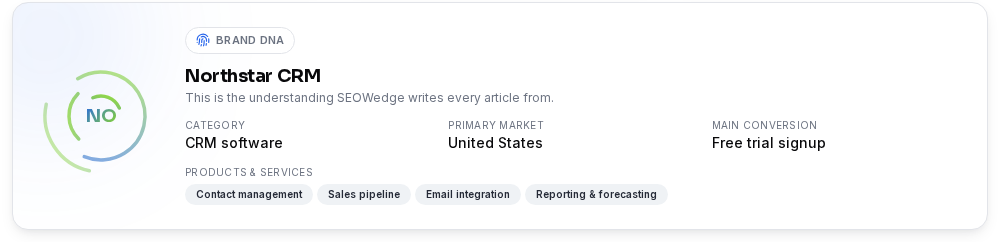
SEOWedge begins by crawling your ecommerce site to extract a Brand DNA profile: category, product range, and main conversion goals. It then automatically discovers the high-intent buyer questions actually asked in your market—including those about compatibility with third-party accessories. These questions use real buyer phrasing, so you don’t have to guess or maintain a prompt list.
Unlike traditional SEO or prompt-based tools, SEOWedge’s discovery is not limited to keywords you provide. The platform identifies compatibility queries such as “Is this laptop charger compatible with Brand X devices?” or “Will this case fit a Y-brand phone?” The result is a list of actionable, buyer-reflective questions that map directly to real purchase blockers and cross-sell opportunities.
This approach ensures you see the full range of compatibility concerns—covering both your own accessories and those made by third parties. For more on question discovery, see How Does SEOWedge Find Buyer Questions for My Ecommerce Site?.

Can SEOWedge Pinpoint Which Compatibility Questions and Pages Are Missing from AI Answers?
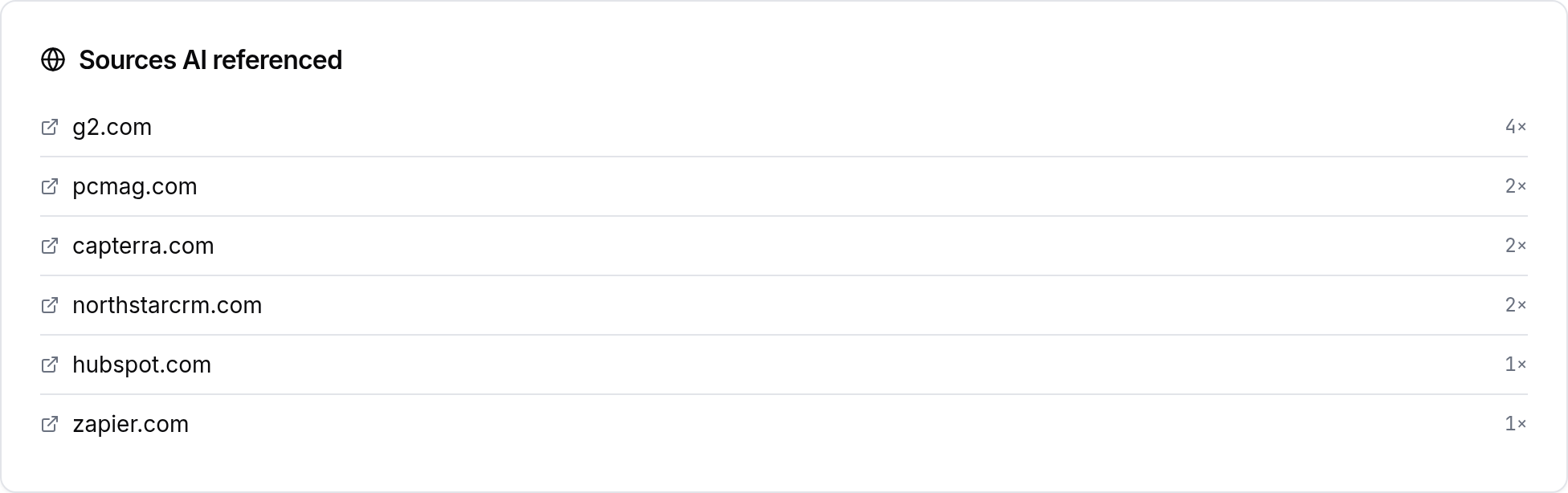
After SEOWedge has built your buyer question set, it sends each one to major AI assistants—OpenAI (GPT) on every plan, and Google Gemini on paid plans. The platform records which brands and specific pages are cited in the answers for each compatibility query. If your brand or a specific page is missing, SEOWedge flags this as a gap and shows you exactly which competitor or third-party site is being cited instead.
The output is not just a list of missed queries. SEOWedge ties every gap to a specific page, so you know whether you need to create a new compatibility guide, update an existing product page, or clarify accessory fitment. This page-level mapping turns measurement into a concrete, actionable task.
You receive a prioritized opportunity list, with each compatibility question, the current AI answer, the cited page, and the recommended action. This lets you focus directly on the gaps that cost you citations and buyer trust.
What Does an Action Brief for a Compatibility Gap Contain?
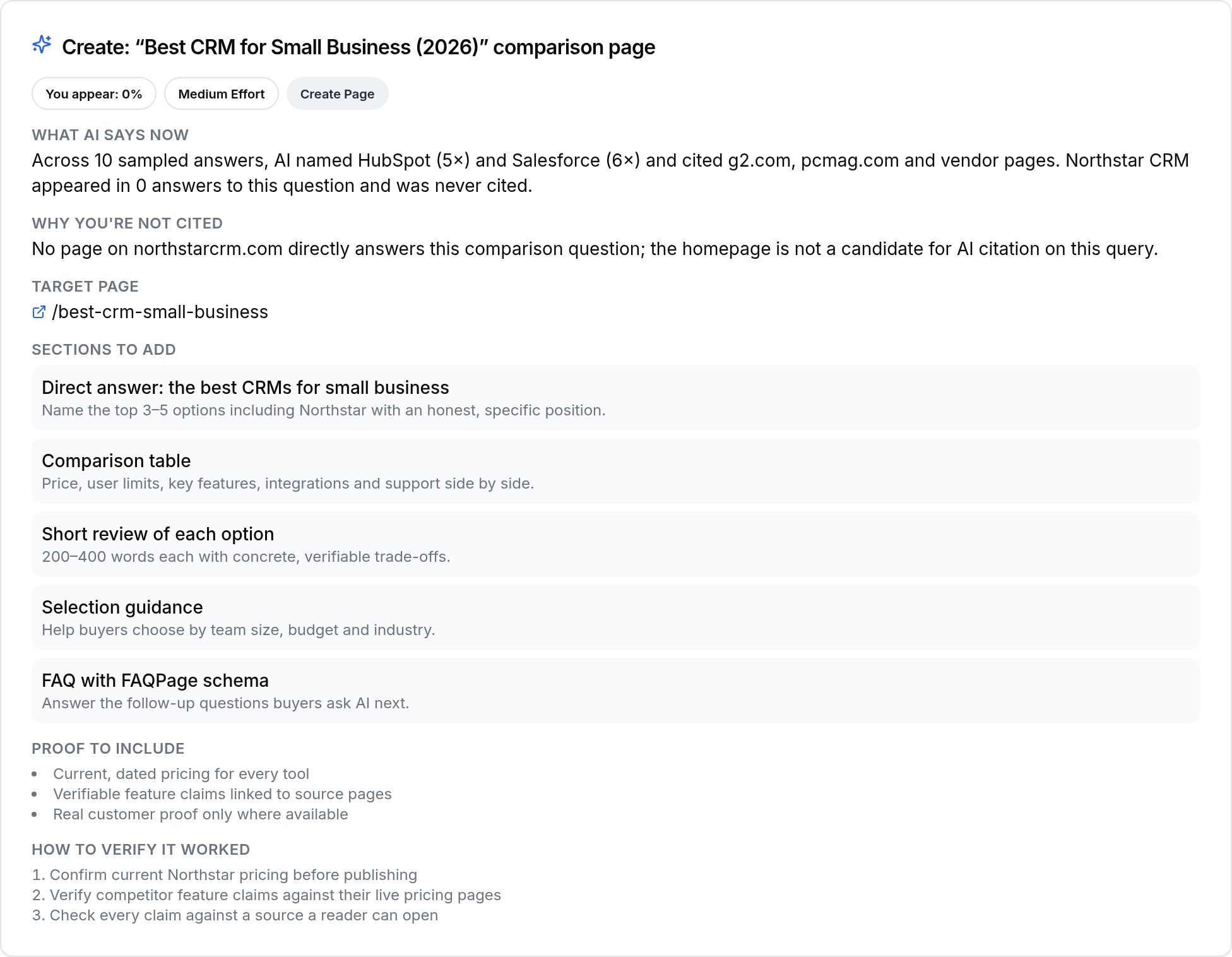
For every compatibility gap, SEOWedge produces an Action Brief. This document includes: the exact buyer question (e.g., “Does Product A work with Accessory B?”), a replay of the current AI answer (showing who is cited), and an explanation of why your page is missing or misattributed. The brief names the exact page you need to create or update to win the citation.
You get a concrete next step: which question to target, what content is missing, and why the AI assistant chose another source. This removes guesswork and lets you assign or queue the fix with full context. Action Briefs can be exported, shared, or sent directly into your content workflow for immediate action.
This structure is what sets SEOWedge apart from classic SEO audits or prompt-based trackers. Instead of a generic “improve compatibility content” suggestion, you receive a specific, buyer-phrased question and a page-level fix.
How Do I Generate On-Brand, Answer-Ready Compatibility Content with SEOWedge?
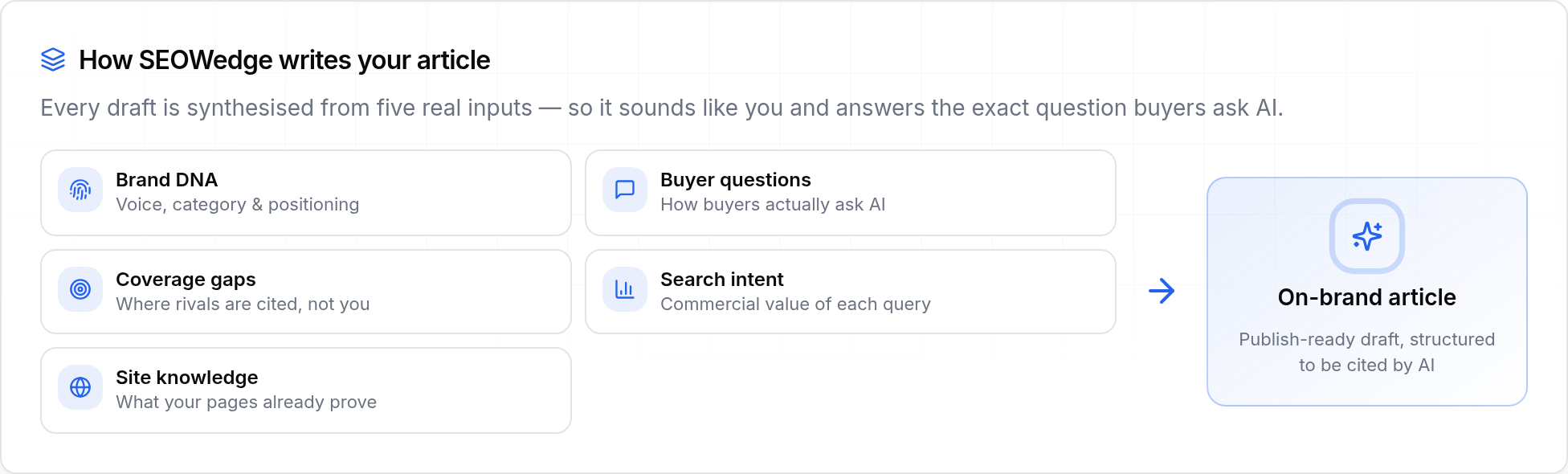
After reviewing your Action Briefs, you move into the Content Studio. Here, SEOWedge generates a draft page for each compatibility gap, using your Brand DNA profile to ensure the content matches your voice, product specifics, and conversion goals. The generated content is tailored to your product, the accessory in question, and the buyer’s real concern—not generic filler.
You can edit the draft directly in the Content Studio, add technical or legal clarifications, and ensure every answer is accurate. Each page is scored for Publish Readiness before export: this score measures how well the content answers the question, matches your brand, and fits AI answer engine criteria. You see exactly what still needs work before publishing.
Paid plans allow you to generate several compatibility pages at once, so you can close multiple gaps in a single workflow. For more on Brand DNA and on-brand content, see Can SEOWedge Write Pages That Match My Brand Voice?.
How Does SEOWedge Structure Compatibility Content for AI Citation?
SEOWedge’s workflow is built around answer engine optimization (AEO) and generative engine optimization (GEO). Each generated page is structured with clear question/answer blocks, schema where relevant, and direct, unambiguous compatibility statements. This structure increases the likelihood of being cited by AI models such as ChatGPT, Gemini, and Copilot.
Before export, every page receives a deterministic Publish Readiness score. This score is based on how well the content answers the buyer’s question, its clarity, and its alignment with your Brand DNA. The score reflects the same criteria AI assistants use to select and quote a source—not a guess or a vanity metric.
Once published, SEOWedge submits your new page via IndexNow so participating engines are notified immediately. This reduces the time between publishing and being eligible for AI citation. For more on answer-ready page structure, see Answer Engine Optimization (AEO): How to Become the Quoted Source.

How Is SEOWedge’s Compatibility Workflow Different from Classic SEO or Prompt-Based Tools?
Classic SEO tools focus on keywords and rankings, not on the specific buyer questions that drive AI citations. Prompt-based AI trackers require you to write and maintain a list of prompts, and only track what you specify. SEOWedge discovers real compatibility questions automatically, and ties every gap to both the missing page and the current AI answer.
Unlike generic AI writers, SEOWedge’s loop covers the entire workflow: from question discovery, to gap identification, to on-brand, answer-ready content generation. There is no need for separate tools, manual research, or buying additional credits for content creation. Every step is built for ecommerce and compatibility queries.
If you want to see how SEOWedge’s workflow compares to other tools, see SEOWedge vs Semrush AI Visibility: What Actually Gets Measured and Fixed?.
What Do I Get for Free, and When Should I Upgrade for Full Compatibility Coverage?
SEOWedge offers a real free scan: enter your domain and get a one-time Lite Scan with 5 discovered buyer questions (including compatibility queries if present), one Action Brief, and one free article draft. No credit card is required. This is enough to see how your site performs for compatibility questions and to test the content workflow.
Paid plans start at $29/month and unlock more scans, more discovered questions (up to 25 per scan on Agency), bulk article generation, and coverage of both OpenAI and Google Gemini answers. Paid users can address multiple compatibility gaps at once and export more reports. Credits can be topped up for busy months without upgrading the whole plan. For more detail on plan differences, see SEOWedge Free vs Paid Plans for Ecommerce: What Are the Limits?.
| Plan | Questions Discovered per Scan | Action Briefs per Scan | Articles per Month |
|---|---|---|---|
| Free | 5 | 1 | 1 |
| Pro | 12 | 8 | 30 |
| Agency | 25 | Unlimited | 150 |
SEOWedge plan limits for compatibility content discovery and generation

What’s My Next Step to Close Compatibility Content Gaps with SEOWedge?
You can start by running a free scan at SEOWedge signup. The scan will show you which compatibility questions matter for your products and which are missing from AI answers. Review your Action Brief, generate your first compatibility page, and see how the Publish Readiness score works in practice.
If you need to close more than one compatibility gap, upgrade to a paid plan for more scans, Action Briefs, and article generation. Paid plans also allow bulk drafting and coverage of Google Gemini, so you can address compatibility queries across all major AI surfaces.
For a step-by-step example of how a compatibility gap becomes a published, AI-citable page, see How SEOWedge Turns AI Visibility Gaps Into Actionable Content.
How this was tested
All claims are based on SEOWedge’s workflow and outputs as of 2026-08-28. Buyer questions are discovered automatically from a site and its category context. AI answers are sampled via API from OpenAI (GPT) on all plans, and Google Gemini on paid plans. Gaps, Action Briefs, and content generation steps are produced by the platform’s deterministic workflow. Results can be verified by running a free scan or reviewing a sample report. No prompt writing or external data sources are required for discovery or measurement.
What this page does not cover
This page covers how SEOWedge surfaces, diagnoses, and closes content gaps for buyer questions about product compatibility with third-party accessories. It does not address classic SEO, prompt-based tracking, or compatibility content for marketplace listings without a standalone domain. For bundled accessory visibility, see How Do I Use SEOWedge to Improve AI Visibility for Product Accessories Bundled with Main Products?. For broader compatibility question strategy, see How SEOWedge Helps Win Citations for Product Compatibility Questions.
Questions buyers ask us
How does SEOWedge know which third-party accessories buyers care about for my products?
SEOWedge discovers compatibility questions by crawling your site and analyzing the category context. It surfaces questions buyers actually ask, including those about popular third-party brands and accessories relevant to your product type. You do not need to provide a prompt list or accessory catalog—SEOWedge’s discovery is automatic and market-driven.
Can SEOWedge show me which competitor pages are being cited for compatibility questions I’m missing?
Yes. For each compatibility question, SEOWedge records which brands and specific URLs are cited in AI answers. You see exactly which competitor or third-party page is winning the citation, so you know what type of content or format is favored by AI assistants. This lets you target the right gap with your next content update.
How do I make sure my compatibility content is accurate and on-brand?
SEOWedge’s Content Studio drafts each page from your Brand DNA profile, ensuring the copy matches your voice and product details. You can review, edit, and add technical or legal clarifications before publishing. The Publish Readiness score flags any missing details or weak spots before export, so you control the final output.
How long does it take for a new compatibility page to be cited by AI assistants after publishing?
AI assistants re-crawl and update their citations over weeks, not hours. SEOWedge submits your new page via IndexNow to speed up discovery by participating engines. The time to citation depends on the assistant’s crawl cycle, but SEOWedge’s workflow ensures your page is visible and answer-ready as soon as possible.
Does SEOWedge handle compatibility queries for both my own accessories and third-party brands?
Yes. SEOWedge surfaces all high-intent compatibility questions buyers ask in your category, whether about your own accessories or third-party products. The workflow and Action Briefs apply equally to both types of compatibility queries.
What if I need to create compatibility content for bundles or kits, not just single products?
For bundled accessory visibility, see How Do I Use SEOWedge to Improve AI Visibility for Product Accessories Bundled with Main Products?. SEOWedge supports bundle and kit compatibility content in the same workflow—discovering relevant buyer questions, surfacing citation gaps, and generating on-brand, answer-ready pages for those scenarios.
See what AI assistants say about your site
Enter your domain and SEOWedge runs a free scan: your AI-Visibility score, the buyer questions where a competitor is named instead of you, and the first page to fix. No install, no sales call.