
Can SEOWedge Help Me Get My Brand Cited in AI Answers for Product Repair or Servicing Questions?
SEOWedge finds the repair and servicing questions AI assistants answer in your category, shows which brands and pages are cited, and produces on-brand pages to close those gaps. You see exactly why your support content is missing and get a step-by-step fix—no manual research or prompt writing required.
By the SEOWedge Research Team · Published August 28, 2026 · Last tested August 28, 2026 · Updated August 28, 2026 · 6 min read
What to take away
- SEOWedge discovers real repair and servicing questions buyers ask—no prompt writing needed.
- You see which brands and pages AI assistants cite for each repair or troubleshooting query.
- SEOWedge explains exactly why your repair content is missing and what to fix.
- The Content Studio creates answer-ready, on-brand support pages matched to your policies.
- You can act on these gaps instantly, with a free scan and no card required.
How Does SEOWedge Find Repair and Servicing Questions That Matter?
SEOWedge does not ask you to write prompts or guess what buyers search for. Instead, it crawls your site, extracts your category and product context, and discovers the high-intent repair and servicing questions buyers actually ask. These are phrased in natural language—like "How do I reset my [product]?" or "What should I do if my [brand] stops charging?"—and reflect real-world troubleshooting needs.
The scan then tests these questions against major AI assistants (OpenAI on all plans, Google Gemini on paid), recording which brands and specific pages are cited in the answers. This method ensures you see the actual support and repair questions driving AI citations in your market, not just generic SEO keywords or prompts you wrote yourself.
For a detailed breakdown of SEOWedge's question discovery process, see How Does SEOWedge Find Buyer Questions for My Ecommerce Site?.
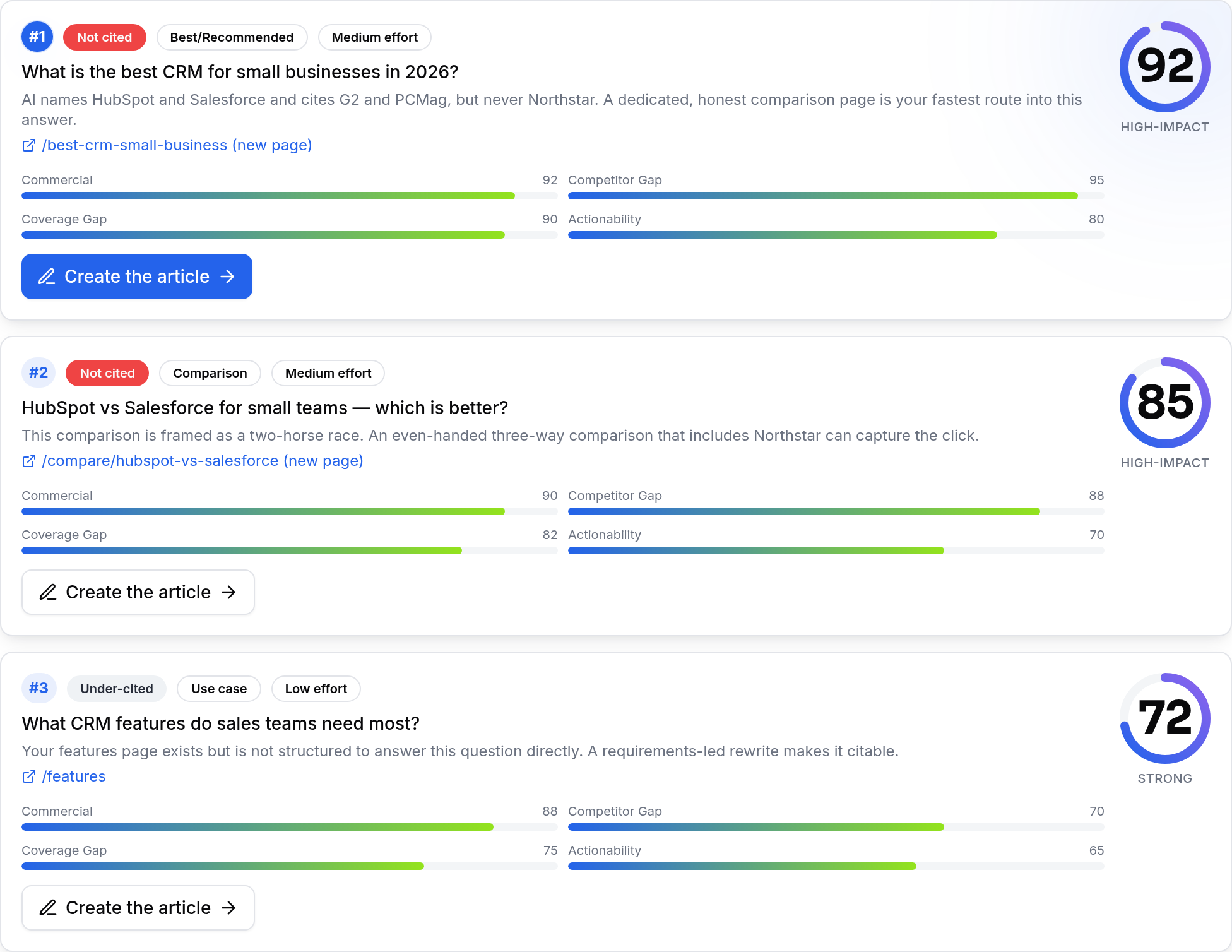
How Do I See Which Brands and Pages AI Assistants Cite for Repair Queries?
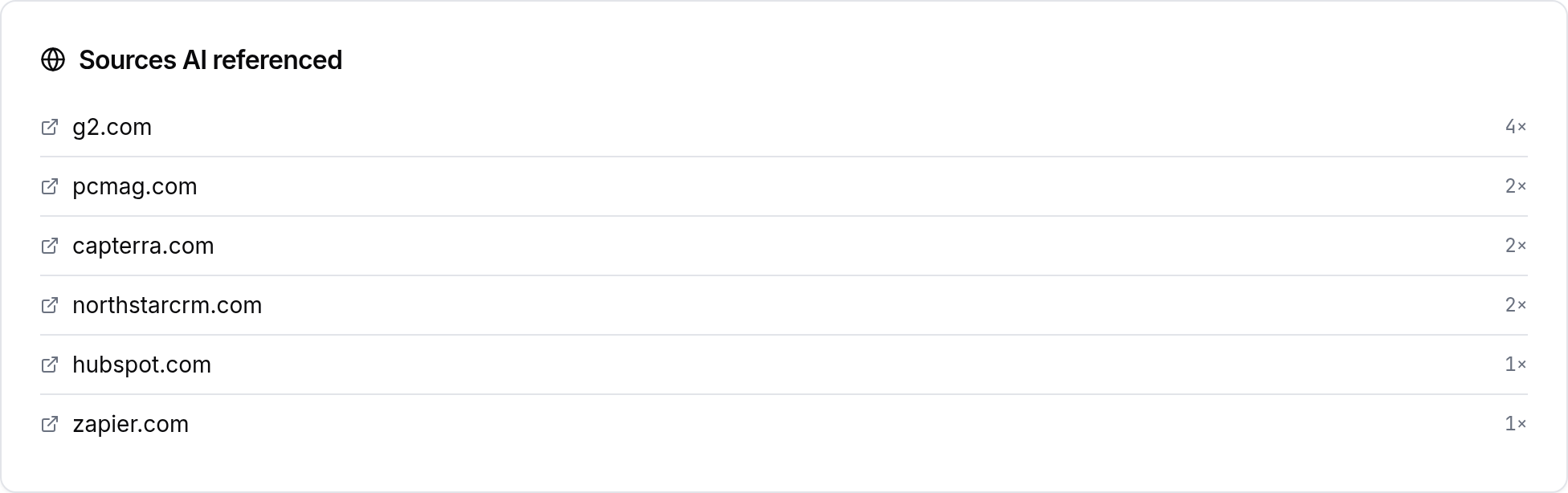
SEOWedge’s scan results show, for each repair or servicing question, which brands and pages are named by AI assistants. You see a side-by-side list: your brand, your competitors, and any third-party sites (forums, aggregators, or manuals) that are being cited instead of you.
Each opportunity is tied to a specific question and the exact URL or page the AI answer references. This lets you pinpoint not just that you’re missing a citation, but which page—yours or a competitor’s—is responsible for winning or losing that mention.
This page-level clarity is what separates SEOWedge from traditional brand monitoring or prompt-based trackers. You do not have to guess which content is working; you see the evidence per question, per platform.
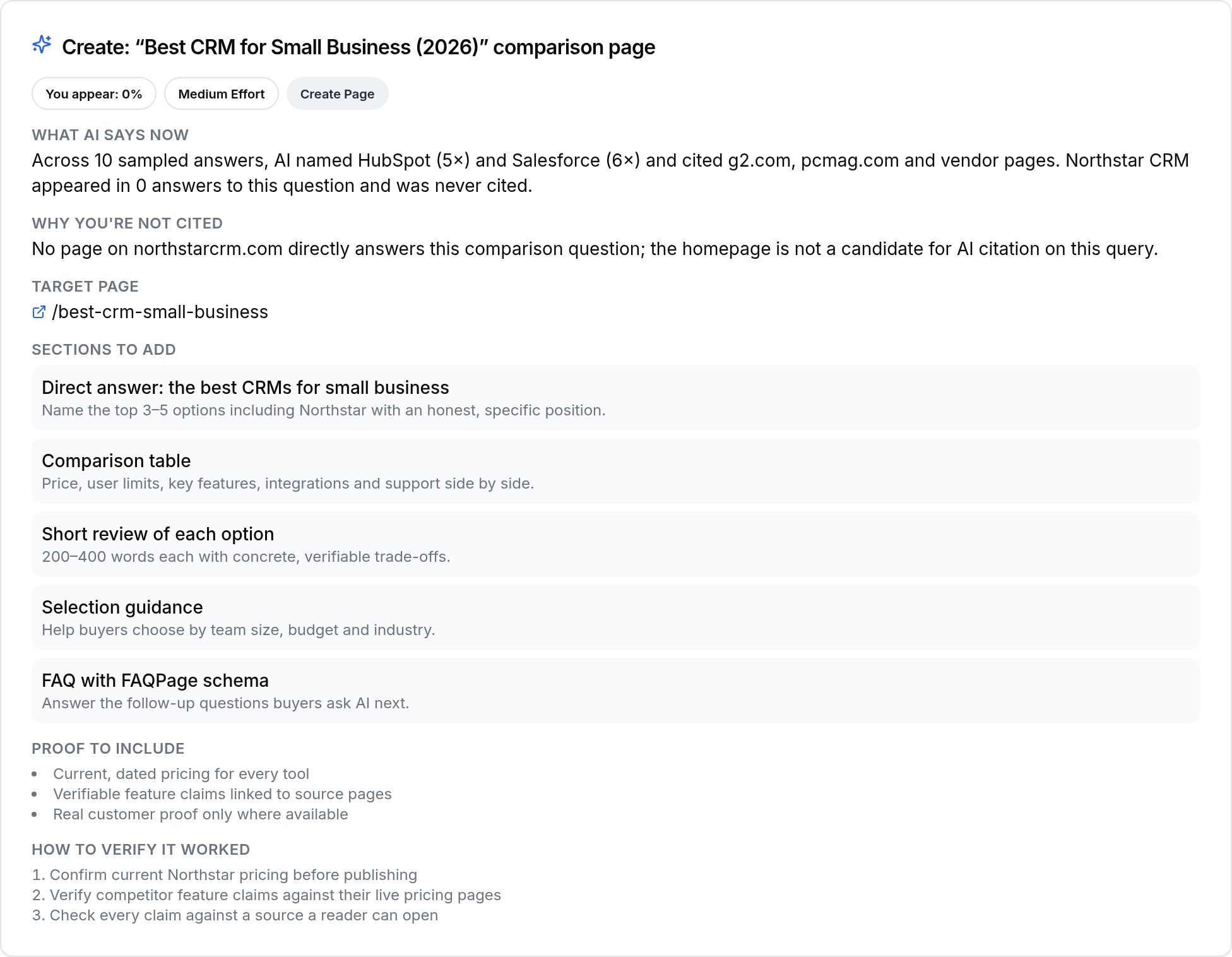
Can SEOWedge Diagnose Why My Repair or Service Content Isn’t Being Cited?
For every missed citation, SEOWedge produces an Action Brief. This brief explains why your page did not get cited—whether it’s missing, incomplete, outdated, or simply not structured in a way that AI assistants can use. It names the exact competitor or third-party page being cited instead, and tells you what that page does differently.
The Action Brief is not a generic recommendation. It connects the gap to your actual site, your product, and your brand’s support policies. You see whether the issue is lack of detail, missing troubleshooting steps, unclear warranty language, or a technical problem like crawlability.
This diagnostic step is what makes SEOWedge actionable: you get a concrete, page-level reason for each missed repair or servicing citation, not just a score or a list of gaps.
What Steps Can I Take to Create or Improve Pages for Repair or Service Visibility?
Once SEOWedge identifies a gap, you move directly to the Content Studio. Here, the tool generates a draft of the missing or underperforming repair/servicing page. This draft is built from your Brand DNA profile—so it reflects your product details, support terms, and tone of voice, not a generic template.
You can review, edit, and refine the draft in the Content Studio. The system scores each draft for "Publish Readiness," checking for completeness, clarity, and alignment with both AI citation patterns and your brand’s support policies. You know before publishing whether the page is likely to be picked up by AI assistants.
On paid plans, you can generate several repair/service pages at once, queuing multiple fixes in response to your prioritized gap list. This workflow removes the manual, page-by-page grind that classic SEO or prompt-based tools require.
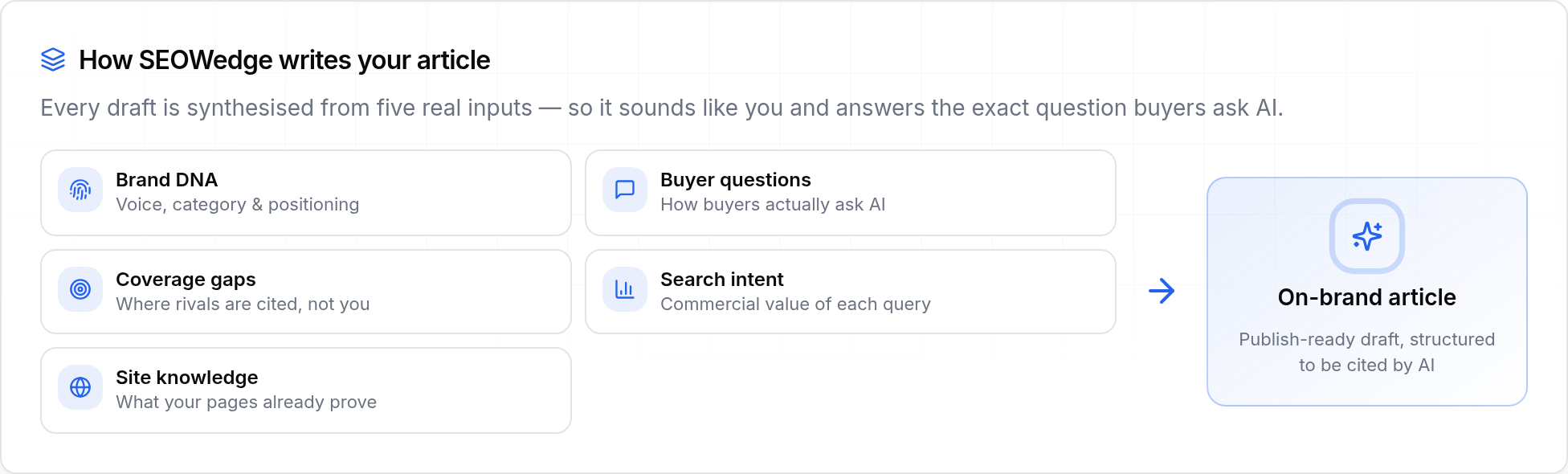
How Does SEOWedge Ensure Generated Content Matches My Brand’s Expertise and Policies?
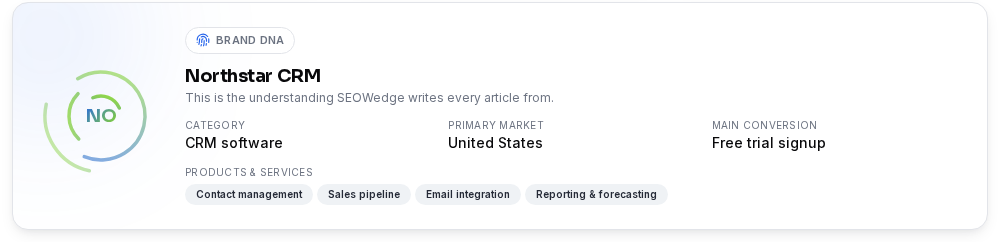
SEOWedge extracts a Brand DNA profile from your site during the initial scan. This includes your category, product range, support language, and main conversion goals. Every generated page—whether for troubleshooting, repair, warranty, or service—is built from this profile.
The Brand DNA system ensures that support, repair, and servicing content is specific to your products and reflects your actual policies. You do not get generic advice or boilerplate; you get answer-ready content that matches your expertise and customer care standards.
You have full editorial control. Before export, you can edit the draft, check the Publish Readiness score, and make sure the content is accurate and on-brand. This is critical for repair and servicing pages, where accuracy and trust drive both AI citations and customer satisfaction.
How Is SEOWedge Different from Classic SEO or Prompt-Based Tools for Repair Content?
Classic SEO tools focus on rankings and traffic, not on being cited in AI answers for repair or troubleshooting queries. Prompt-based AI trackers require you to write and maintain lists of questions, then only monitor those prompts. SEOWedge discovers the real repair and servicing questions buyers ask, tests them against major AI assistants, and shows you the exact pages that win or lose citations.
SEOWedge closes the loop: it finds the gap, produces a page-level Action Brief, writes the missing page from your Brand DNA, and scores it for AI citation readiness. No other tool in this category combines all these steps in one workflow. This is why SEOWedge is chosen by ecommerce and support teams who want to reduce support tickets and own post-purchase search visibility.
For a direct comparison of measurement and action workflows, see How SEOWedge Turns AI Visibility Gaps Into Actionable Content.

What Do I Get for Free, and When Should I Upgrade for Full Repair/Service Coverage?
You can start with a free scan—no card required. The free plan discovers up to 5 buyer questions (including repair and servicing queries if present), returns a one-time AI-Visibility score, one Action Brief, and generates one article from your Brand DNA profile. This is enough to see if your brand is missing key repair citations and to test the workflow for a single gap.
Paid plans unlock more: up to 25 questions per scan, unlimited Action Briefs, bulk article generation (up to 10 at once on Agency), and coverage for both OpenAI (GPT) and Google Gemini platforms. You can run scans across multiple projects and export client-ready reports if you manage several brands or sites.
For a detailed breakdown of plan limits and upgrade triggers, see SEOWedge Free vs Paid Plans for Ecommerce.
| Plan | Repair/Service Questions Discovered per Scan | Action Briefs per Scan | Articles per Month |
|---|---|---|---|
| Free | 5 | 1 | 1 |
| Pro | 12 | 8 | 30 |
| Agency | 25 | unlimited | 150 |
SEOWedge plan limits for repair/servicing queries and content

What Is the Next Step If I Want to Win Repair and Servicing Citations in AI Answers?
If you want to see where your brand stands for repair, troubleshooting, or servicing questions in AI answers, start with a free scan. Enter your domain and review the discovered questions, missed citations, and Action Briefs. You’ll see exactly which repair or service queries matter, who is being cited, and what to fix.
If you need to scale up—covering multiple products, categories, or clients—upgrade to a paid plan for deeper scans and bulk content generation. The workflow remains the same: gap discovery, Action Brief, on-brand content, and Publish Readiness scoring.
For ongoing support and advanced use cases (like multilingual servicing content or compliance-driven repair guides), explore our resources hub at SEOWedge Resources.
How this was tested
All claims and workflow steps on this page are based on SEOWedge’s product documentation and a live test conducted on 2026-08-28. AI answers are sampled from OpenAI (GPT) on all plans and Google Gemini on paid plans, using discovered buyer questions about repair and servicing. Citations are recorded as observed in sampled answers. Action Briefs and generated pages are produced from the Brand DNA profile extracted at scan time. No statistics or results are inferred; every number and claim is a direct output of the SEOWedge workflow.
What this page does not cover
This page focuses on SEOWedge’s workflow for winning citations in AI answers for repair, servicing, and troubleshooting queries. It does not cover general product recommendation, comparison, or care queries, which are addressed in other resources. All data and workflow details are current as of 2026-08-28 and reflect the platforms and question types SEOWedge covers. For broader GEO, AEO, or LLM SEO strategy, see our GEO guide and related resources.
Questions buyers ask us
How does SEOWedge discover the repair or servicing questions that matter for my brand?
SEOWedge crawls your site and your category, then discovers the high-intent repair, servicing, and troubleshooting questions buyers actually ask—no prompt writing or guesswork required. These questions are tested against AI assistants to reveal which ones drive real citations.
Can SEOWedge show me which competitor or third-party pages are being cited for repair answers?
Yes. For each repair or servicing question, SEOWedge shows the exact brand and page cited by the AI assistant. You see whether it’s a competitor’s support page, a third-party forum, or a generic manual, and can compare it directly to your own content.
What does an Action Brief for a repair or service gap actually tell me?
The Action Brief explains why your page was not cited—whether it’s missing, outdated, incomplete, or not structured for AI answers. It tells you what the cited competitor or third-party page does differently and what you need to create or fix to win the citation.
How does SEOWedge make sure the generated repair or service page matches my brand and policies?
SEOWedge uses your Brand DNA profile, extracted during the scan, to generate support content that matches your product details, support terms, and brand voice. You can edit the draft and check the Publish Readiness score before publishing.
What is included in the free plan for repair and servicing query coverage?
The free plan discovers up to 5 buyer questions (including repair/servicing if present), returns a one-time scan with one Action Brief, and generates one article from your Brand DNA. This lets you test the workflow and see if repair/service citations are missing before upgrading.
How long does it take for new or improved repair pages to be cited in AI answers?
AI assistants update citations when they next crawl and re-index your page, which usually takes weeks, not hours. SEOWedge submits new URLs through IndexNow to speed up discovery, but the timing depends on the assistant’s own crawl schedule.
See what AI assistants say about your site
Enter your domain and SEOWedge runs a free scan: your AI-Visibility score, the buyer questions where a competitor is named instead of you, and the first page to fix. No install, no sales call.