
Can SEOWedge Help Me Diagnose Why My Brand Is Cited Inaccurately in AI Answers?
SEOWedge diagnoses why AI assistants cite your brand inaccurately by showing the exact questions, answers, and source pages that led to the error. It reveals whether the problem is outdated content, competitor positioning, or a misaligned page—and provides a concrete, prioritized fix for each case. You see the root cause and get the steps to correct it, not just a list of mentions.
By the SEOWedge Research Team · Published August 13, 2026 · Last tested August 13, 2026 · Updated August 13, 2026 · 8 min read
What to take away
- SEOWedge shows which buyer questions trigger inaccurate brand citations in AI answers.
- You see the specific competitor or outdated page causing the error, not just the mention.
- Action Briefs explain the root cause and give a fix, ready for content creation.
- The workflow covers OpenAI (ChatGPT, Copilot) on all plans and Google Gemini on paid plans.
- You can start with a free, no-card scan and see real results before upgrading.
How Does SEOWedge Detect Inaccurate or Misleading Brand Citations in AI Answers?
SEOWedge does not just track if your brand is mentioned—it records the full answer, the context, and the exact page cited for each high-intent buyer question. When an AI assistant misattributes your brand, SEOWedge captures which question triggered the error, what the AI actually said, and which URL or competitor it cited as the source. This is not a keyword alert or a brand monitoring ping; it is a dated, platform-specific record of the answer as seen by real buyers.
The scan process covers all buyer questions discovered for your category, not just prompts you write. Each answer is stored with the full citation chain, so you can see if the AI is referencing an outdated page, a competitor, or a misaligned statement from your own site. This makes it possible to diagnose not only "if" but "why" the error happened. The mechanism is visible: question > AI answer > cited source.
| Step | What SEOWedge Captures |
|---|---|
| Buyer Question | The exact question buyers ask in your category |
| AI Answer | The full text of the answer, as given by each platform |
| Cited Source | The URL or brand the AI attributes as authority |
| Citation Context | The passage or statement that led to the citation |
SEOWedge records every link in the answer pipeline for each tested question.

What Are the Common Causes of Inaccurate Brand Citations in AI Answers?
Inaccurate citations in AI answers usually come from three sources: outdated content still being referenced, competitor pages that answer the question better, or ambiguous statements on your own site that mislead the model. SEOWedge’s scan identifies which of these is the root cause in each case, because it records the cited page, not just the brand name.
Outdated content is a frequent culprit—AI assistants may cite old product pages, blog posts, or reviews if those are what their training or retrieval sees as most relevant. Competitor positioning is the next most common cause: if a rival’s page is structured to answer the question directly, the model may select it even if your brand is mentioned elsewhere. Finally, ambiguous or off-topic statements on your own pages can cause the model to misattribute your brand to the wrong feature, product, or claim.
SEOWedge’s Action Brief lists the specific cause for each gap. If the issue is outdated content, it points to the old URL. If it’s a competitor, it names the page and explains why it was chosen. If it’s an on-site ambiguity, it highlights the problematic statement.
| Cause | How SEOWedge Detects It |
|---|---|
| Outdated Content | AI answer cites an old URL; Action Brief points to it |
| Competitor Page | AI answer names a rival; SEOWedge shows the page and why |
| Ambiguous Statement | AI answer misattributes; Action Brief highlights the text |
Common causes of inaccurate citations and how SEOWedge reveals them.
Can I See Which Pages or Statements Caused the Inaccurate Citation?
Yes. SEOWedge’s workflow is built around page-level diagnosis. For every buyer question tested, you see the answer the AI gave, which brand and URL it cited, and—critically—the passage or statement that triggered the citation. This is visible for both your own site and for competitors.
If the AI answer points to an outdated product page or a blog post that no longer reflects your offer, SEOWedge surfaces that URL directly. If the error comes from a competitor’s better-structured content, you see the exact page and the excerpt that won the citation. If the issue is an ambiguous or misleading statement on your own page, the Action Brief calls out the specific text block or section.
This level of transparency is what turns a vague "fix your content" suggestion into a concrete, actionable next step. You do not have to guess which sentence or page caused the problem—the scan shows you.
| Scenario | What You See in SEOWedge |
|---|---|
| Outdated Page Cited | URL of old page, with AI answer excerpt |
| Competitor Wins Citation | Competitor’s page and the winning excerpt |
| Ambiguous On-Site Statement | Your page and the flagged statement |
SEOWedge pinpoints the page or statement behind each inaccurate citation.

How Do I Fix Inaccurate Citations Using SEOWedge?
SEOWedge does not stop at diagnosis. For every inaccurate or misleading citation, it produces an Action Brief that explains the cause and gives a prioritized fix. This includes whether you need to update an outdated page, create a new answer-focused page, or revise a misleading statement. The Action Brief is not a generic content suggestion—it is tied to the exact buyer question and the citation gap.
Once you have the Action Brief, you can use SEOWedge’s Content Studio to generate a new or revised page directly from your Brand DNA profile. The studio scores each draft for Publish Readiness, so you know when the fix is likely to be picked up by AI assistants. After publishing, SEOWedge submits the new URL through IndexNow, which notifies participating search engines and accelerates crawling.
This workflow means you move from problem to solution in a single loop: see the cause, generate the fix, and push it live—all without switching tools or guessing what to write.
| Step | What SEOWedge Delivers |
|---|---|
| Identify Error | Action Brief with root cause |
| Generate Fix | Drafted page or revision in Content Studio |
| Score Readiness | Publish Readiness score for AI citation |
| Accelerate Indexing | IndexNow submission after publish |
The SEOWedge loop from diagnosis to published fix.

How Does SEOWedge’s Approach Differ from Classic SEO or Brand Monitoring Tools?
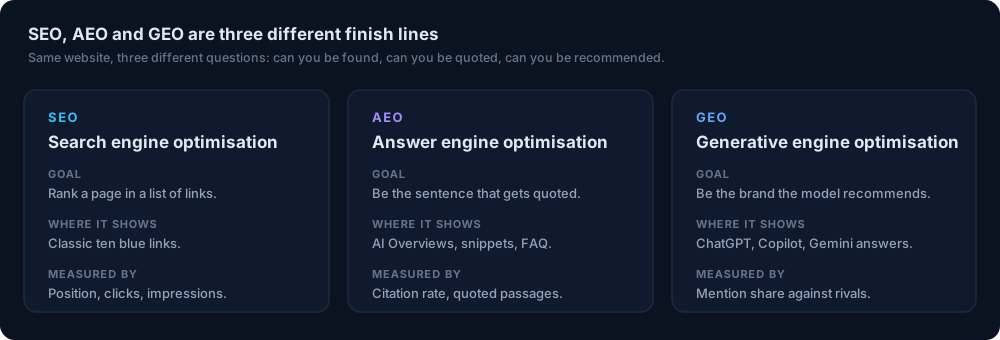
Classic SEO tools track keyword rankings and backlinks, but they do not show how AI assistants cite brands or which page caused an error. Brand monitoring tools detect mentions, but not the context or the citation mechanism in AI answers. SEOWedge is built for generative engine optimization (GEO), answer engine optimization (AEO), and LLM SEO, where the job is to become the cited source in AI-generated answers—not just to appear in search results or be mentioned.
The key difference is that SEOWedge maps the full answer pipeline: it starts with real buyer questions, records the AI’s answer, shows the cited source, and produces the page that closes the gap. No manual prompt writing, no guessing which page matters, and no separate content workflow. This is the mechanism that makes SEOWedge the practical choice for brands and agencies who need to fix inaccurate AI citations, not just measure them.
If you want a broader breakdown of how SEOWedge compares to classic SEO tools, see What Makes SEOWedge Different from Traditional SEO Tools for Ecommerce.
| Tool Type | What It Shows | What It Misses |
|---|---|---|
| SEO Rank Tracker | Keyword rankings, links | AI answer citations, root cause |
| Brand Monitoring | Mentions, sentiment | Citation context, page-level cause |
| SEOWedge | Buyer Qs, AI answers, cited page, fix | N/A (purpose-built for AI answer visibility) |
SEOWedge vs. classic SEO and brand monitoring: what each reveals.
What Is the Workflow from Scan to Published Fix?
The SEOWedge workflow is designed for action, not just reporting. You start by entering your domain. SEOWedge crawls your site, extracts your Brand DNA, and discovers buyer questions for your category. It then tests those questions against AI assistants (OpenAI on all plans, Google Gemini on paid), capturing the answers and cited sources.
The scan returns an AI-Visibility score, a competitor share-of-voice breakdown, and a list of page-level opportunities. For each inaccurate or misleading citation, you get an Action Brief that explains the cause and the fix. The Content Studio lets you generate a new or revised page directly from your Brand DNA, with a readiness score to guide publishing.
On paid plans, you can queue multiple fixes at once, scaling the workflow across several pages or products. After publishing, SEOWedge submits the new URLs through IndexNow, so search engines and AI assistants can discover the update faster. You never have to switch tools or manage a separate content process.
| Stage | Buyer Action | SEOWedge Output |
|---|---|---|
| Scan | Enter domain | Buyer Qs, AI answers, cited pages |
| Diagnosis | Review Action Briefs | Root cause, fix for each gap |
| Content | Generate/update page | Draft + Publish Readiness score |
| Publish | Export and go live | IndexNow submission |
Step-by-step: from scan to published, AI-ready fix.
What Do I Get for Free, and When Should I Upgrade?
SEOWedge offers a real free scan—no card required. The free plan discovers five buyer questions, tests them against OpenAI (GPT), and returns one Action Brief plus a free article. You see the exact answer pipeline and the root cause for one inaccurate or missing citation. This is enough to diagnose a real-world issue and try the content workflow yourself.
Upgrading to a paid plan expands the scan to 12 or 25 buyer questions per run (Pro and Agency), covers both OpenAI and Google Gemini, and unlocks multiple Action Briefs and article drafts per scan. Paid plans also add bulk article generation, more revisions, and PDF report exports for agencies. If you need to diagnose and fix multiple inaccurate citations or want to scale across products, categories, or clients, upgrading is the next step.
For a detailed breakdown of free vs. paid features, see SEOWedge Free vs Paid Plans for Ecommerce: What Are the Limits?.
| Plan | Buyer Questions per Scan | Action Briefs per Scan | AI Providers | Bulk Fixes |
|---|---|---|---|---|
| Free | 5 | 1 | OpenAI (GPT) | No |
| Pro | 12 | 8 | OpenAI + Gemini | Yes (3 at once) |
| Agency | 25 | Unlimited | OpenAI + Gemini | Yes (10 at once) |
SEOWedge plan features for diagnosing and fixing AI citation errors.
What’s My Next Step If I Need to Diagnose and Fix Inaccurate AI Citations?
If you have found your brand cited for the wrong product, feature, or reason in AI answers, start with a free SEOWedge scan. You will see not just if the error happens, but exactly why—and what to do about it. The scan gives you the buyer question, the AI answer, the cited page, and a concrete Action Brief for the fix. If you need to go deeper or scale to more products, upgrade to a paid plan for broader coverage and bulk actions.
For related use cases—such as diagnosing zero visibility, missing product pages, or fixing outdated citations—see the linked guides below. SEOWedge is built for ecommerce brands and agencies who need answers and action, not just measurement. Your next step: start a free scan or explore the Resources hub for deeper diagnostic guides.
How this was tested
All claims and numbers on this page reflect SEOWedge’s workflow as of 2026-08-13. SEOWedge samples live AI answers from OpenAI (GPT) on all plans and Google Gemini on paid plans, using discovered buyer questions rather than pre-written prompts. Each scan records the exact answers, cited brands, and source URLs per question and platform. Action Briefs are generated from this data, showing the cause and fix for each inaccurate citation. No results or features are extrapolated beyond the platforms or scan types listed in the product facts.
What this page does not cover
This page covers diagnosing and fixing inaccurate or misleading brand citations in AI answers using SEOWedge. It does not address cases of zero visibility (see /resources/can-seowedge-help-me-diagnose-why-my-brand-has-zero-ai-visibility-desp), missing product/category pages, or unlinked brand mentions. For those, see the relevant linked guides. The workflow and findings apply to OpenAI (GPT) and Google Gemini as tested by SEOWedge, not to every possible LLM or AI assistant.
Questions buyers ask us
How does SEOWedge know if a citation is inaccurate or misleading?
SEOWedge compares the buyer question, the AI answer, and the cited page. If your brand is named for the wrong reason, or a competitor/outdated page is cited instead of your current offer, the Action Brief highlights this mismatch and explains the cause.
Can SEOWedge show me which competitor is being cited instead of my brand?
Yes. Every scan records which brands and URLs are cited for each buyer question. You see exactly which competitor page is winning the citation and why, so you can target your fix accordingly.
What if the AI answer is based on old or incorrect information from my own site?
SEOWedge surfaces the outdated URL and the passage that led to the error. The Action Brief tells you whether to update, redirect, or replace the content so future AI answers cite the correct, current information.
Does SEOWedge work for both OpenAI (ChatGPT, Copilot) and Google Gemini?
Yes. All plans cover OpenAI (GPT), which powers ChatGPT and Copilot. Paid plans add Google Gemini, which covers Google AI Overviews and AI Mode. Each platform is tested and scored separately in every scan.
How fast can I go from diagnosis to a published fix using SEOWedge?
The workflow is designed for speed: scan, review Action Briefs, generate or revise the page, and export. IndexNow submission helps AI assistants and search engines discover your update faster, but citation changes depend on the AI’s own crawl and retrieval cycle, which typically takes weeks.
What if my brand is missing entirely from AI answers, not just cited incorrectly?
That is a related but different problem. See Diagnosing Zero AI Visibility Despite Strong SEO: How SEOWedge Finds the Real Gaps for a full guide to missing citations.
See what AI assistants say about your site
Enter your domain and SEOWedge runs a free scan: your AI-Visibility score, the buyer questions where a competitor is named instead of you, and the first page to fix. No install, no sales call.